
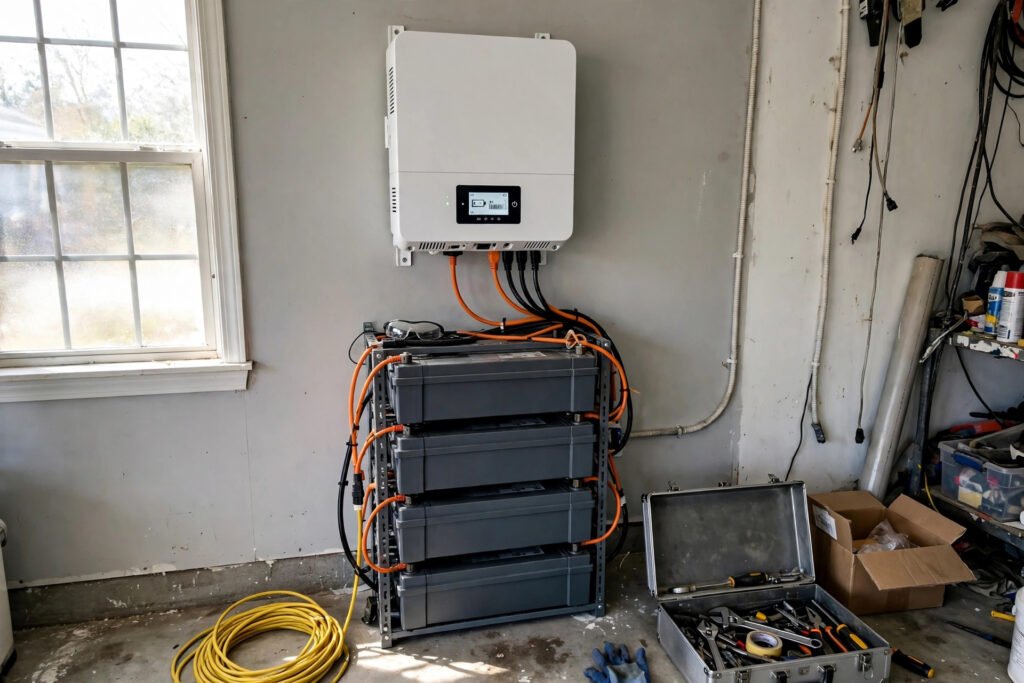
What this guide works from. One rig: a Sofar ME3000SP, firmware 2.40 before the update and 3.06 after it, with three Pylontech US3000C packs, 74 Ah each, 222 Ah in all, 10,656 Wh. The bank rested at 52.4 V and 62% charge. The data cable was the one that came in the ME3000SP box. The link ran on CAN, the two-wire bus the pack uses to send charge limits to the inverter.
The short answer. Yes, the update can kill the link, and the fix is in the menu, not in the cable. On our rig the update reset the battery type away from PYLON, so the inverter stopped listening for the pack. The screen showed ID52, Battery Communication, and the SOC went blank. We re-selected battery type 1. PYLON, re-entered every setting, and the SOC came back at 62% in under two minutes.
The rig that stopped talking
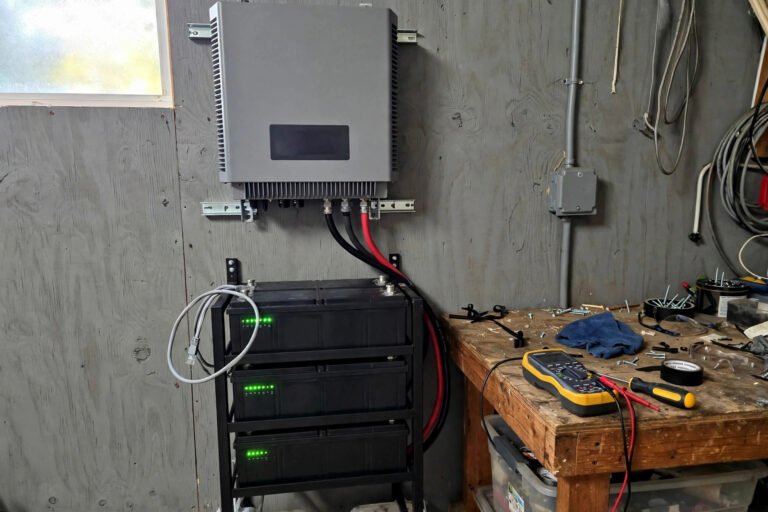
The ME3000SP sat on the wall of a garage in the UK, wired to a home solar array through the grid. Three US3000C packs sat below it in a rack. Each pack is 15 cells, 48 V nominal, 3,552 Wh. Three packs give 222 Ah and 10,656 Wh. The bank read 52.4 V at rest, 3.49 V per cell times 15 cells. SOC is state of charge, how full the pack is. The BMS is the battery management system, the board that guards the pack.
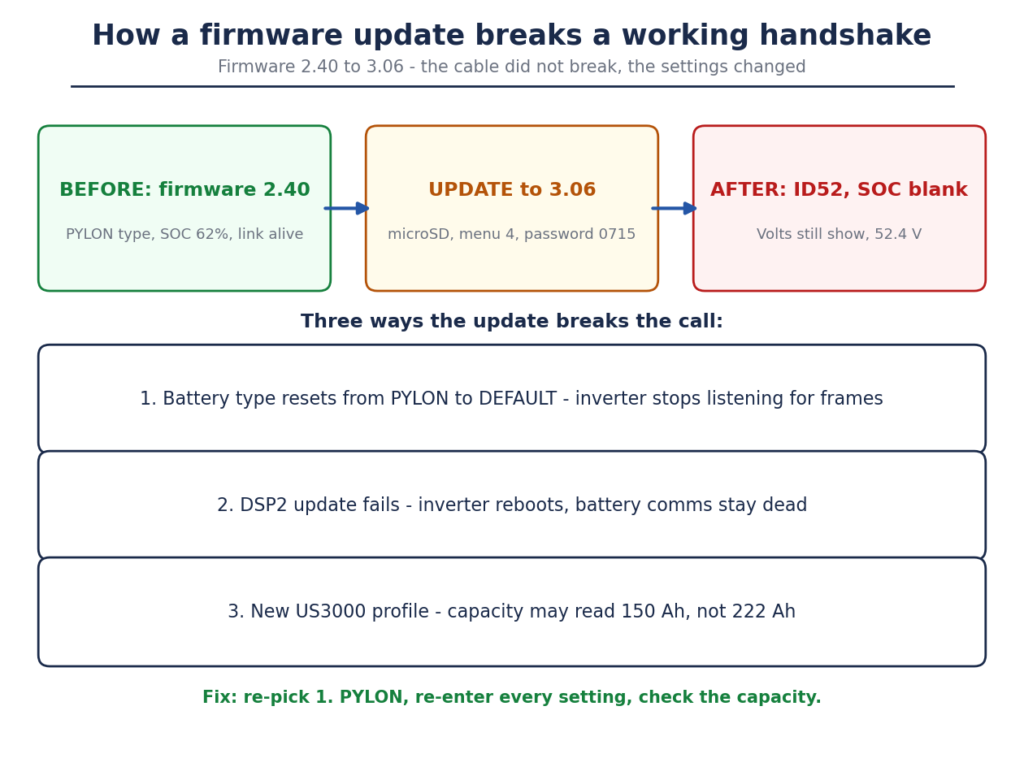
The system had run fine for two years on firmware 2.40. Then the owner updated to 3.06 from a microSD card with an ES3000firmware folder, using menu 4. Software Update and the password 0715. The update ran, the inverter rebooted, and the screen showed a red alarm light. The event list showed ID52, Battery Communication. The home screen still showed the pack volts, 52.4 V, but no SOC and no limits. The pack was fine. The BMS was awake. The link was the fault.
The proof came from the meter. With the power off, the ohms test between CAN-H and CAN-L read 60 ohms, so the bus caps were in place and the cable was not the fault. After battery type 1. PYLON was picked again and the settings were re-entered, the SOC showed 62% within two minutes. Then a 2,000 W heater ran for ten minutes: 38.0 A, 333 Wh, 3.1% of 10,656 Wh, SOC 62% to 59%. Then the pack charged at 40 A for 30 minutes: 20 Ah added, 9.0% of 222 Ah, SOC 59% to 68%.
What the ME3000SP is, and what it is not
The ME3000SP is an AC-coupled energy storage inverter, a battery charger that works with a grid-tied solar inverter you already own. It has no PV input. It takes spare power from the grid and stores it in the pack, then feeds it back to the house. That is a different job from a hybrid inverter, which takes panels and a battery. Do not use hybrid wiring or hybrid menu paths on this box.
The datasheet gives the hard numbers. Rated power is 3,000 W. Rated battery voltage is 48 V, and the battery range is 42 V to 58 V. Max charge current is 65 A. Max discharge current is 70 A. The manual adds that the recommended pack size is 200 Ah, with 100 Ah to 500 Ah allowed, and the recommended stored energy is 9.6 kWh. Our bank sits just above that mark.
| Fact | Value | Source |
|---|---|---|
| Type | AC-coupled battery inverter, no PV input. | Sofar ME3000SP datasheet. |
| Rated power | 3,000 W. | Sofar ME3000SP datasheet. |
| Battery voltage, nominal | 48 V. | Sofar ME3000SP datasheet. |
| Battery voltage range | 42 V to 58 V. | Sofar ME3000SP datasheet. |
| Max charge current | 65 A, range 0 A to 65 A. | Sofar ME3000SP datasheet. |
| Max discharge current | 70 A. | Sofar ME3000SP datasheet. |
| Comms | RS485, WiFi, Ethernet, CAN 2.0. | Sofar ME3000SP datasheet. |
| Recommended pack size | 200 Ah, 100 Ah to 500 Ah allowed. | ME3000SP user manual, section 7. |
| Recommended stored energy | 9.6 kWh. | ME3000SP user manual, section 7. |
| Our rig | 3 US3000C packs, 222 Ah, 10,656 Wh. | Worked case in this guide. |
Pylontech’s compatibility list, version 2.43, updated 2 February 2026, names the ME3000SP with RS485 at 115,200 baud or CAN, for on-grid use. The list covers the US2000, US3000, US5000, UP5000, UF5000 and Force-L1 and L2 packs. Our US3000C packs are on that list. The HYD series is on the same list, but it is a hybrid, and the two do not share a pinout or a menu. More pairings are in the Brand Pairings hub.
What the pins carry
The CAN link runs between two sockets. On the pack end it is the A/CAN port on the master pack, the same plug shape as a network cable. Pin 4 is CAN-H and pin 5 is CAN-L, the blue pair, the centre two pins. The pack sends its data once per second at 500 kbit/s, and the two wires must sit on one twisted pair, so noise cancels out.
On the inverter end, the cable goes into the ME3000SP CAN port. The manual shows it wired to a Pylontech US2000 PLUS or US2000B CAN port. A comms cable comes in the ME3000SP accessory bag, with one inverter end and one battery end. Use that cable. The manual does not print a pin table for the ME3000SP CAN port in the pages I read, so the ME3000SP-side pin numbers are not confirmed here, and I do not print them.
That last point matters. The Sofar HYD 3000-6000EP hybrid uses pin 1 for CAN-H and pin 2 for CAN-L on its COM port. Those are HYD pins, not ME3000SP pins. If you wire an ME3000SP the HYD way, the link stays dead. The full HYD pin story is in the Sofar HYD BMS port pinout guide.
The ME3000SP also has an RS485 socket, and that is where installers go wrong. The two sockets sit close together under the comms cover. A cable plugged into RS485 when the battery type expects CAN gives you the same blank SOC and the same ID52. One owner found the local firm had put the cable in the RS485 socket, moved it to CAN, and still had the fault, because the settings were also wrong.
| Wire | Pylontech A/CAN port | ME3000SP end |
|---|---|---|
| CAN-H | Pin 4. | CAN port. Pin number not confirmed, use the supplied cable. |
| CAN-L | Pin 5. | CAN port. Pin number not confirmed, use the supplied cable. |
| Ground | Pin 6 on the pack, CAN ground. | Not confirmed for the ME3000SP. Do not guess. |
| RS485 | Pins 7 and 8 on the pack. | Separate RS485 socket. Do not plug the CAN cable here. |
| Link between packs | Link Port 1 to Link Port 0, chain down. | Master pack is the one with Link Port 0 empty. |
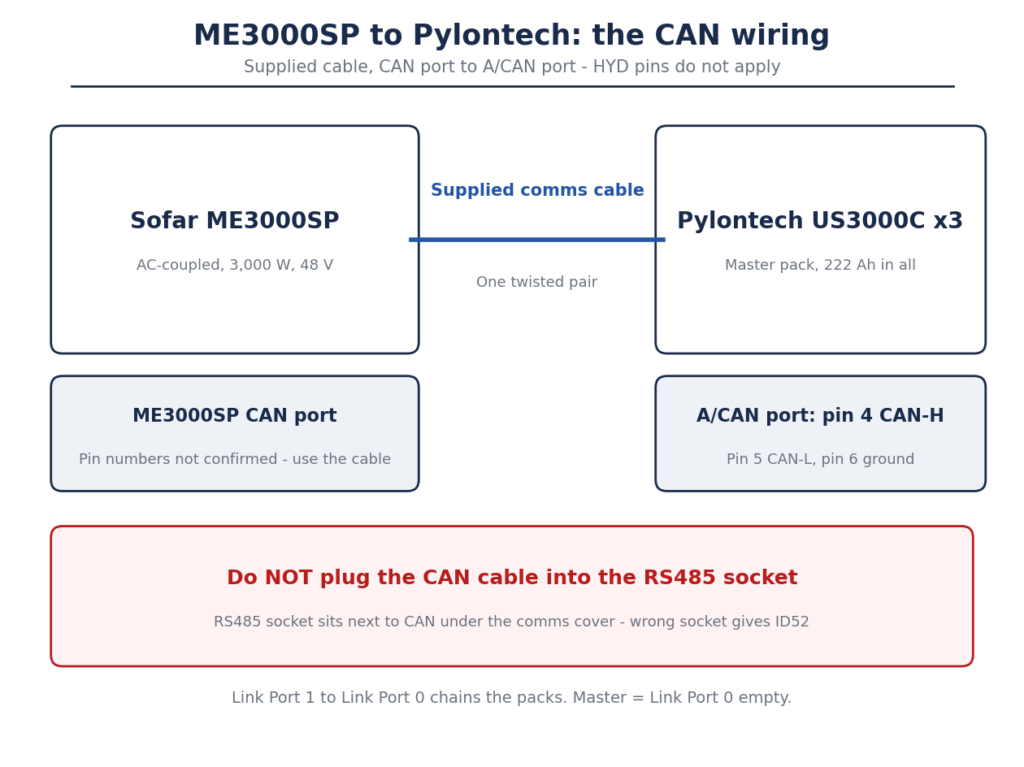
Pylontech’s list says RS485 or CAN both work. But CAN carries the full frame set once a second, while RS485 needs the right baud rate, set by the DIP1 switch: 0 is 115,200 bps, 1 is 9,600 bps. If you run CAN, DIP1 does not matter, but DIP2 does: 0 means the CAN end cap is in, 1 means NONE. In a single group, keep DIP2 at 0. The same DIP2 trap broke a Sunny Island link in the Pylontech to SMA Sunny Island guide.
Why a firmware update breaks a working handshake
Think of the handshake as a short call the two boxes make again and again. The pack sends six CAN frames once per second: 0x351 volts and limits, 0x355 SOC and health, 0x356 volts, current and temperature, 0x359 alarm flags, 0x35C charge requests, and 0x35E the maker name, “PYLON”. The ME3000SP sends its own frame, 0x305, once per second. If the inverter gets no frames, it has no SOC and no limits, and it logs ID52.
A firmware update can break this call in three ways, and our rig hit the first one.
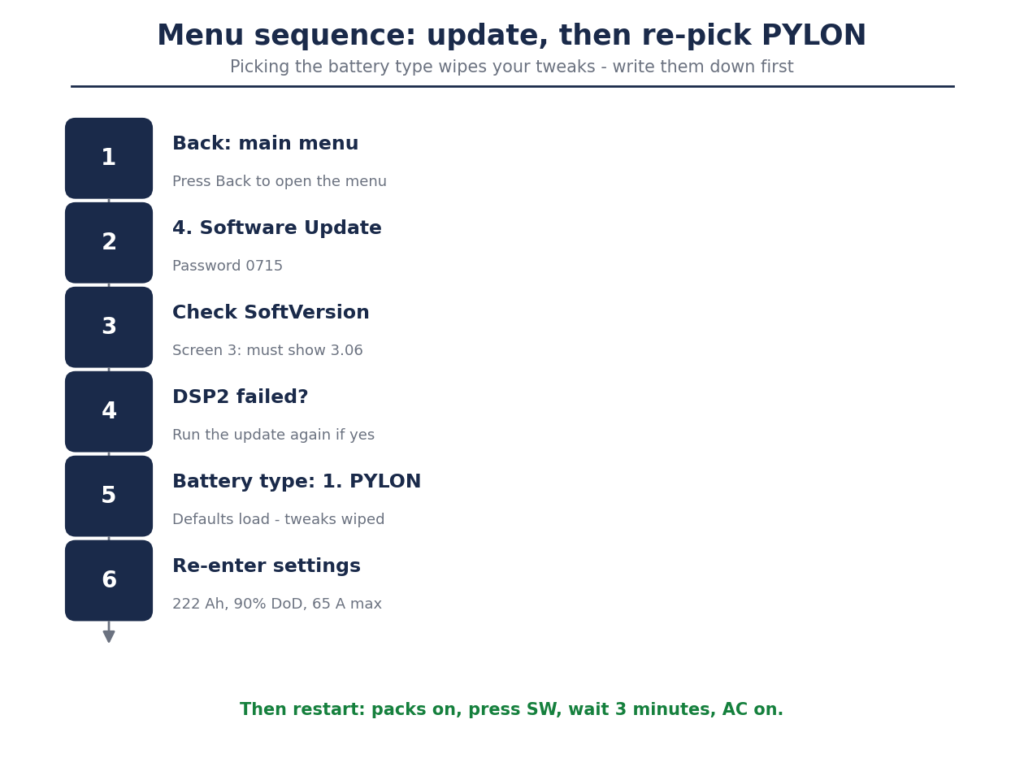
First, the update resets the battery settings. New firmware can load fresh defaults, and if the type flips from 1. PYLON to 3. DEFAULT, the inverter stops listening for Pylontech frames. It still reads the pack volts down the thick DC cables, so the screen looks half alive: volts show, SOC does not. The manual lists six battery types: 1. PYLON, 2. DARFON, 3. DEFAULT, 4. General Lithium, 5. Alpha ESS, 6. SOLTARO. Picking PYLON again is the fix, but the moment you pick a battery type, the defaults load and wipe every tweak you made before. So go through each setting again after you re-pick PYLON.
Second, the update itself can fail halfway. The ME3000SP updates three parts in turn: DSP1, DSP2 and ARM. DSP is a digital signal processor, a chip that runs the power control. Setfire Labs found a first-time success rate of 1 out of 3, and every failure was on DSP2. The update carries on after a DSP2 fail and the inverter reboots, but the battery comms do not work. Run the update again from the start. If you see ID52 right after an update, check the update result first.
Third, the new firmware changes what the inverter expects. Firmware 3.06 added a setting that lets you pick US3000 packs by name, and it raised the depth of discharge for Pylontech packs from 80% to 90%. Depth of discharge is how far the pack is allowed to drain. That is a real gain: 80% of 10,656 Wh is 8,525 Wh, and 90% is 9,590 Wh, a gain of 1,065 Wh. But if the two profiles disagree about the pack size, the SOC maths goes wrong, so step 8 checks the capacity the inverter shows.
None of this means the update was a mistake. Firmware 3.06 is a good update, but it has to be followed by a full settings check. The cable did not break. The pack did not break. The settings changed.
Fix it in order: ten steps, each with a check
Work the steps in order. If a check fails, stop there. Switch everything off before you touch a terminal. Only trained techs may install the battery.
- Write down what you see. Note the fault code, the pack volts, and whether the inverter shows any SOC. Our rig showed ID52, 52.4 V, and a blank SOC. Check: fault code, volts and SOC in hand.
- Check the pack is awake and in range. The pack must sit inside 44.5 V to 53.5 V, and the ME3000SP takes 42 V to 58 V. Our bank read 52.4 V. Check: meter at the pack posts reads 44.5 V to 53.5 V.
- Check the firmware version and the update result. Go to System Information, screen 3, SoftVersion, and confirm the version is 3.06. If the update showed Update DSP2 Fail, run it again from menu 4. Software Update with the password 0715. Check: version shows 3.06 with no DSP2 fail on the last run.
- Check the socket. The comms cable must sit in the ME3000SP CAN port, not the RS485 socket next to it under the comms cover. Check: cable in the CAN port.
- Test the bus with the power off. Meter ohms between CAN-H and CAN-L at the pack end: our rig read 60 ohms. Check: near 60 ohms. If it reads open, go to step 6.
- Check DIP2 on the master pack. DIP2 must be 0, which means the cap is in. If it is 1, set it to 0 and restart the pack. Check: ohms test now reads near 60 ohms.
- Re-select the battery type. Go to the battery settings and pick 1. PYLON. Expect every other setting to reset to its default. That is normal. Check: battery type shows 1. PYLON.
- Re-enter every setting, and check the capacity. Set the capacity to your true bank size: 222 Ah for our bank. The inverter may show 150 Ah instead, 50 Ah per pack, because it cannot tell a US2000 from a US3000. Fix the number by hand. Set the depth of discharge to 90%, which firmware 3.06 now allows, and max charge to 65 A. Check: capacity shows 222 Ah, depth of discharge shows 90%, max charge shows 65 A.
- Restart in the right order. Turn everything off. Turn the packs on. Press the red SW button on the master pack. Wait three full minutes. Then turn the AC supply on, with the house using at least 200 W, so the CT clamps read the right way. Check: red alarm light off, no ID52 in the event list after two minutes.
- Prove it with a load and a charge. On our rig the SOC showed 62% after about 40 seconds. Then run a 2,000 W heater for ten minutes: 38.0 A, 333 Wh, 3.1% of 10,656 Wh, SOC 62% to 59%. Then charge at 40 A for 30 minutes: 20 Ah added, 9.0% of 222 Ah, SOC 59% to 68%. Check: SOC matches the pack, limits show, and SOC moves down on load and up on charge.
Three packs allow 111 A of charge, but the ME3000SP caps it at 65 A, and 222 A of discharge, but the inverter caps at 70 A. So the inverter is the limit both ways. The same 0 A charge limit on a Victron has a different cause. See the Pylontech Victron charge limit 0A guide.
Read the meter: what the numbers mean
A meter settles most fights about a dead link. The meter at the pack posts is the truth. All volt numbers are DC to ground, and the pack charge window is 52.5 V to 53.5 V.
| When you read it | Reading on our rig | What it means |
|---|---|---|
| Bank at rest, before fix | 52.4 V, 62%. | Bank healthy, 3.49 V per cell. |
| Ohms, power off, before | 60 ohms. | Both ends capped, cable fine. |
| Ohms, power off, after | 60 ohms. | Same, settings were the fault. |
| CAN lines, idle | 2.5 V each. | Bus idle, nobody talking. |
| CAN lines, with traffic, after | CAN-H 2.7 V, CAN-L 2.3 V. | Frames flowing, link alive. |
| Inverter SOC, before | Blank, ID52. | Link down, volts lie. |
| Inverter SOC, after | 62%, limits live. | Link live, SOC matches. |
| 2,000 W load, 10 min | SOC 62% to 59%. | 333 Wh used. |
| Charge at 40 A, 30 min | SOC 59% to 68%. | 20 Ah added. |
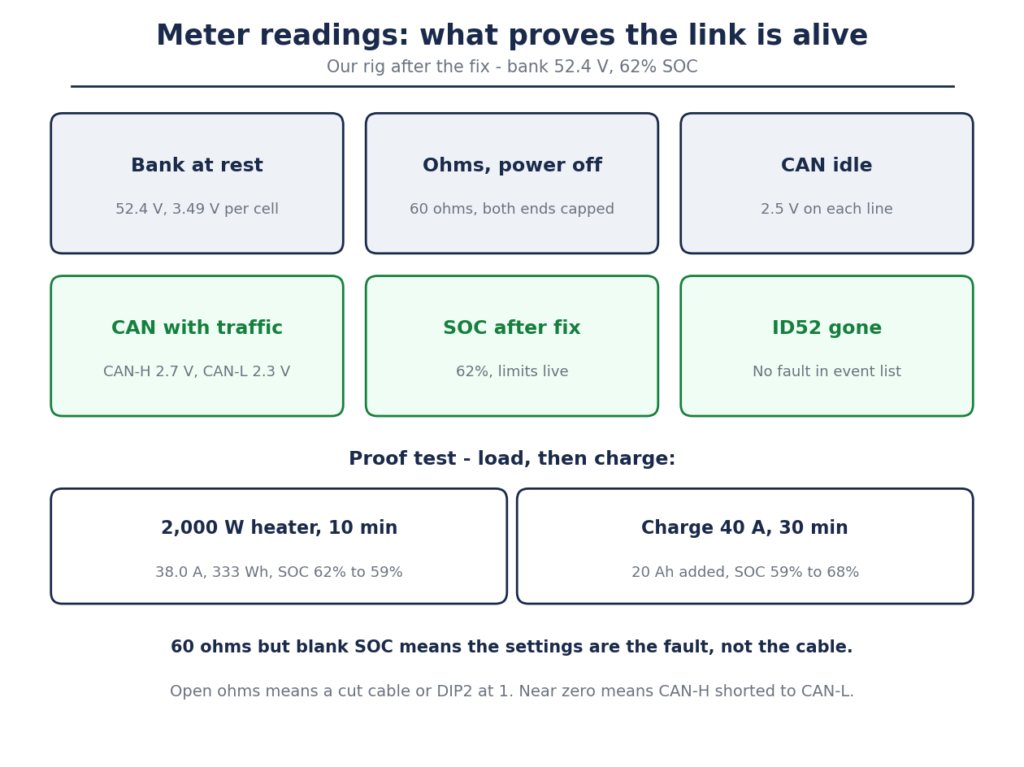
If the ohms test reads near 60 ohms but the SOC is still blank, the cable is fine and the settings are the fault. Work steps 7 and 8. If it reads open, the cable is cut or a cap is missing. If it reads near zero, CAN-H and CAN-L are shorted.
What each symptom points to
Match what you see to a row, then work the fix.
| What you see | Most likely cause | Fix |
|---|---|---|
| ID52, SOC blank, volts show, right after an update. | Battery type reset away from PYLON. | Steps 7 and 8. |
| ID52, SOC blank, update showed DSP2 fail. | Update failed halfway. | Step 3, run the update again. |
| ID52, SOC blank, cable in RS485 socket. | Cable in the wrong socket. | Step 4. |
| No SOC, ohms read open. | Cable cut, or DIP2 at 1. | Steps 5 and 6. |
| No SOC, ohms near 0. | CAN-H shorted to CAN-L. | Step 5, test the cable. |
| SOC shows, capacity reads 150 Ah not 222 Ah. | US2000/US3000 mix-up bug. | Step 8, fix by hand. |
| Link works, then dies at noon. | Cable tight against power cables. | Move the cable away. |
| SOC shows, charge limit 0 A. | BMS fault, or a cell out of range. | Read the pack alarms. |
The first row is the one most owners hit after an update: a good bank, a good cable, and no SOC in the first hour.
What can still go wrong
ID52 is not named in the 2019 manual’s event list.
Owners report ID52 as Battery Communication. But the 2019 manual lists ID01 to ID51, then ID53 to ID77, and never names ID52. So the code is real in the field and not confirmed in the manual. Treat ID52 as a lost BMS link.
The update resets the battery type, and re-picking it wipes your tweaks.
Picking a battery type loads its defaults at once, so any depth of discharge, capacity or current limit you set before is gone. Step 8 tells you to re-enter every setting, so write your settings down first.
The inverter reads a US3000 as a US2000 and sets 50 Ah per pack.
Setfire Labs found the inverter cannot tell the two packs apart on the CAN bus, so it sets 50 Ah per pack instead of 75 Ah. The Pylontech manual gives 74 Ah for a US3000C. Either way, three packs show as 150 Ah, not 222 Ah, 68% of the true bank size. Fix it by hand in step 8.
The RS485 or CAN choice is not settled in the docs.
Pylontech’s list says RS485 or CAN both work, and Sofar support told owners there is no difference. But the newest manuals have stopped showing the CAN and RS485 wiring diagrams, while the 2019 manual shows only the CAN port wiring. So the docs disagree. CAN is the path this guide proves with meter readings.
The HYD pinout does not work on the ME3000SP.
The HYD hybrid uses pin 1 for CAN-H and pin 2 for CAN-L. The ME3000SP is an AC-coupled box with its own CAN port and supplied cable, so the HYD numbers are wrong here. The Pylontech side is firm: pin 4 CAN-H, pin 5 CAN-L. The ME3000SP side pins are not confirmed in the pages I read, so use the supplied cable and do not guess.
The CT clamps can flip after a restart.
The ME3000SP works out which way round the current clamps sit each time it restarts. If it does this while you are exporting power, it reads the export as import and can push power out at full rate. Freeze the CT direction once the setup is right: Configuration, option 13, then FREEZE. Do it before any firmware update.
A DSP2 fail can look like a finished update.
The update carries on after DSP2 fails, the inverter reboots, and the screen looks normal. Only the battery comms are dead. Always check the update result line by line, and run it again if DSP2 failed.
Common questions
Can a Pylontech US3000C work on a Sofar ME3000SP?
Yes. Pylontech’s compatibility list, version 2.43, names the ME3000SP with RS485 or CAN, for on-grid use, at firmware V1.2, covering the US2000, US3000, US5000, UP5000, UF5000 and Force-L1 and L2. Pick battery type 1. PYLON, use the CAN port, and check the capacity by hand.
What should I do first after a firmware update kills the link?
Check the battery type first. If it still says 1. PYLON, look elsewhere. If it says 3. DEFAULT, that is your fault. Re-pick PYLON, then re-enter every setting, because picking the type wipes your tweaks. Then restart in order.
Which pins carry CAN on a Pylontech pack?
Pin 4 is CAN-H and pin 5 is CAN-L, on the A/CAN port, the blue pair. Pin 6 is CAN ground. Pins 7 and 8 are RS485. On the ME3000SP side, use the CAN port and the supplied cable. The ME3000SP-side pin numbers are not confirmed, so do not wire it from HYD pin numbers.
What should the ohms test read?
Near 60 ohms with the power off, between CAN-H and CAN-L. Our rig read 60 ohms before and after the fix, which told us the cable was fine and the settings were the fault. If it reads open, check DIP2 and the cable. If it reads near zero, CAN-H and CAN-L are shorted.
Why does the inverter show volts but no SOC?
Because volts come down the thick DC cables, and SOC comes over CAN. A dead CAN link leaves the volts in place and takes the SOC away. Check the battery type, the socket, and the cable first. A Growatt link fails the same way. See the Pylontech Growatt menu 05 and 36 guide.
Do this next
- Meter your bank at its posts. Expect 44.5 V to 53.5 V.
- Check the event list for ID52 and the firmware version.
- Check the cable sits in the CAN port, not the RS485 socket.
- Meter ohms with the power off. Expect near 60 ohms.
- Check DIP2 on the master pack. It must be 0.
- Re-pick battery type 1. PYLON, then re-enter every setting by hand.
- Fix the capacity to your true bank size. Three US3000C packs are 222 Ah, not 150 Ah.
- Set depth of discharge to 90% and max charge to 65 A.
- Restart in order: packs on, press SW, wait three minutes, AC on.
- Prove it with a load and a charge, and write the readings down.
- Still stuck? Call Sofar support with the version, the DSP2 result, and the ohms reading.
Sources
Checked on 28 November 2026. Unconfirmed items are labelled “not confirmed” in the text.
- Sofar ME 3000SP Datasheet, 3000 W AC-coupled energy storage inverter. Battery type lithium-ion and lead-acid, rated battery voltage 48 V, range 42-58 V, max charging current 65 A, range 0-65 A, max discharging current 70 A, comms RS485, WiFi, Ethernet, CAN 2.0, rated power 3000 W.
- Sofar Solar ME3000SP User Manual, 2019-9-29, 41 pages. Section 4.3, CT, RS485 and NTC connection, and the comms cable in the accessory bag, one inverter end and one battery end. ME3000SP CAN port to Pylontech US2000 PLUS or US2000B CAN port. First-time setup battery types: 1. PYLON, 2. DARFON, 3. DEFAULT, 4. General Lithium, 5. Alpha ESS, 6. SOLTARO. Section 7, technical data: battery range 42-58 V, recommended capacity 200 Ah, 100-500 Ah allowed, recommended storage 9.6 kWh. Section 8, troubleshooting: event list ID01-ID51 and ID53-ID77, with ID52 not named.
- Setfire Labs, Sofar Solar ME3000SP Battery Inverters, installation tips. Firmware 2.4 notes: CT freeze, option 13, US3000 capacity read as 50 Ah per pack instead of 75 Ah, and re-picking a battery type loads defaults and wipes tweaks.
- Setfire Labs, Sofar Solar firmware upgrade notes, 2.40 to 3.06. MicroSD card, ES3000firmware folder, FAT32, menu 4. Software Update, password 0715, version 3.06, DSP2 fail leaves battery comms dead and the update must be run again, new US3000 battery pick, depth of discharge up to 90% with Pylontech.
- Setfire Labs, Pylontech CAN interface and the ME3000SP. Pylontech CAN data once per second at 500 kbit/s: 0x351 volts and limits, 0x355 SOH and SOC, 0x356 volts, current and temperature, 0x359 protection and alarm flags, 0x35C charge request flags, 0x35E maker name “PYLON”. ME3000 sends 0x305 once per second.
- Setfire Labs, Multiple Sofar ME3000SP inverters for 3-phase setup. US2000 and US3000 talk to the ME3000SP over CAN with battery type PYLON. PYLON settings: min discharge 47.2 V, empty discharge 46.7 V, full charge 52.08 V, over-voltage protection 54.0 V, max charge voltage 52.8 V. US2000 max charge 20 A, US3000 max charge 37 A.
- Pylontech Compatibility List of Low Voltage ESS and Inverters, Ver. 2.43, 2 February 2026. Sofar ME3000SP, RS485 at 115,200 baud or CAN, on-grid, firmware V1.2, for US2000, US3000, US5000, UP5000, UF5000 and Force-L1 and L2.
- Pylontech US3000C Operation Manual, Information Version 20CQSV1103. 48 V nominal, 3,552 Wh, 74 Ah, 15 cells, 44.5 to 53.5 V discharge, 52.5 to 53.5 V charge, Dip1 RS485 baud, Dip2 CAN terminal resistance 0 connected and 1 NONE, single group keep Dip2 at 0, switch block deployed physically reversely.
- myenergi community, Sofar Solar Mass Energy Battery Storage System, blank screen thread. Owner event log shows ID52 Battery Communication. Reset procedure: everything off, 200 W load, packs on, press red SW on the master, wait 3 minutes, AC on. Comms settings Com Addr 01, baudrate 9600, 8 data bits, no parity, 1 stop bit. Cable found in the RS485 socket instead of CAN. Sofar support: no difference between RS485 and CAN for Pylontech, newest manuals stop showing CAN and RS485 wiring diagrams.
- This site: Brand Pairings hub, Sofar HYD BMS port pinout guide, JK BMS to Sofar HYD CAN guide, Pylontech to SMA Sunny Island guide, Pylontech Victron charge limit 0A guide, Pylontech Growatt menu 05 and 36 guide, SolaX X1 and X3 BMS port pinout guide, Pylontech Force-L1 and L2 to Solis RHI CAN handshake guide, Sungrow SH5.0RT and SH10RT BMS terminal block pinout guide, MPP Solar PIP Fault 61 Pylontech PACE lithium batteries guide, Disable equalization charge hybrid inverter LiFePO4 BMS guide.
Comments (0)