
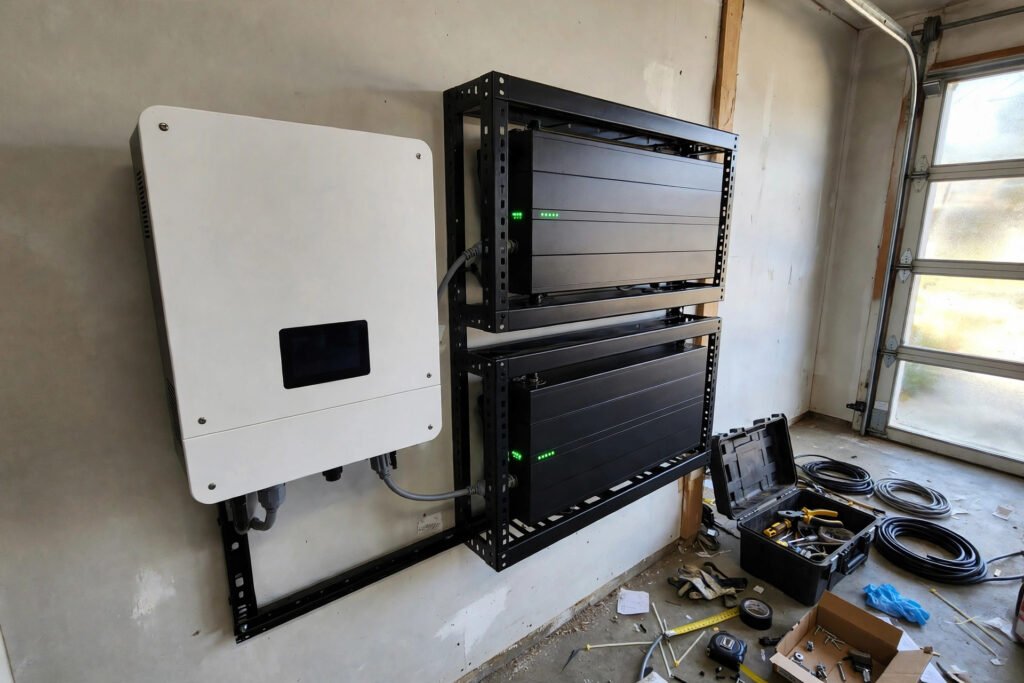
What this guide works from. One rig: an MPP Solar PIP-8048MAX, 8 kW, with two Pylontech US3000C packs in parallel, 7,104 Wh in total, 148 Ah at 48 V nominal, pack at rest 51.9 V, Fault 61 on the screen. Second rig: the same PIP model with a SOK 48 V 100 Ah PACE pack, 5,120 Wh, 16 cells.
The short answer. Fault 61 means the PIP hears nothing from the battery BMS. BMS stands for battery management system. It is the battery brain. It watches the cells and sends the inverter the charge state, the volts, and the charge limits. On our Pylontech rig the fix was a cable in the wrong socket: we moved it from the CAN port to the RS485 port, set DIP 1 on for 9600 baud, and set Program 05 to PYL. On the PACE rig the fix was the profile in PbmsTools: we changed it to PYLON over RS485, and Program 05 PYL then linked at once.
The rig that showed Fault 61
Two Pylontech US3000C packs sat in a rack, wired in parallel. Each pack holds 3,552 Wh, so two packs hold 7,104 Wh. At 48 V nominal that is 148 Ah. Each pack has 15 LiFePO4 cells, the safe lithium cell type used in home solar packs. The packs were at 51.9 V at rest, or 3.46 V per cell. The LEDs showed about 58% charge. At 58% of 148 Ah, the bank held about 85.8 Ah, or about 4,120 Wh.
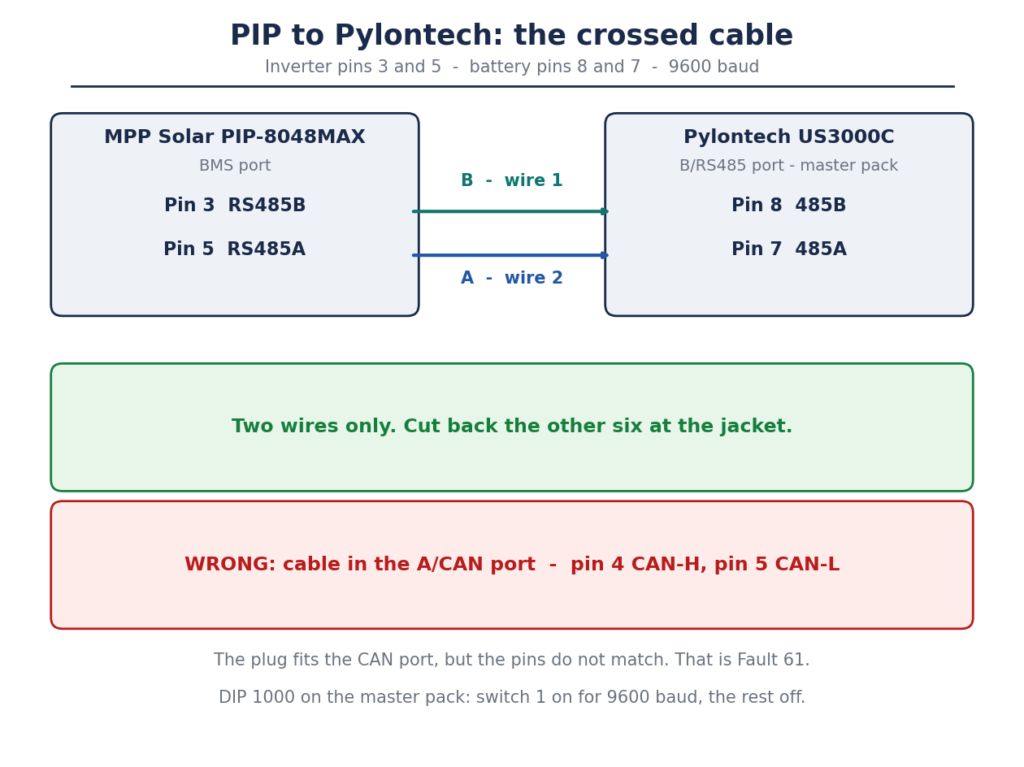
Then the PIP was switched on. Fault 61 showed on the screen, the battery icon did not flash, and the charge state never moved. The inverter could not read the charge state, the volts, or the charge limits from the BMS, so it guessed from voltage alone. The fault was the cable. It sat in the A/CAN port on the master pack. Program 05 PYL does not listen on CAN. It listens on RS485.
What Fault 61 means
Fault 61 is a code with a clock on it. The MPP Solar PIP manual gives the timing in plain words. After the battery is wired in, if no talk signal is found for 3 minutes, the buzzer beeps. After 10 minutes, the inverter stops charging and discharging the lithium battery. If the link was live and then drops, the buzzer beeps at once. That timing is the clue: it is a talk fault, not a flat pack.
On an Axpert the same code shows as Warning 61. On a PIP it shows as code 61, and most PIP guides call it Fault 61 or Error 61. The PIP is built on the same Voltronic Axpert base: the PIP-GK is the Axpert VM III, the PIP-MK is the Axpert King, and the PIP-MAX is the Axpert Max. See the Axpert Warning 61 fix for the same six codes.
Fault 61 only shows when Program 05 is set to a lithium type. Set it to AGM, Flooded, or User-Defined, and the inverter expects no BMS talk. A rig set to USE runs on volts alone and never warns you that the BMS is silent.
They come from the manual Code Reference table.
- Code 60: BMS blocks charge and discharge.
- Code 61: the talk itself is lost. No frames arrive at all.
- Code 62: battery pack count changed.
- Code 69: BMS blocks charge.
- Code 70: BMS wants a charge.
- Code 71: BMS blocks discharge.
Codes 60, 69, 70, and 71 mean the talk works and the BMS gave an order. Code 61 means the talk does not work at all. Fix the talk first. Then read what the BMS orders. The Error Codes hub lists every code guide on this site, and the Axpert Error 69 and 70 guide explains codes 69, 70, and 71.
What the pins carry
The PIP BMS port and the battery port look the same. They take the same plug. But the pins inside them do not match. That is the trap. Count pins with the clip facing away from you, pin 1 on the left.
On the PIP BMS port, RS485 lives on pins 3 and 5: pin 3 is RS485B, pin 5 is RS485A. The speed is 9600 baud. Both sides must use the same speed, or each side hears noise.
On the Pylontech B/RS485 port, pin 7 is 485A and pin 8 is 485B. Pins 1, 2, and 3 on that port must stay empty: the US3000C manual says these pins shall be NULL. The CAN port is the A/CAN port: pin 4 is CAN-H and pin 5 is CAN-L. So the working Pylontech cable is two wires only: inverter pin 3 to battery pin 8 for B, and inverter pin 5 to battery pin 7 for A. Note the cross.
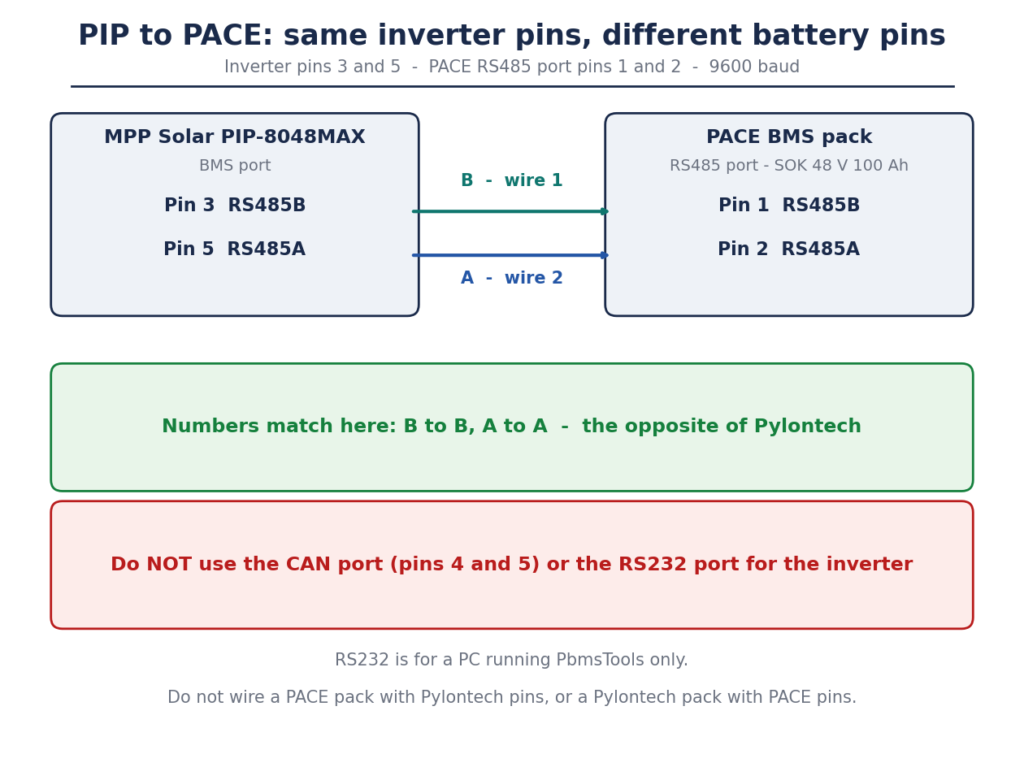
A PACE BMS is not a battery brand. PACE is a BMS maker, not a battery brand. Its boards sit inside batteries sold under other names, such as SOK and EG4 LifePower4. If your battery opens with PbmsTools, the free PACE software, this part is for you. A PACE BMS has three same-looking RJ45 ports. The CAN port puts CAN-H on pin 4 and CAN-L on pin 5. The RS485 port puts RS485B on pin 1 and RS485A on pin 2. The RS232 port is for a PC, not for an inverter. The full port guide is the PACE BMS RJ45 pinout.
For a PIP, use the PACE RS485 port, pins 1 and 2: inverter pin 3 to battery pin 1 for B, and inverter pin 5 to battery pin 2 for A. Here the numbers match, B to B and A to A, which is the opposite of the Pylontech cross. Use a short shielded twisted-pair cable. Plug the battery end into the port marked RS485 on the master pack, the top pack. On our rig the cable sat in the A/CAN port. That one mistake gave us Fault 61.
| Wire | PIP BMS port | Pylontech B/RS485 port | PACE RS485 port |
|---|---|---|---|
| RS485B | Pin 3. | Pin 8. | Pin 1. |
| RS485A | Pin 5. | Pin 7. | Pin 2. |
| CAN-H/L | Pins 6 and 7, not used here. | A/CAN port pins 4 and 5. | CAN port pins 4 and 5. |
The settings that make the link work
Three settings must match, one on each side plus the cable. Miss one and you get silence, then Fault 61.
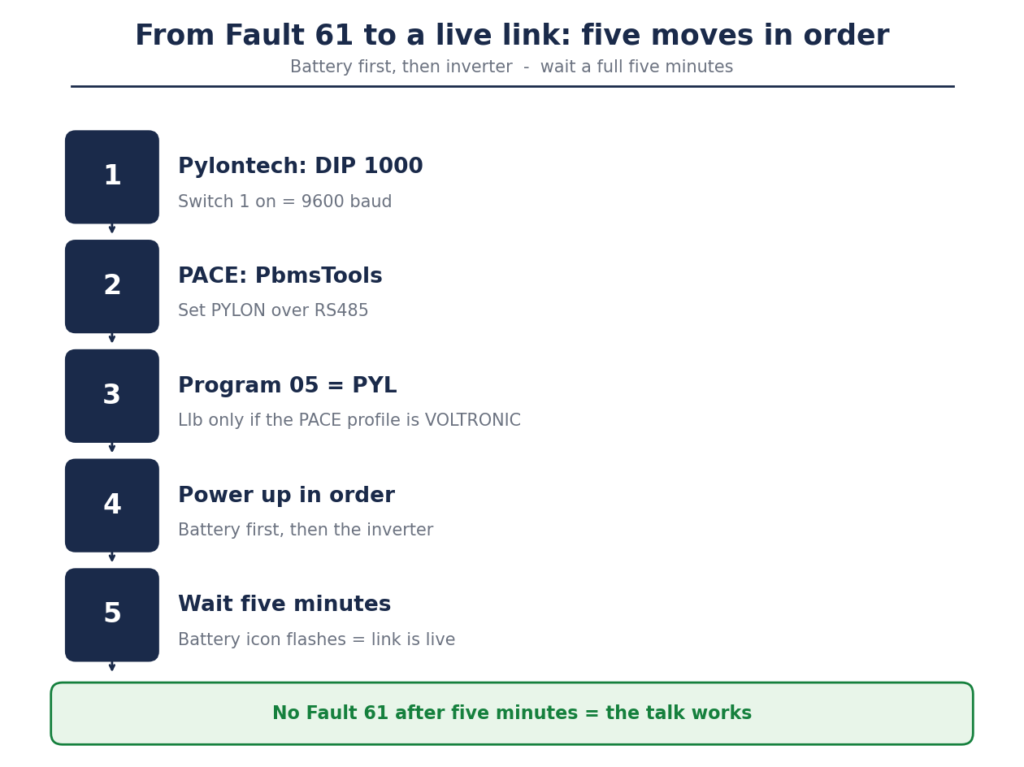
On the Pylontech battery side, set the DIP switches on the master pack. DIP switches are small on-off switches. For the US3000C, DIP 1 sets the RS485 speed: on means 9600 baud, off means 115200 baud. DIP 2 sets the CAN end resistor: off means connected. So the master pack reads 1000: switch 1 on, the rest off. Restart the battery after a DIP change.
On the inverter side, hold the menu button and go to Program 05, battery type. Pick PYL. The PIP-MAX manual says it in plain words: select battery type as PYL in LCD program 5. Set Program 12, the low DC cut-off volt, to 47.5 V or 48.0 V, and Program 13, the charge volt limit, to 53.0 V. Once the talk works, the BMS takes over these volts itself.
On the PACE battery side, open PbmsTools on a PC. Plug the RS232 lead into the PC port. Go to System Config, then Inverter Protocol. Pick PYLON over RS485. Write it to the BMS and restart the battery. The write password the Bimble guide lists for this step is Pz# 168178. One catch: on some PACE packs, PYLON over RS485 is not loaded at the factory, so install it first with PbmsTools. See the edge case below.
The other PACE choice is VOLTRONIC over RS485, the Voltronic own talk, not the Pylontech talk. If you pick VOLTRONIC in PbmsTools, set Program 05 to LIb on the inverter, not PYL. On our PACE rig the profile was VOLTRONIC while Program 05 read PYL. We changed it to PYLON over RS485, and the link came up in under two minutes.
| Setting | Where it sits. | Pylontech rig. | PACE rig. |
|---|---|---|---|
| Battery side | US3000C ADD switch. | DIP 1000, 9600 baud. | PbmsTools PYLON. |
| Program 05 | PIP menu, Program 05. | PYL. | PYL, to match PYLON. |
| Programs 12 and 13 | PIP menu. | 47.5 V cut-off, 53.0 V charge. | 48.0 V cut-off, 55.2 V charge. |
| Cable | PIP BMS port to battery RS485 port. | Pin 3 to pin 8, pin 5 to pin 7. | Pin 3 to pin 1, pin 5 to pin 2. |
One honest flag: the JK protocol table marks the Voltronic profile 007 as not tested on a named device. Do not pick JK protocol 007 for a Pylontech or PACE pack. The JK BMS to Axpert Max over RS485 guide covers the JK case on its own.
Why the PIP stops hearing the BMS
An RS485 link is a question and an answer. The inverter asks for the charge state, the volts, and the charge limits. The BMS answers in a frame, one short packet of data. If no answer comes back in time, the inverter raises Fault 61. That talk can fail in only four ways: the wire is wrong, the port is wrong, the protocol is wrong, or the bus is broken. A reboot fixes none of these.
The PIP trap is the port mix-up: CAN and RS485 use different pins, and Pylontech puts them on two different sockets. A cable in the A/CAN port puts the RS485 talk on pins the inverter never reads for Program 05 PYL. The inverter hears silence. It waits 3 minutes, then the buzzer beeps. After 10 minutes it stops charging and discharging the battery. The second trap is speed: a US3000C with DIP 1 off talks at 115200 baud while the PIP listens at 9600 baud.
The third trap is the profile. On a PACE pack the profile lives in PbmsTools, not on a DIP switch. A pack that ships on the standard CAN profile will not answer an RS485 question, even with the right cable in the right port. The fourth trap is the address: DIP 1000 on a Pylontech, address 1 on a PACE pack.
Fix it in order: ten steps, each with a check
Work in order. Stop at the first failed check.
- Write down what you have. Note the PIP model, battery model, firmware versions, pack volts, and charge state. Photo both screens. Check: model names, firmware, and photos in hand.
- Cut the power before you touch a plug. Switch the inverter off and the battery breaker off. Check: LCD dark, battery breaker off.
- Find the right port on the battery. On a Pylontech, use the B/RS485 port on the master pack, not the A/CAN port. On a PACE pack, use the RS485 port. Check: the port label reads RS485.
- Build the cable by hand for the right pins. For Pylontech: pin 3 to pin 8, pin 5 to pin 7. For PACE: pin 3 to pin 1, pin 5 to pin 2. Crimp two wires only. Check: the two wires join the right pins.
- Set the battery side. On a Pylontech, set DIP 1000 on the master pack: switch 1 on, the rest off. On a PACE pack, set PYLON over RS485 in PbmsTools, write it, and restart the battery. Check: DIP reads 1000, or PbmsTools reads PYLON.
- Set Program 05 to PYL. Go to Program 05, pick PYL, save it. If your PACE profile is VOLTRONIC, pick LIb instead. Check: menu reads PYL, or LIb.
- Check the cable with a meter, power off. Test each wire runs clean pin to pin. Test no pin is shorted to its neighbour. Check: pin 3 joins the right battery pin, pin 5 joins the other, no shorts.
- Power up in order and wait past the 3-minute mark. Battery first, then the inverter. Wait five minutes. Check: no Fault 61 after five minutes, battery icon flashes.
- Prove the link under load and on charge. Run a 1,500 W load for 30 minutes. At 52 V that draws about 29 A, so 30 minutes uses about 14.5 Ah. On our rig the charge state moved from 58% to 48%. Check: charge state moves down under load and up on charge.
- If the link still fails, run open-loop for the night. Set Program 05 to USE. For a Pylontech bank set 52.5 V bulk, 52.5 V float, 47.5 V cut-off. For a 16-cell PACE pack set 55.2 V bulk, 53.6 V float, 48.0 V cut-off. Check: loads run, pack charges on volts alone.
Read the meter: what the numbers mean
A meter settles most fights about Fault 61. On a dead bus the A-B reading sits flat at 0.0 V. On a live bus it jumps as frames pass.
| When you read it. | Reading on our rig. | What it means. |
|---|---|---|
| Pack at rest, before the fix. | 51.9 V, 58% on the LEDs, Fault 61. | Pack healthy at 3.46 V per cell. |
| Meter vs screen. | 51.9 V vs 51.8 V. | 0.1 V apart, DC path is sound. |
| Cable test, power off. | Pin 3 to pin 8, pin 5 to pin 7. | Cable is wired right. |
| A-B volts, power on, link dead. | 0.0 V, flat, never moves. | No frames on the bus. |
| A-B volts, power on, link live. | Jumps, 0.1 to 0.5 V, never still. | Frames are flowing. |
| Load test, 1,500 W, 30 min. | 29 A, 14.5 Ah used, charge 58% to 48%. | Link is live, charge state tracks the load. |
| Charge test, after the fix. | Charge state climbs, bulk moves to 53.2 V. | BMS is in charge of charge volts. |
| PACE rig, after the fix. | 52.8 V, charge 52%, bulk moves to 55.2 V. | PACE link live, BMS asks for 55.2 V. |
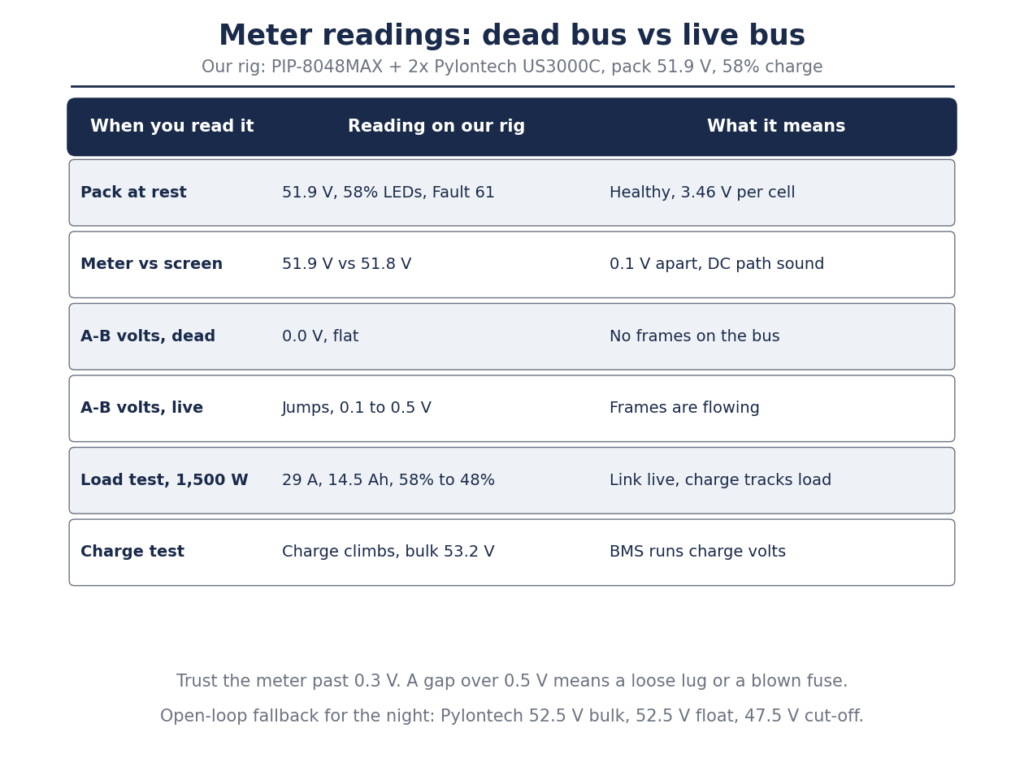
Trust the meter past 0.3 V. A gap of more than 0.5 V between the pack posts and the inverter DC posts means a loose lug or a blown fuse. If the A-B reading sits flat at 0.0 V with power on, go back to steps 3, 4, 5, and 6.
RS485 has no ohms test: a CAN bus reads about 60 ohms between CAN-H and CAN-L with the power off. The US3000C manual names 120 ohms for its ports, but it does not say to add a resistor on a short cable. Our rig linked fine with no added resistor on a 1 m cable.
What each symptom points to
- Fault 61, buzzer at 3 minutes. No BMS frames arrived. Fix: steps 3, 4, 5, and 6.
- Fault 61 clears, then comes back at noon. Cable picks up noise at peak current. Fix: move the comms cable away from power cables.
- Fault 61 only after a firmware update. Program 05 list moved or renamed. Fix: read the protocol list again.
- Fault 61 on a PACE pack, PYL set. PbmsTools profile is VOLTRONIC, not PYLON. Fix: set PYLON over RS485, restart.
- Fault 61 on a Pylontech, PYL set. Cable in the A/CAN port, or DIP 1 off. Fix: move to the B/RS485 port, set DIP 1000.
- Code 69 or 71 with no Fault 61. Talk works, BMS gave an order. Fix: read the BMS.
- No Fault 61 but charge state never moves. Link is not up. Fix: step 9, the bulk voltage test.
- Fault 61 on a parallel rig. Second inverter also set to PYL. Fix: set the spare inverters to USE.
What can still go wrong
Your PIP is too old for Pylontech talk.
MPP Solar added Pylontech support to the PIP-GK and PIP-MK in late 2018. Older PIP-5048 units have no PYL choice in Program 05. Field reports say those units cannot gain it by a firmware flash alone. If your Program 05 list has no PYL and no LIb, do not chase the cable. Run open-loop in USE mode at 52.5 V bulk and 52.5 V float. Whether one exact old model can be fixed by a board swap is not confirmed.
The firmware broke the link, not the cable.
A field report on an Axpert Max II 8 kW with Pylontech: the rig worked on older firmware. After an update to main CPU 81.01 with display CPU 122.12, code 61 showed with battery type PYL, even though the cables and the battery were fine. The working set was main CPU 54.01 with display CPU 22.08. Whether a later firmware fixed it is not confirmed. If Fault 61 shows only after an update, read the protocol list again.
The Pylontech pins 1 and 2 conflict: read your own battery manual first.
The docs disagree here by battery age. The US3000C manual puts RS485 on pins 7 and 8 of the B/RS485 port, and says pins 1, 2, and 3 on that port must stay empty. The older US3000 manual lists pins 1 and 2 as well as pins 7 and 8, and marks pins 7 and 8 as advised. On a US3000C, use pins 7 and 8.
PYLON over RS485 is not loaded on some PACE packs.
The DeLong guide says PYLON over RS485 is not loaded at the factory on its PACE packs. Install it first with PbmsTools, then pick it under Set 485 Prot. Whether your exact pack ships with it loaded is not confirmed.
A parallel rig: only one inverter talks to the BMS.
When two or more PIPs run in parallel on one bank, only the inverter wired to the BMS should be set to PYL. Set the rest to USE. A spare set to PYL raises Fault 61 on its own.
Common questions
Is Fault 61 dangerous?
No. Fault 61 means the inverter lost the BMS talk. After 10 minutes it stops charging and discharging the battery. Do not bypass the BMS. Fix the cable, the DIP, and the profile first.
What is the difference between Fault 61 and codes 69, 70, and 71?
Fault 61 means the talk itself is dead. Codes 69, 70, and 71 mean the talk works and the BMS gave an order. Code 69 blocks charge. Code 70 asks for charge. Code 71 blocks discharge.
Which pins do I use for the PIP BMS port?
Pins 3 and 5: pin 3 is RS485B, pin 5 is RS485A. On a Pylontech pack the battery end is pins 7 and 8 of the B/RS485 port: pin 8 is RS485B, pin 7 is RS485A. On a PACE pack the battery end is pins 1 and 2 of the RS485 port: pin 1 is RS485B, pin 2 is RS485A.
What should Program 05 be for Pylontech and PACE?
PYL for both, when the battery speaks the Pylontech talk. A Pylontech pack always speaks it. A PACE pack speaks it only when PbmsTools is set to PYLON. If your PACE profile is VOLTRONIC, set Program 05 to LIb instead.
Can I clear Fault 61 by switching to USE mode?
Yes, and it is the right move for the night if the code will not clear. In USE mode the inverter runs on volts alone, so Fault 61 cannot show. For a Pylontech bank set bulk to 52.5 V, float to 52.5 V, and cut-off to 47.5 V. For a 16-cell PACE pack set 55.2 V bulk, 53.6 V float, 48.0 V cut-off. Go back to PYL once the cable and the profile are right.
Will a firmware update fix Fault 61?
It can, if the fault is a protocol bug in your firmware version. But one field report shows an update breaking a working PYL link. Check the cable, pins, DIP, and profile first.
Do this next
- Write down the PIP model, firmware versions, pack volts, and charge state.
- Check the port label: Pylontech B/RS485 port, PACE RS485 port, never the CAN port.
- Build the cable by hand: Pylontech 3 to 8 and 5 to 7, PACE 3 to 1 and 5 to 2.
- Set the battery side: Pylontech DIP 1000 for 9600 baud, PACE PYLON over RS485 in PbmsTools.
- Set Program 05 to PYL, or LIb if the PACE profile is VOLTRONIC.
- Power the battery first, then the inverter, and wait five minutes.
- Meter the pack: 51.9 V at the posts, A-B volts jumping.
- Prove the link: run a load, watch the charge state fall, then charge it.
- If Fault 61 shows, work the ten steps in order.
- If the link will not hold, switch to USE for the night at the volts in step 10.
- If Program 05 has no PYL, your PIP may be too old for Pylontech talk: run open-loop and ask your seller.
- More code guides: Axpert Warning 61, Axpert Error 69 and 70, PACE BMS pinout, JK BMS to Axpert Max, Axpert King and Max pinout, and the same-day Pylontech to Sofar ME3000SP, Sungrow SH5.0RT and SH10RT pinout, disable equalization charge.
Sources
Checked on 28 November 2026. Unconfirmed items are labelled “not confirmed” in the text.
- MPP Solar PIP 6048MGX-T User Manual, page 63, ManualsLib. Code Reference: codes 60, 61, 62, 69, 70, 71; communication lost only when the battery type is a lithium type; 3-minute beep, 10-minute stop; talk can take more than 1 minute to set up.
- MPP Solar PIP8048MAX User Manual, page 62, ManualsLib. Select battery type as PYL in LCD program 5; battery icon flashes when the talk works; talk can take more than 1 minute.
- MPP Solar PIP5048MKX User Manual, page 63, ManualsLib. Code Reference: same codes 60, 61, 62, 69, 70, 71; communication lost only when the battery type is Pylontech Battery.
- Pylontech US3000C User Manual, manua.ls. 48 V nominal, 3,552 Wh, 15 cells, charge 52.5 to 53.5 V, recommend 37 A, max 74 A; DIP 1 RS485 baud 9600 on, 115200 off; CAN 500 kbps 120 ohm, RS485 9600 or 115200 bps 120 ohm; B/RS485 port pin 7 485A, pin 8 485B, pins 1 to 3 NULL; A/CAN port pin 4 CAN-H, pin 5 CAN-L, pin 6 CAN-GND.
- Kodak and Pylontech User Guide, Manualshelf. Set 05 PYL for Pylontech batteries; USE on slave inverters in parallel; Program 12 discharge limit not below 46 V; Program 13 charge limit 53 V; Error 61 BMS communication failed, causes: cable, DIP switches, Program 05, wrong port; OG range RS485 only, 9600 baud.
- MPP Solar inverters direct support Pylontech, PowerForum. PIP-GK and PIP-MK from Dec 2018 and Jan 2019 support Pylontech; PIP-GK is the Axpert VM III, PIP-MK is the Axpert King; Pylontech mail: inverter pin 3 RS485B and pin 5 RS485A, battery pin 8 RS485B and pin 7 RS485A, 9600 baud, ADD 1000, Program 05 PYL.
- Force MPPSolar bulk and float voltages for connected Pylontech battery, PowerForum. PIP6048MT with Pylontech US5000 asks 53.2 V bulk and float; one Axpert firmware version gives Error 61 with Pylontech; QBMS reply shows 53.2 V high, 45.0 V low.
- DeLong Top Energy 15 kWh PACE BMS battery, Wattuneed. PACE BMS, multi-protocol CAN and RS485; PYLON over RS485 not loaded at the factory, install first with PbmsTools, then select under Set 485 Prot; WKS EVO and Voltronic: crossed RJ45, inverter pins 3 and 5 to battery RS485 pins 8 and 7, PYLON over RS485, inverter Program 05 PYL; RS485 protocols list: PACE_MODBUS, PYLON, GROWATT, VOLTRONIC, SOFARSOLAR_V2, GROWATT_V109, MUST_V202, AFORE.
- Axpert Max 11 kW User Manual, Version 1.0, Full Circle Solar (PDF). Appendix II pin list: pin 3 RS485B, pin 5 RS485A, pin 6 CANH, pin 7 CANL, pin 8 GND. Code Reference: Warning 61, Battery management system communication loss, 3-minute beep, 10-minute stop.
- Axpert MAX II 8K BMS problem with Pylontech, PowerForum. Main CPU 81.01 with display CPU 122.12 broke the Pylontech PYL link; older main CPU 54.01 with display CPU 22.08 worked; inverter polls frames CID 61, 62, and 63; frame 63 limits 53.25 V high and 45.00 V low.
- YamBMS functions guide, Forgejo mirror. Voltronic LIB is RS485, Modbus RTU; Voltronic PYL is RS485, Pylontech protocol; Voltronic and MPP Solar share this protocol, confirmed identical by MPP Solar’s own manual.
- This site: Error Codes hub, Axpert Warning 61 BMS communication lost fix, Axpert Error 69 and 70 battery charge and discharge prohibited, PACE BMS RJ45 pinout RS485 CAN ground, JK BMS to Axpert Max over RS485, Axpert King and Max BMS RJ45 pinout, Pylontech to Sofar ME3000SP BMS communication lost firmware fix, Sungrow SH5.0RT and SH10RT BMS terminal block pinout shielding, disable equalization charge hybrid inverter LiFePO4 BMS.

Comments (0)