
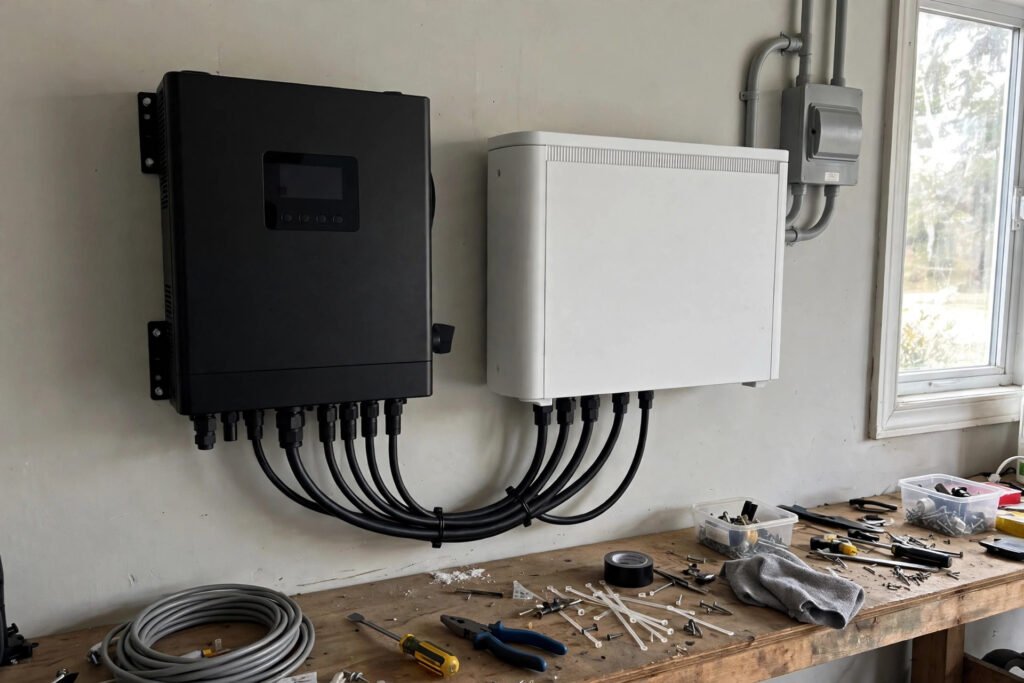
What this guide works from. One rig: a Luxpower SNA5000 WPV inverter, one Pylontech UP5000 pack, 48 V, 4,800 Wh, 100 Ah, 4,560 Wh you can use. CAN is the data bus that links the battery to the inverter. BMS is the battery management system, the board that guards the pack.
The short answer. The inverter was set to the wrong battery brand. Program 03 was set to Li-ion, which is right, but the brand was left at 0, Standard Battery. A Pylontech pack needs brand 2, Pylon Battery. With brand 0 the inverter waits for the wrong data format, hears nothing it can use, and shows W000, a warning that means the battery is not talking. Set Program 03 to Li-ion, set the brand to 2, and the link comes up in seconds.
The rig that showed volts but no charge
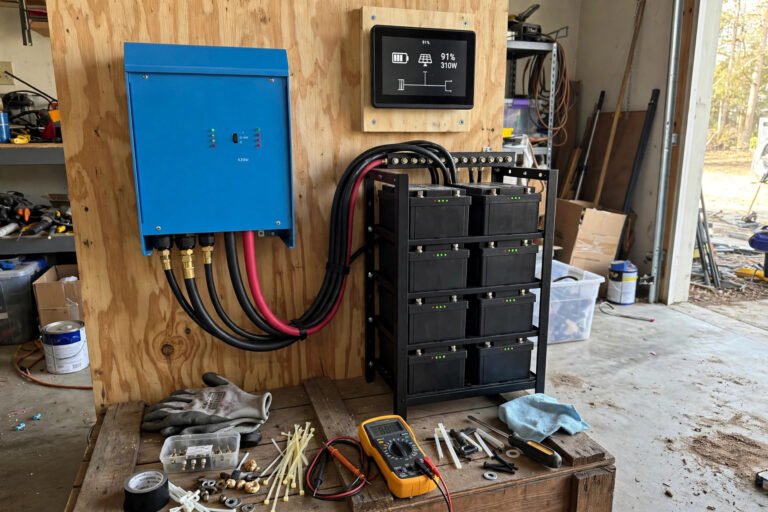
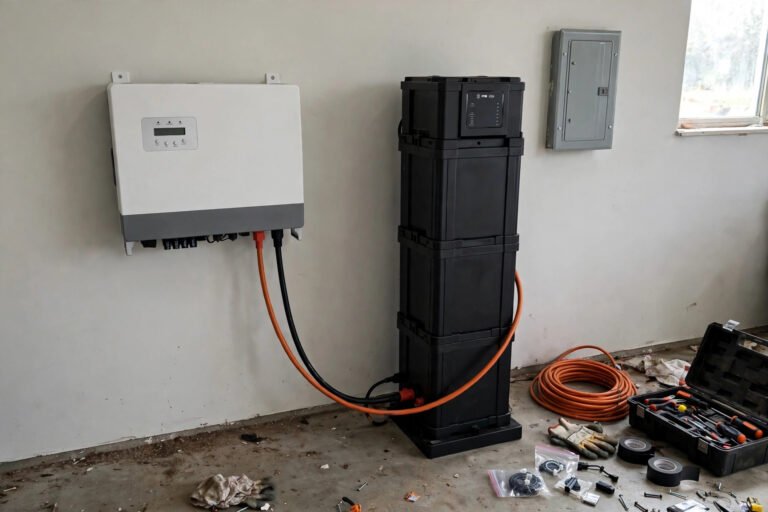
A new UP5000 stood in a rack next to a new SNA5000 WPV. The power cables were tight, the breaker was on, and the battery LEDs showed a healthy pack. The installer set Program 03 to Li-ion on the inverter screen, then moved on. He did not check the brand number.
At 09:00 the sun was up and the panels made power, but the battery took none of it. The inverter screen showed W000. SOC, the state of charge, showed two dashes, not a number. The battery volts read 51.2 V on the inverter screen and on a hand meter at the battery posts. The volts were fine. The charge current was 0 A.
The owner called the installer back. The installer first blamed the cable. He pulled it out, pushed it back in, and swapped it for a new one. Nothing changed. W000 stayed. The cable was never the fault.
At 10:00 the installer opened Program 03 again and looked one step further. The type read Li-ion. The brand read 0, Standard Battery. He changed the brand to 2, Pylon Battery, and pressed Enter. Within seconds W000 went away. The screen showed SOC 62%. Solar power flowed into the pack at 50 A, about 2,560 W. The whole fix was one number.
The case shows the shape of this fault. The volts are right, the cable is right, and the pack is fine, yet nothing charges. That split, good volts and no data, points at the brand ID, not at the wires.
What Program 03 and the brand number mean
Program 03 is the battery menu on the Luxpower SNA. It holds two choices, and both must be right. The first choice is the battery type: Lead-Acid, Li-ion, or Run with No Battery. The second choice is the battery brand, and it only shows for a Li-ion pack. The brand number is the protocol ID. A protocol is a set of rules for how two boxes talk. Each brand speaks its own form of the CAN data, so the inverter must know which form to listen for.
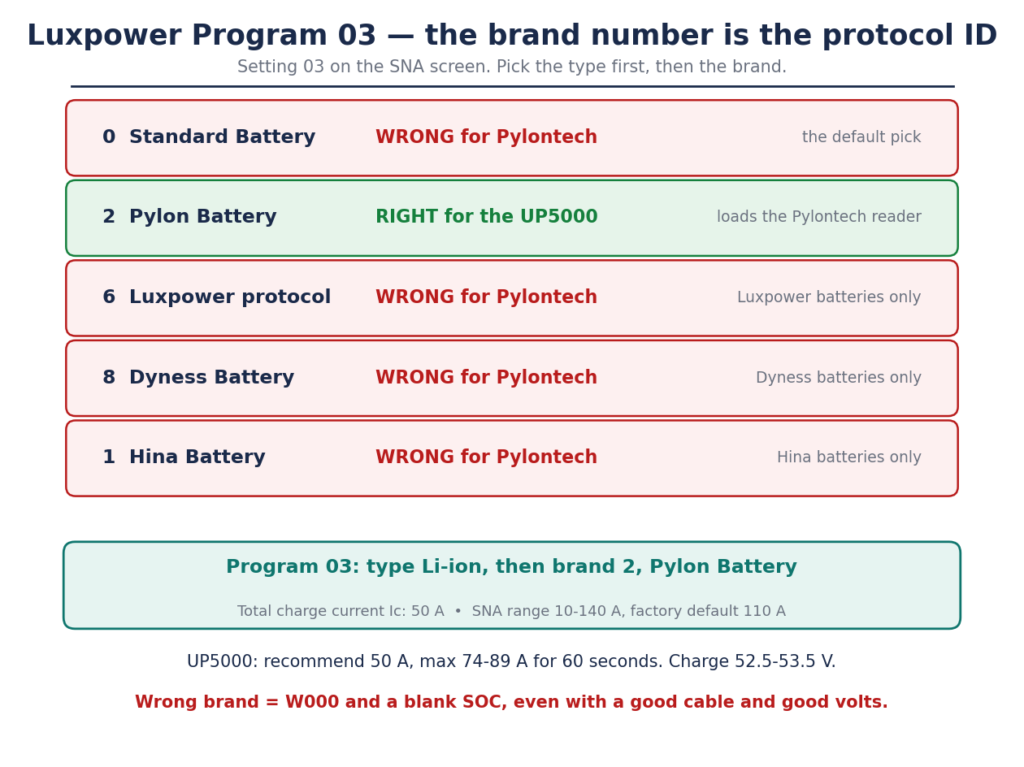
The manual for the SNA 3000-6000 WPV, version UM-SNA01001, lists the brands like this: 0 is Standard Battery, 2 is Pylon Battery, 6 is Luxpower protocol Battery, and 8 is Dyness Battery. The same manual adds that a Hina battery uses brand 1. A Pylontech UP5000 is a Pylon battery, so it needs brand 2.
Brand 0 is the trap. It is the first number on the list, and it is where the menu lands when no one picks a brand. Standard Battery sounds safe, like a plain pack that works with all. It is not. With brand 0 the inverter waits for a plain data format that the Pylontech pack never sends.
Brand 6 is the second trap. It says Luxpower protocol, and the inverter is a Luxpower, so it looks like the right pick. It is not. Brand 6 is for a Luxpower brand battery.
The brand number is not a label. It picks the code the inverter runs to read the pack. Pick the wrong code and the two boxes cannot trade a single fact: no SOC, no charge limit, no discharge limit. The inverter then refuses to charge a lithium pack it cannot read, and it says so with W000.
What the pins carry
The CAN cable links the battery CAN port to the inverter CAN port. CAN runs at 500 kbit/s, which means 500,000 bits per second. Both ends must use the same speed, and here they do: the UP5000 manual prints 500 Kbps for CAN.
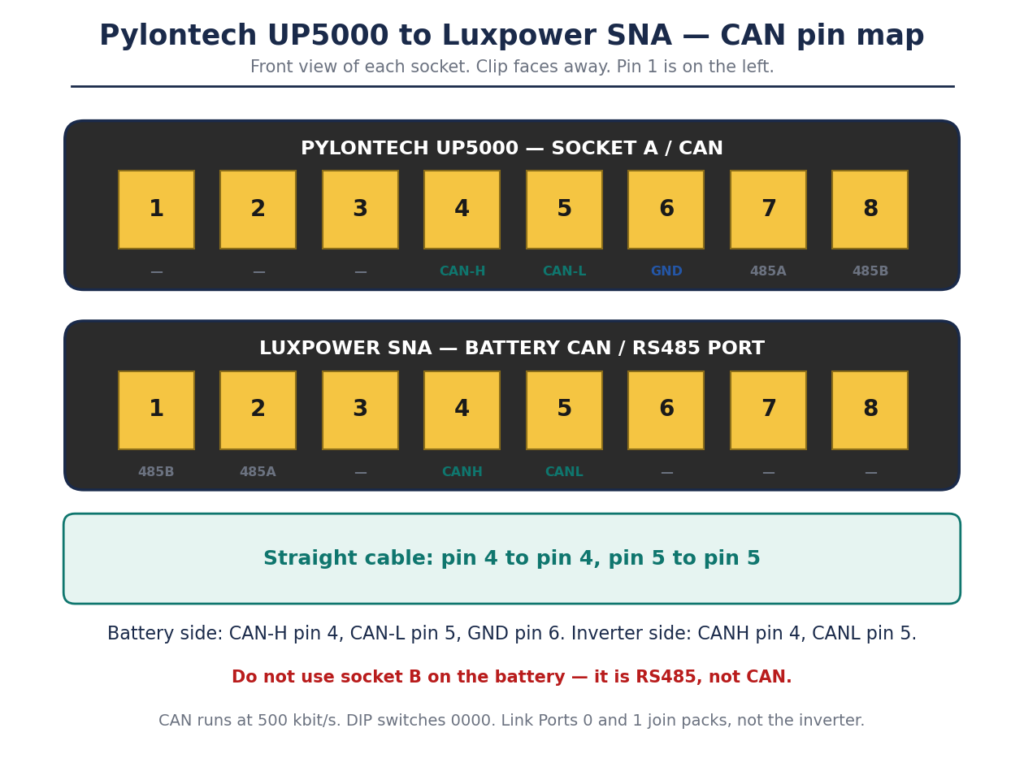
On the UP5000, the CAN port is socket A, marked A/CAN. The RS485 port is socket B, marked B/RS485. The two sockets look the same, and that is the first port trap. Use socket A for CAN. Its pin map is: pins 1, 2 and 3 must stay empty, pin 4 is CAN-H, pin 5 is CAN-L, pin 6 is CAN-GND, pin 7 is 485A, pin 8 is 485B. For a CAN link, only pins 4, 5 and 6 matter.
On the Luxpower SNA, the battery CAN/RS485 port carries both links in one socket. Its pin map is: pin 1 is RS485B, pin 2 is RS485A, pin 4 is CANH, pin 5 is CANL. So a plain straight cable works here: pin 4 to pin 4, pin 5 to pin 5. Both ends put CAN-H on pin 4 and CAN-L on pin 5.
Do not plug the CAN cable into the UP5000 socket B. Socket B is the RS485 port. A CAN plug in socket B gives the inverter no CAN signal at all, and the screen shows the same W000 as a wrong brand ID. The two Link Ports, marked Link Port 0 and Link Port 1, join packs to each other. They are not the inverter link.
Which Luxpower settings fit this pair
Set the battery type first, then the brand. On the SNA screen, hold Enter for about two seconds to open the settings, use Up and Down to pick setting 03, press Enter, pick Li-ion, press Enter, then pick brand 2, Pylon Battery, and press Enter.
Set the total charge current, called Ic on the SNA screen, to 50 A. The SNA lets you set 10 A to 140 A, and it ships at 110 A. The UP5000 manual gives 50 A as the recommended charge and discharge current, with a max of 74 A to 89 A for 60 seconds. At 51.2 V, a 110 A ask is about 5,632 W, more than twice what the pack wants. Our rig runs at 50 A, about 2,560 W into the pack. Your setting is a cap, not a promise. The manual suggests at least 200 Ah of battery for the SNA5000, so one 100 Ah pack is the small end of the range. The 50 A cap is what keeps it safe.
| Setting | Where | Value for our rig |
|---|---|---|
| Battery type, Program 03 | LCD setting 03 | Li-ion |
| Battery brand, Program 03 | Same menu, step 2 | 2, Pylon Battery |
| Total charge current, Ic | LCD settings | 50 A |
| CAN speed | Fixed by the hardware | 500 kbit/s |
| Battery charge volts | UP5000 manual | 52.5 V to 53.5 V |
| Battery discharge volts | UP5000 manual | 44.5 V to 53.5 V |
The pack volts in this table are the safe window from the UP5000 manual. Our rig stayed inside it the whole charge.
Check the DIP switches on the UP5000 while you are there. DIP is short for dual in-line package, a row of tiny on-off switches on the front of the pack. For one pack, set all four to 0. DIP2 sets the CAN end resistor: 0 means the resistor is connected.
Why a wrong brand ID breaks the handshake
A handshake is the short trade of facts that starts a CAN link. The battery sends its state: SOC, pack volts, charge limit, discharge limit, and any guard. The inverter reads those facts, then charges inside the limits the battery sent. No handshake, no charge. The inverter will not guess.
Each brand sends those facts in its own frame shape. A frame is one short burst of data on the bus. The inverter must know which shape to expect before it can read a single frame. That is what the brand number does. Brand 2 loads the Pylontech frame reader. Only brand 2 can read the frames this pack sends.
This is why the fault is so clean on screen. The cable is fine, so the bus has traffic. The volts are fine, so the power path is fine. But the inverter throws every frame away because it is reading them with the wrong rules. The result is W000 and a blank SOC, every time, until the brand number changes.
While the link is down, the inverter will not charge the pack at all. On our rig the house still ran, but only from solar and the grid. One wrong number cut the battery out of the rig.
The fix is instant because the brand number loads the reader at once. There is no file to send, no cable to swap, and no restart to wait for. The moment the inverter loads the Pylontech reader, the next frame from the pack parses clean, and the screen fills in: SOC, volts, limits, all at once. That speed is itself a check. If the brand change does not clear W000 in a minute, the fault is not the ID.
The exact frame numbers are not printed in the manuals I could read, so this guide does not list them. That gap does not change the fix. The brand number is the only control the installer has, and it is the control that works.
Fix it in order: ten steps, each with a check
Work the steps in order. If a check fails, stop there.
- Read the inverter screen and write down what it shows: the warning code, the SOC, the battery volts, and the charge amps. Check: W000, a blank SOC, volts near 51 V, and 0 A of charge.
- Meter the battery at its own posts with the breaker on. Red lead to positive, black lead to negative. Check: the meter reads within 0.5 V of the inverter screen.
- Check the plug on the battery. It must sit in socket A, marked A/CAN, not socket B. Check: the plug is in socket A and clicks home.
- Check the plug on the inverter. It must sit in the CAN/RS485 battery port, not in a parallel port or a CT port. Check: the plug is in the battery port.
- Check the DIP switches on the UP5000. All four must read 0. DIP2 at 0 means the CAN end resistor is connected. Check: DIP1 0, DIP2 0, DIP3 0, DIP4 0.
- Open Program 03 on the inverter. Hold Enter for about two seconds, pick setting 03, press Enter. Check: the type reads Li-ion.
- On the same Program 03 screen, look at the brand number. Check: the brand reads 2, Pylon Battery.
- Watch the screen for one minute. Do not touch anything else. Check: W000 is gone and SOC shows a number.
- Check the charge current setting Ic. Check: it reads 50 A.
- Run a charge test in full sun or from the grid. Watch SOC, pack volts and charge amps for ten minutes. Check: SOC climbs and charge amps sit near 50 A.
If the reading differs, the reading is the answer
A meter can prove the wires in minutes. It cannot read CAN frames, but it can tell you if the bus is live, shorted, or open. On our rig the meter told the truth before the brand fix: the bus had traffic, so the cable was fine, and the fault had to be the ID.
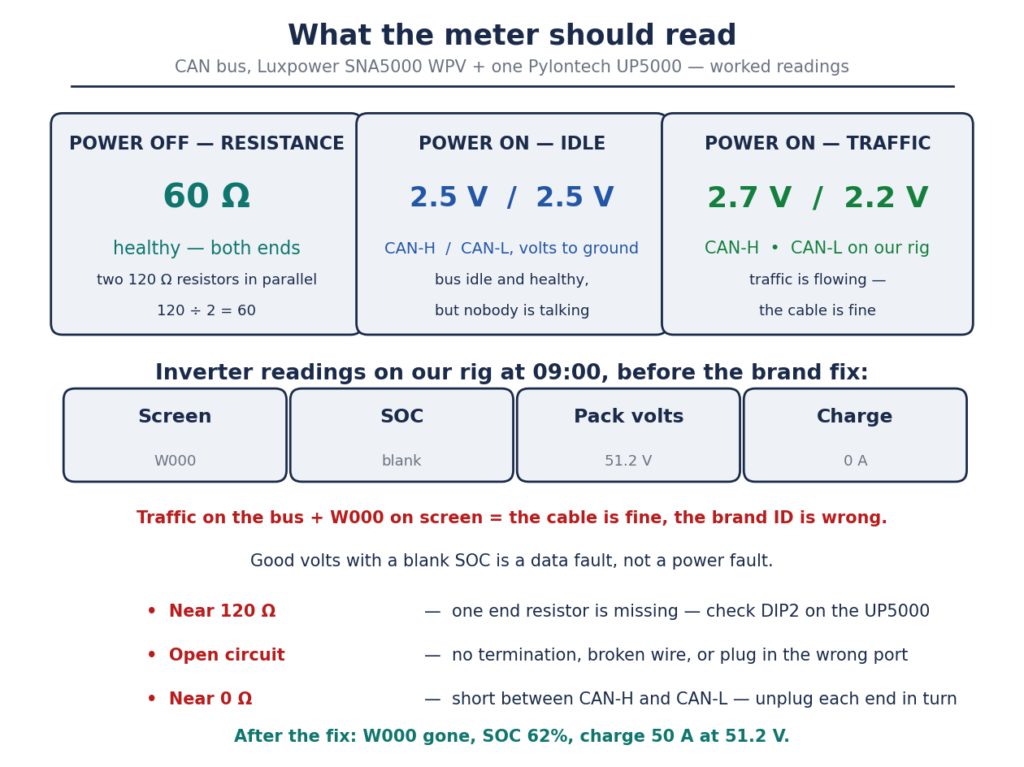
On a live CAN bus with traffic, a plain meter shows the average volts: CAN-H 2.6 V to 3.0 V, CAN-L 2.0 V to 2.4 V, each read to ground. On our rig, before the fix, CAN-H read 2.7 V and CAN-L read 2.2 V. The pack was sending frames. That pair of numbers rules out the cable in one test.
On a live bus with no traffic, both lines sit near 2.5 V. That is the idle state: the bus is wired, but nobody is talking.
With the power off, meter the resistance across CAN-H and CAN-L. A healthy bus reads about 60 ohms: two 120 ohm end resistors side by side. On the UP5000, DIP2 at 0 connects the battery end resistor. The inverter end resistor value is not confirmed in the manual I could read.
| Reading | What it means. | What to do. |
|---|---|---|
| CAN-H 2.6 V to 3.0 V, CAN-L 2.0 V to 2.4 V. | Traffic is flowing. The cable is fine. | The fault is the brand ID. Go to Step 7. |
| Both lines near 2.5 V. | Bus idle. Nobody is talking. | Check the battery is on, then Steps 3 and 4. |
| About 60 ohms, power off. | Both end resistors are there. | Go to Step 7. |
| Near 120 ohms, power off. | One end resistor is missing. | Check DIP2 on the UP5000. |
| Open circuit, power off. | No termination, a broken wire, or the wrong port. | Check the port, then swap the cable. |
| Near zero ohms, power off. | A short between CAN-H and CAN-L. | Unplug each end in turn. |
The 2.5 V idle figure and the 120 ohm end resistor come from the CAN bus standard, ISO 11898-2.
What our rig showed, hour by hour
The table below is the worked case from start to finish. The pack is 100 Ah, so 50 A is half the pack size per hour.
| Time | Brand | Screen | SOC | Pack volts | Charge amps |
|---|---|---|---|---|---|
| 09:00 | 0, Standard | W000 | Blank | 51.2 V | 0 A |
| 09:30 | 0, Standard | W000 | Blank | 51.2 V | 0 A |
| 10:00 | Changed to 2, Pylon | W000 clears | 62% | 51.2 V | 0 A, then 50 A |
| 10:05 | 2, Pylon | No warning | 62% | 51.2 V | 50 A |
| 10:35 | 2, Pylon | No warning | 85% | 52.0 V | 44 A |
| 11:05 | 2, Pylon | No warning | 99% | 52.6 V | 8 A |
Read the table top to bottom and the fault is plain. At 09:00 and 09:30, with brand 0, nothing moved: same volts, same blank SOC, same 0 A. The cable swap at 09:30 changed nothing, which is what a wrong ID looks like. At 10:00 the brand changed and the screen changed with it.
The charge math checks out. From 62% to 85% is 23% of a 100 Ah pack, or 23 Ah. At about 47 A on average that takes about 29 minutes, and the table shows 30 minutes. From 85% to 99% is 14 Ah, and the current fell from 44 A to 8 A as the pack filled. The volts rose only 1.4 V across the whole charge, from 51.2 V to 52.6 V. That flat rise is why volts alone cannot tell you the SOC.
What each screen reading points to
Match what you see to the row below, then work the fix in that row.
| What you see. | Most likely cause. | Fix. |
|---|---|---|
| W000, SOC blank, volts near 51 V, 0 A. | Wrong brand ID in Program 03. | Step 7: set brand 2. |
| W000, SOC blank, volts near 51 V, cable in socket B. | CAN plug in the RS485 port. | Step 3: move the plug to socket A. |
| W000, SOC blank, both CAN lines near 2.5 V. | Battery off or asleep, or plug in a Link Port. | Turn the pack on, then Steps 3 and 4. |
| W000, SOC blank, bus near 120 ohms. | One end resistor missing. | Step 5: set DIP2 to 0. |
| W000 clears, SOC shows, charge stuck at 0 A. | Charge current setting or a BMS guard. | Step 9, then read the pack alarms. |
| No warning, SOC shows, charge amps over 74 A. | Ic set above the pack max. | Step 9: set Ic to 50 A. |
| W004 on screen, SOC shows. | Battery fault from the BMS. | Restart the pack. If W004 stays, call the battery seller. |
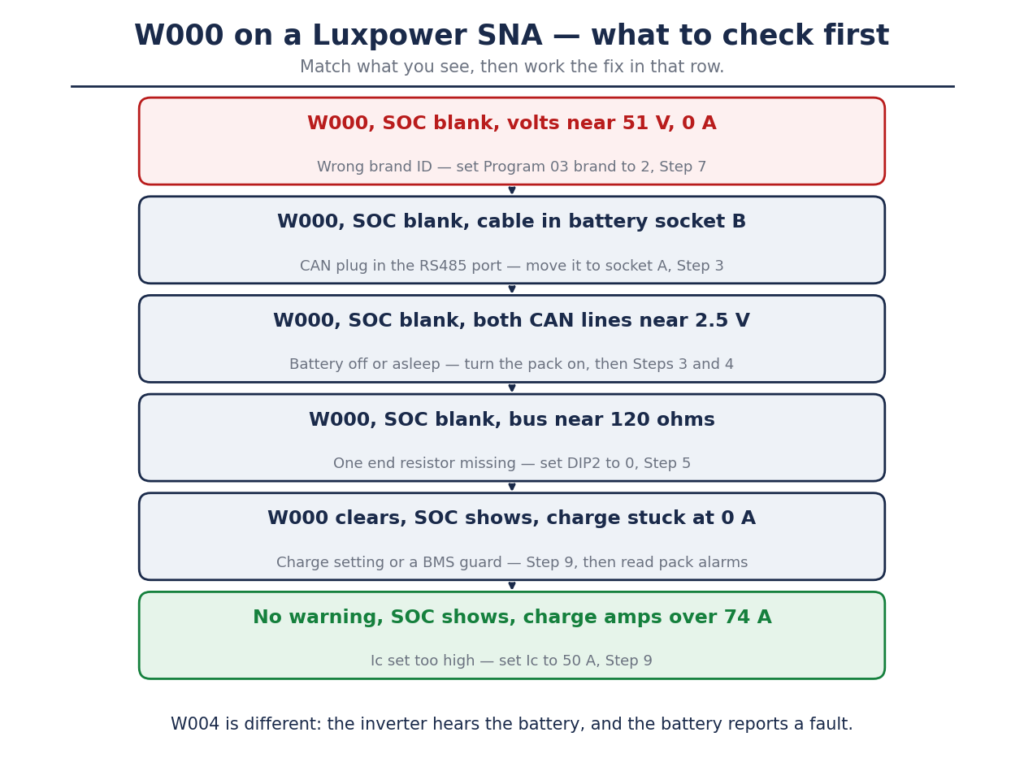
W004 is a different warning from W000. W000 means the inverter cannot hear the battery. W004 means the inverter hears the battery, and the battery reports a fault of its own. This guide fixes W000. A W004 needs the battery manual, not a brand change.
What can still go wrong
Brand 6 was picked because the inverter is a Luxpower.
Brand 6 is the Luxpower protocol battery, and it is the right pick only for a Luxpower brand battery. On a Pylontech pack it gives the same W000 as brand 0. The brand number must match the battery, not the inverter.
The CAN cable went into socket B on the battery.
Socket B is RS485, not CAN. Its pins 7 and 8 carry RS485 data. A CAN plug there gives the inverter no CAN signal at all. The screen shows W000, just like a wrong brand ID. If Step 7 does not clear W000, go back to Step 3 and read the socket letter.
DIP2 sits at 1 and the bus loses its end resistor.
DIP2 at 1 means no CAN end resistor on the battery side. The bus then reads near 120 ohms with the power off, and the link can drop in and out. The screen may flip between W000 and a live SOC. Set DIP2 to 0 for a single pack, then re-check the ohms.
A second UP5000 joins the rig and the master is wrong.
With two packs, the newest pack must be the master, and the packs join through Link Port 0 and Link Port 1. The inverter cable still plugs into the CAN port of the master pack only. The master-pack rule is the same one our Pylontech to Deye master DIP guide uses, and it holds here too.
The brand list on your screen does not match this guide.
Brand numbers can shift with inverter firmware. A newer manual adds brand 1 for Hina batteries. That shift is not confirmed for every firmware version, so read the list on your own LCD. If your screen has no brand 2 at all, stop and ask Luxpower for a firmware update.
Common questions
Which brand number is right for a Pylontech pack on a Luxpower SNA?
Brand 2, Pylon Battery. Set Program 03 to Li-ion first, then the brand to 2. Brand 0 is Standard, brand 6 is Luxpower protocol, and brand 8 is Dyness.
Can I use RS485 instead of CAN for this pair?
Yes, the manuals say the SNA supports CAN or RS485 for a lithium battery, and the UP5000 has both ports. For RS485, use the battery socket B, pins 7 and 8, and the inverter pins 1 and 2. Which RS485 speed the inverter expects is not confirmed in the manual I could read, so this guide uses CAN, where both ends are fixed at 500 kbit/s.
Why does the inverter still show battery volts when W000 is on?
Volts come down the power cables. The inverter can read volts with a plain meter circuit, and it does not need the data link for that. SOC and charge limits need the CAN link. Good volts with a blank SOC is the sign of a data fault, not a power fault.
Will the inverter charge a lithium pack with W000 on screen?
On our rig it would not. With no handshake the inverter held charge at 0 A. Whether every SNA firmware does the same is not confirmed in the manual I could read.
Do I need to restart the inverter after changing the brand?
On our rig, no. W000 cleared within seconds of pressing Enter on brand 2, and SOC came back at once. If your screen still shows W000 after a minute, power the inverter off and on once.
What if W000 stays after I set brand 2?
Work the cable and the bus. Check socket A on the battery, the battery port on the inverter, and DIP2 at 0. If CAN-H reads 2.6 V to 3.0 V and CAN-L reads 2.0 V to 2.4 V, the cable is fine and the fault is elsewhere. If the bus is idle at 2.5 V on both lines, the pack may be off or asleep. Press the Start button on the pack for more than half a second to wake it.
Do this next
- Open Program 03 on your Luxpower SNA and read the type and the brand. Write both down.
- If the brand is not 2, set the type to Li-ion and the brand to 2, Pylon Battery, and press Enter.
- Watch the screen for one minute. W000 must clear and SOC must show a number.
- Set the total charge current Ic to 50 A, the recommended current for one UP5000.
- Meter CAN-H and CAN-L if W000 stays. Traffic reads 2.6 V to 3.0 V on CAN-H and 2.0 V to 2.4 V on CAN-L.
- Run a ten minute charge test and check SOC climbs and charge amps sit near 50 A. Browse the Brand Pairings hub.
Sources
Checked on 24 November 2026. Unconfirmed items are labelled “not confirmed” in the text.
- Luxpower SNA 3000-6000 WPV User Manual, Version UM-SNA01001 (2024-07-19). Section 2.3.2: set battery type to Li-ion in Program 03 and choose the battery brand. LCD chapter: brand 0 Standard, 2 Pylon, 6 Luxpower protocol, 8 Dyness, 1 Hina. Section 7: W000 communication failure with battery, check the right battery brand and the cable. Total charge current 10 A to 140 A, default 110 A.
- Luxpower SNA-US 6000 ECO Hybrid Inverter User Manual, Version UM-SNAUS01001 (2024-07-15). Section 7: W000 communication failure with battery, W004 battery failure, E019 bus voltage high. Section 2.3.2: same Program 03 Li-ion and brand pick.
- Pylontech UP5000 Operation Manual, Information Version SD20UP501001. Section 3.2: 48 V nominal, 4,800 Wh, 4,560 Wh usable, charge 52.5 V to 53.5 V, discharge 44.5 V to 53.5 V, recommend 50 A, max 74 A to 89 A at 60 seconds, peak 90 A to 200 A at 15 seconds. Section 3.3: DIP1 RS485 speed, DIP2 CAN end resistor, CAN 500 Kbps, RS485 9600 or 115200 bps. Definition of RJ45 Port Pin: pin 4 CAN-H, pin 5 CAN-L, pin 6 CAN-GND, pin 7 485A, pin 8 485B.
- Pylontech UP5000 Operation Manual, RJ45 pin and DIP page. Same manual, page 13: DIP switch table, 0000 gives RS485 115200 and CAN end resistor connected, and the Console and Contact pin tables.
- ISO 11898-2 CAN standard guide. Idle 2.5 V, dominant 3.5 V and 1.5 V, 120 ohm per end, about 60 ohms measured across the bus.
- This site: Brand Pairings hub, JK BMS to Luxpower SNA/LXP protocol, Luxpower W000 BMS communication failure fix, Pylontech US2000/US3000 to Growatt Menu 05 and 36, Luxpower Warning 04 battery open fix, Huawei SUN2000 Smart Dongle BMS COM pinout, Sol-Ark 12K/15K F58 BMS communication fault fix, Install dbus-serialbattery on Victron Cerbo GX, Pylontech multiple batteries Deye master DIP guide.

Comments (0)