
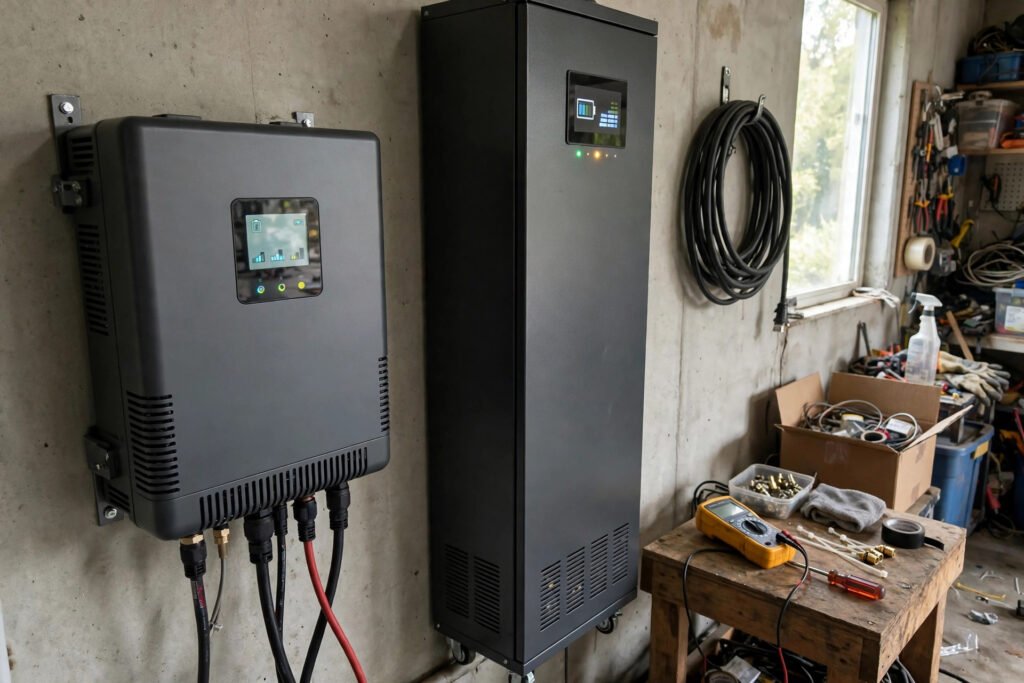
What this guide works from. One rig: a Voltronic Axpert King 5 kW, a JK Inverter BMS (PB series, JK-PB2A16S20P) on a 16-cell LiFePO4 pack, 280 Ah, 14,336 Wh at 51.2 V nominal. Program 05 set to LIb, JK RS485-1 protocol 007 at 9600 baud, BMS port pins 3 and 5.
The short answer. Error 69 means the battery BMS told the inverter to stop charging. Error 70 means the opposite: the BMS told the inverter the pack must be charged. The code most people pair with 69 is not 70. It is 71, which means the BMS told the inverter to stop discharging. On our rig the fix was one weak cell that ran high and a charge volt limit set too high. We pulled the pack down with a load, set the charge volt limit to 55.2 V, and let the cells even out. Code 69 cleared, and the pack charged to full the next day.
The rig that threw Error 69
The battery box held 16 LiFePO4 cells with a JK Inverter BMS on top of the pack. It was a clear morning in late November, and the sun was strong by 11:40. The panels could make 2,400 W. But the charge current sat at 0 A, and the screen showed code 69.
The pack read 54.6 V, or 3.41 V per cell on average. But the average hid the fault. The JK app showed the top cell at 3.65 V and the low cell at 3.38 V, a spread of 0.27 V. The app also showed the charge switch off, the charge current limit at 0 A, and the discharge current limit still at 200 A. The state of charge read 97%.
At 97% of 280 Ah, the pack held 271.6 Ah, or about 13,900 Wh. But nearly full is not full, and a pack with one cell at 3.65 V is a pack the BMS must protect. The BMS cut charge to 0 A, and the inverter showed code 69.
What codes 69, 70 and 71 really mean
Here is the part most guides get wrong. The Voltronic manual Code Reference table gives these codes in plain words. The same words show in the Axpert King, VM III, MKS III, and Max manuals. They all agree.
| Code | Manual words, in short. | What the inverter does. |
|---|---|---|
| 60 | BMS blocks charge and discharge. | Stops charging and stops discharging. |
| 61 | Talk with the BMS is lost. | Beeps after 3 min, stops both after 10 min. |
| 62 | Battery pack count changed. | Asks you to re-check the pack count. |
| 69 | BMS blocks charge. | Stops charging only. Loads still run. |
| 70 | BMS says the pack must be charged. | Charges the pack. |
| 71 | BMS blocks discharge. | Stops discharging only. Charging still works. |
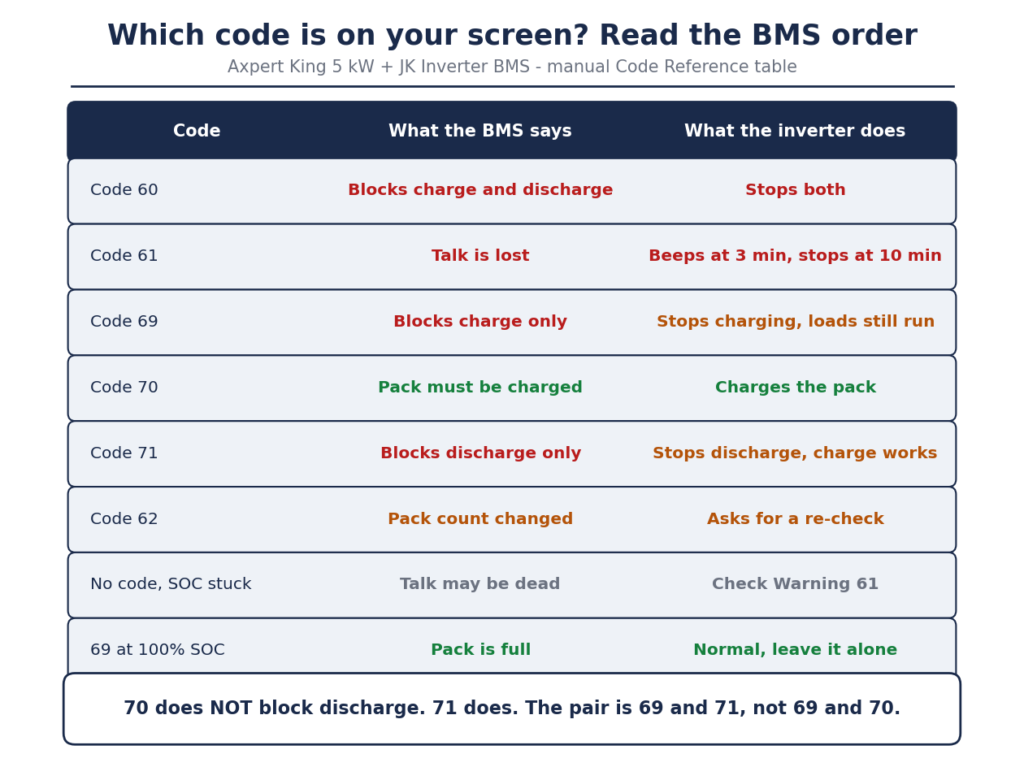
Read the 70 row again. Code 70 does not block anything. It is an order to charge. The BMS sends it when the pack is low and needs power. So the common web phrase “Error 69 and 70, charge and discharge prohibited” mixes two codes up. The true charge and discharge pair is 69 and 71. Code 69 stops charge. Code 71 stops discharge. Code 70 sits between them, and it means charge now.
Why does the mix-up happen? Because 69 and 70 sit next to each other in the table, and both show when the BMS sends an order. A reader skims the list and pairs them. The manual does not pair them that way. Our own Axpert Warning 61 guide lists the same six codes, and the full Error Codes hub lists every code guide on this site.
These codes only show when Program 05 is set to a lithium type and the inverter is talking to the BMS. If the talk itself is dead, you get Warning 61 instead.
Why the BMS blocks charge or discharge
A BMS is a guard for the cells. BMS stands for battery management system. It watches every cell and can open or close two switches: one for charge, one for discharge. When it opens a switch, current stops on that path. The inverter only follows the limits the BMS sends over the comms cable.
The BMS sends four limits. Learn these names. They explain every 69, 70, and 71 you will ever see.
- CVL, the charge volt limit. The highest pack volts the BMS will allow. On our rig the JK asked for 56.0 V at first, or 3.50 V per cell.
- CCL, the charge current limit. The most amps the BMS will allow into the pack. When a cell runs high, this number falls to 0 A.
- DCL, the discharge current limit. The most amps the BMS will allow out of the pack. When a cell runs low, this number falls to 0 A.
- DVL, the discharge volt limit. The lowest pack volts the BMS will allow.
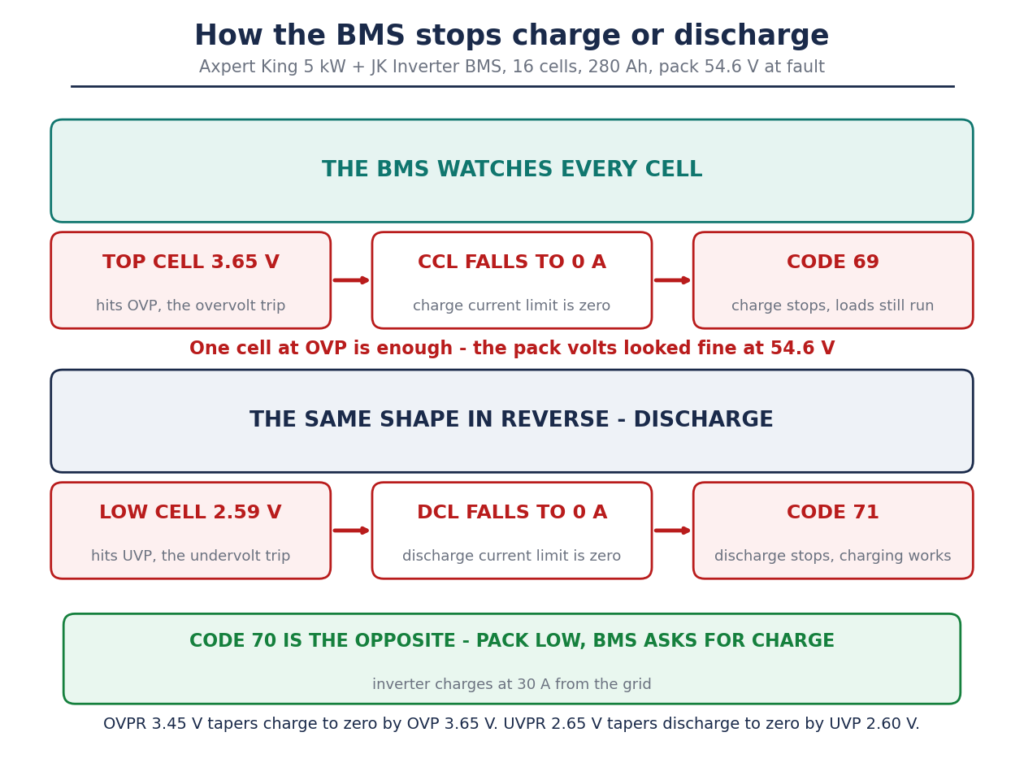
On our rig the chain ran like this. The sun pushed power in at 40 A. Fifteen cells sat near 3.40 V, but one weak cell climbed fast to 3.65 V. That is the cell overvolt trip point, called OVP, short for overvoltage protection. When any one cell hits OVP, the BMS opens the charge switch and sets CCL to 0 A. The inverter sees CCL at 0 A and shows code 69.
The BMS does not wait until OVP to slow down. It tapers first, starting at the recovery volt, called OVPR, which was 3.45 V on our rig. Between 3.45 V and 3.65 V, the allowed charge current falls in a straight line to zero. That is why charge current hit 0 A while pack volts were only 54.6 V. One cell was full, and one cell is enough.
The same shape runs in reverse. The low trip point is called UVP, undervoltage protection, set at 2.60 V per cell on our rig. The recovery point is called UVPR, set at 2.65 V. When the weakest cell hits 2.60 V, the BMS opens the discharge switch, sets DCL to 0 A, and the inverter shows code 71.
Heat and cold trip the same switches. Charge stops when a cell hits 60 C, and stays off until the cells cool to 55 C. Charge also stops at 0 C or below, because charging a frozen cell harms it for good. If the MOSFETs hit 80 C, the BMS stops both charge and discharge at once. That is code 60.
The balancer should have stopped our fault before it started. The JK balancer moves up to 2 A from high cells to low cells, but only when the top cell is above 3.45 V and the spread is above 0.03 V. Two amps is small next to a 40 A charge, so the weak cell ran away and code 69 was the result.
The same rig that evening: code 71, then code 70
The same day gave us the other two codes, from the other side of the pack.
By 18:30 the sun was gone and the pack was low, so we ran a 2,000 W load test. At 48 V, 2,000 W draws about 42 A. The weakest cell dropped to 2.59 V, just under the UVP trip of 2.60 V. The BMS opened the discharge switch, set DCL to 0 A, and the screen showed code 71. The inverter moved the load to utility power. The cell bounced back to 2.70 V within a minute, above the UVPR recovery point of 2.65 V, so the BMS closed the discharge switch again and code 71 cleared on its own.
Then, at 19:05, the screen showed code 70. The pack read 47.9 V, or 2.99 V per cell on average, and the state of charge read 9%. At 9% of 280 Ah, only 25.2 Ah were left, or about 1,290 Wh. The BMS was asking for charge, and the inverter obeyed with 30 A from the grid. Code 70 is not a fault to clear.
Three codes, one day, one rig. Code 69 at noon: one cell too high, charge blocked. Code 71 at dusk: one cell too low, discharge blocked. Code 70 at night: pack low, charge now.
The settings that stop the block
Two settings caused our fault, both on the BMS side. The inverter side was right: Program 05 LIb, protocol 007 at 9600 baud, pins 3 and 5.
| Setting | Where it sits. | As found. | Fixed value. |
|---|---|---|---|
| JK RCV, charge volt ask. | JK app, charge settings. | 3.50 V per cell, 56.0 V pack. | 3.45 V per cell, 55.2 V pack. |
| Cell OVP, overvolt trip. | JK app, volt protection. | 3.65 V. | 3.65 V, unchanged. |
| Cell OVPR, overvolt recovery. | JK app, volt protection. | 3.45 V. | 3.45 V, unchanged. |
| Cell UVP, undervolt trip. | JK app, volt protection. | 2.60 V. | 2.60 V, unchanged. |
| Cell UVPR, undervolt recovery. | JK app, volt protection. | 2.65 V. | 2.65 V, unchanged. |
| Balancer start. | JK app, balancer. | 3.45 V, 0.03 V spread. | Unchanged. |
| Max charge current, Program 02. | Inverter menu. | 60 A. | 20 A while fixing, then 40 A. |
| Axpert Program 05. | Inverter menu, Program 05. | LIb. | LIb, unchanged. |
| JK RS485-1 protocol. | JK app, RS485-1. | 007 Voltronic, 9600 baud. | Unchanged. |
One honest flag first. The JK protocol table marks the Voltronic profile 007 as not tested on a named device. Treat 007 as the right first try, not a sure thing.
The key change is the first row. Asking for 56.0 V pushed toward a pack volt the weak cell could never reach without tripping OVP. Asking for 55.2 V leaves room, and the top cell now peaks near 3.50 V. The full pin guide is the Axpert King and Max BMS RJ45 pinout, and the pairing hub is JK BMS to Axpert Max over RS485.
Fix it in order: ten steps, each with a check
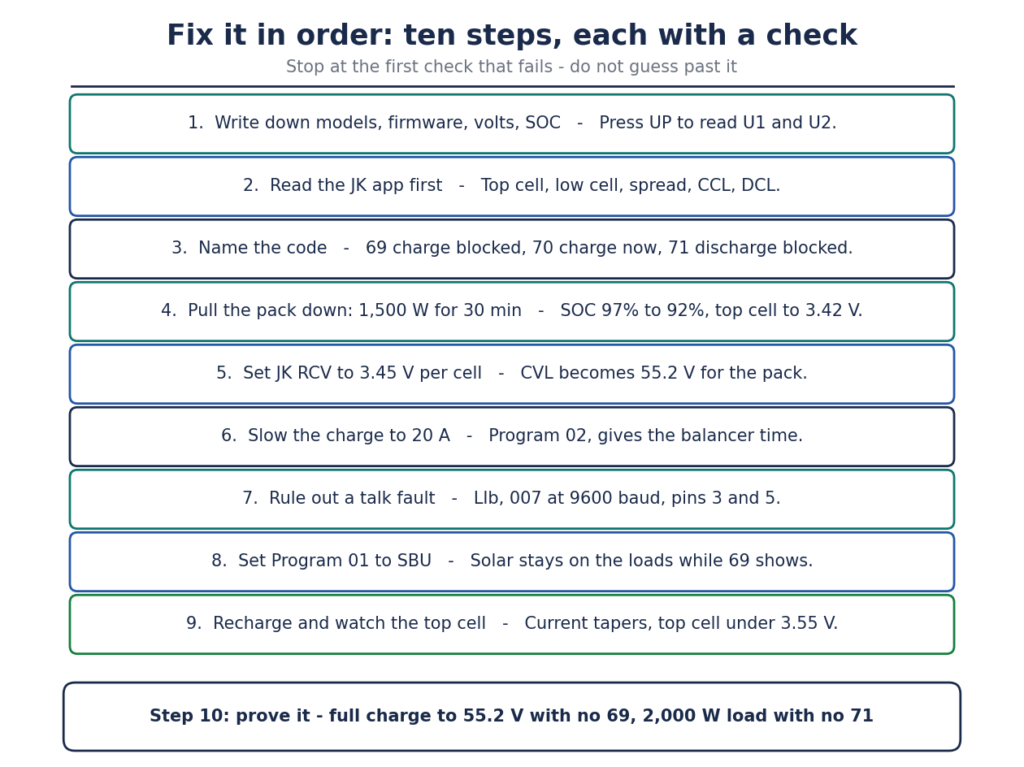
Work in order. Stop at the first failed check.
- Write down what you have. Note the inverter model, the BMS model, the firmware versions, the pack volts, and the SOC on both screens. Check: model names, firmware, and photos in hand. Press the UP key to read the U1 and U2 versions.
- Open the JK app and read the BMS first. Look at the top cell volt, the low cell volt, the spread, both switches, CCL and DCL, and the cell temps. Check: you can name the top cell volt and the open switch.
- Name the code from the table. Code 69 means charge blocked. Code 71 means discharge blocked. Code 70 means charge now. Code 60 means both blocked. Code 61 means the talk is dead. Check: the code on screen matches one row of the table above.
- If the code is 69, pull the pack down with a load. Run a 1,500 W load for 30 minutes, about 14.6 Ah, close to 5% of a 280 Ah pack. On our rig the SOC fell from 97% to 92%, the top cell from 3.65 V to 3.42 V, and the pack from 54.6 V to 53.4 V. Check: top cell below 3.45 V, charge switch closed again, CCL above 0 A.
- Lower the JK charge volt ask to 3.45 V per cell. In the JK app, set RCV to 3.45 V, which sets CVL to 55.2 V for the pack. Leave OVP at 3.65 V. Check: JK app shows RCV 3.45 V, CVL 55.2 V.
- Slow the charge while the cells even out. Set Program 02, max charge current, to 20 A, so the 2 A balancer has time to close the spread. Check: menu reads 20 A after a save.
- Rule out a talk fault. Check Program 05 reads LIb, the JK RS485-1 protocol reads 007 at 9600 baud, and the cable runs on inverter pins 3 and 5. If Warning 61 shows as well, fix the talk first with the Axpert Warning 61 fix. Check: LIb, 007, 9600 baud, pins 3 and 5, no Warning 61.
- Set Program 01 to SBU. On older firmware, code 69 can cut the solar feed and push the loads onto utility power. SBU keeps solar on the loads first. Check: menu reads SBU, loads stay on solar while 69 shows.
- Recharge and watch the top cell. With sun on the panels, watch the charge current and the top cell volt together. The current should taper as the top cell climbs. Check: charge current tapers, top cell stays under 3.55 V, no code 69.
- Prove charge and discharge the next day. Charge to full in sun: the pack should reach 55.2 V, top cell near 3.50 V, spread under 0.05 V. Then run a 2,000 W load: the low cell should stay above 2.65 V with no code 71. Check: full charge with no 69, full load with no 71, spread under 0.05 V.
Read the meter: what the numbers mean
A meter settles most fights about codes 69, 70, and 71. Read the pack at the posts, then read the JK app. The two must agree within 0.3 V.
| When you read it. | Reading on our rig. | What it means. |
|---|---|---|
| Pack at rest, 11:40, code 69. | 54.6 V, SOC 97%, charge 0 A. | Pack looks fine, but one cell is at OVP. |
| Top cell, 11:40, code 69. | 3.65 V, low cell 3.38 V, spread 0.27 V. | Weak cell hit the overvolt trip. |
| Load test, 1,500 W, 30 min. | 14.6 Ah used, SOC 97% to 92%. | Top cell fell to 3.42 V, charge allowed again. |
| Pack at 18:30, code 71. | 47.9 V, low cell 2.59 V. | Weak cell hit the undervolt trip. |
| Pack at 19:05, code 70. | 47.9 V, SOC 9%, charge 30 A from grid. | BMS asked for charge, inverter obeyed. |
| After the fix, next day 11:40. | 55.2 V, top cell 3.50 V, spread 0.04 V. | Full charge, no code, CCL still above 0 A. |
| After the fix, 2,000 W load. | Low cell 2.98 V, DCL 200 A, no code 71. | Discharge holds, weak cell no longer dives. |
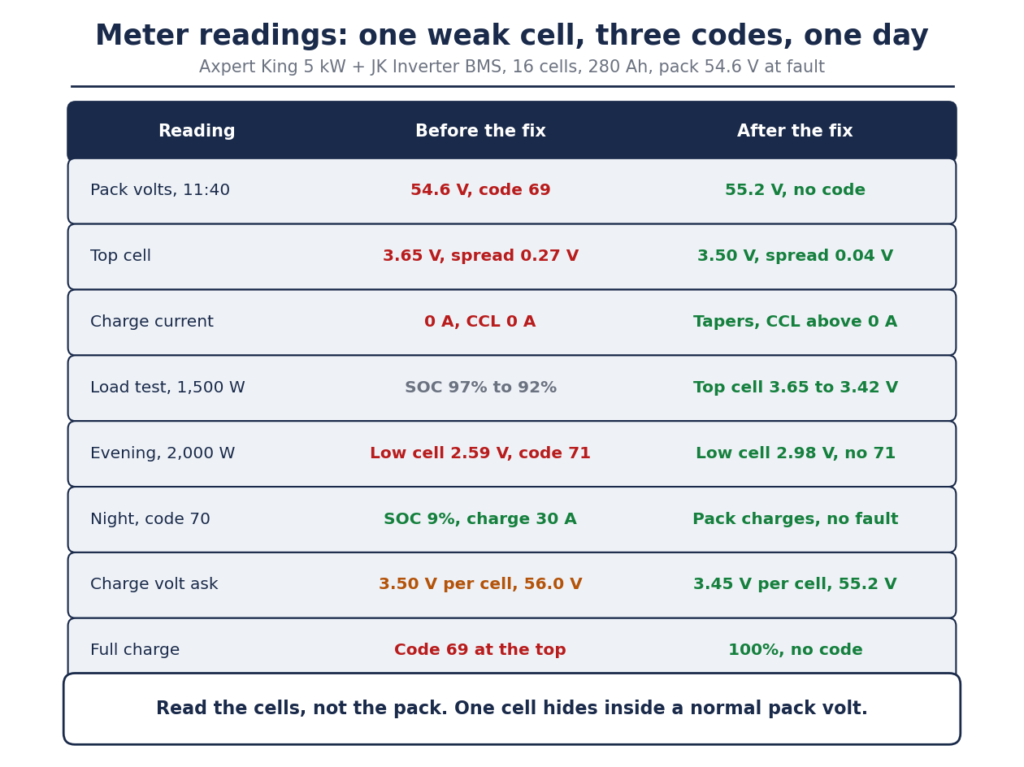
Trust the meter past 0.3 V. A gap of more than 0.5 V between the pack posts and the inverter DC posts means a loose lug, a tripped breaker, or a blown fuse. If the pack volts look fine but a code shows, read the cells, not the pack. The same-day float voltage guide shows how small volt changes move the top of the pack, and the SolaX pinout guide shows the same BMS talk on a different brand.
What each symptom points to
Match what you see to the row.
| What you see. | Most likely cause. | Fix. |
|---|---|---|
| Code 69 at 97% to 100% SOC. | One cell hit OVP, pack is full. | Steps 4, 5, and 9 in order. |
| Code 69 below 90% SOC. | Weak cell runs high, or charge volts too high. | Steps 4 and 5, then check the spread. |
| Code 70, pack low, charging. | BMS asked for charge. | Let it charge, check the low cell. |
| Code 71 under a heavy load. | Weak cell hit UVP, pack is low. | Cut the load, charge the pack. |
| Code 60, both charge and discharge stopped. | Cell temp fault, or MOSFET temp over 80 C. | Cool the pack, read the temps. |
| Code 69 plus Warning 61. | Talk fault, not a cell fault. | Fix the talk first, see the Warning 61 guide. |
| Solar feed drops to zero when 69 shows. | Old firmware bypass bug. | Set Program 01 to SBU, update firmware. |
What can still go wrong
Code 69 at 100% on a healthy pack is normal.
A full pack has nowhere to put more charge. The BMS sets CCL to 0 A, and the inverter shows 69. If 69 only shows at 99% to 100% and clears under load, leave it alone. The Pylontech case is the classic one: the pack asks for 53.25 V, the Axpert overshoots a little, and the BMS says stop. The fix there is USE mode at 52.5 V bulk and 50.5 V float.
Code 69 below 90% SOC means a weak cell or a bad setting.
On newer King display firmware, version 02.70, code 69 only shows when SOC is below 90%. That is a field report, not a line in a manual, so treat it as not confirmed on every model. Either way, 69 at 80% SOC is not a full pack. It is one cell that runs high while the rest still have room.
Code 71 means two different things on the Max.
On the Axpert Max, code 71 shows for two faults: the BMS blocking discharge, and firmware versions not matching across parallel inverters. If 71 shows on a parallel rig, check the U1 and U2 versions on each inverter first. If they differ, the fix is matched firmware.
Old firmware treats 69 as a fault; new firmware treats it as a warning.
Early display firmware treated 69 as a fault with beeps and a full cut of the solar feed. Display version 02.49 changed 69 to a plain warning. King main firmware 71.94 fixed the PV cut: 69 still flashes, but the solar feed stays on. If your rig still cuts PV at 69, read your U1 and U2 versions before you touch the battery.
One dying cell will not balance out.
A balancer moves 2 A. A dying cell climbs fast on charge and dives fast on discharge, every cycle, no matter how long you balance. If the same cell is top on charge and bottom on discharge, and the spread stays above 0.15 V after a week of slow charging, that cell is worn out.
Common questions
Is Error 69 dangerous?
No. Code 69 means the BMS protected the pack by stopping charge. The danger is what you do next. Do not raise the charge volts to push past it. Do not bypass the BMS. Read the top cell first. If it is at 3.65 V, the BMS is right.
What is the difference between Error 69, 70 and 71?
Code 69 stops charge only. Code 71 stops discharge only. Code 70 is the opposite of a block: the pack must be charged. The manual words are plain: 69 means not allowed to charge, 70 means must be charged, 71 means not allowed to discharge.
Can I clear Error 69 by switching to USE mode?
Yes, and it is the right move for the night if the code will not clear. In USE mode the inverter runs on volts alone and never asks the BMS for orders, so 69 cannot show. Set bulk to 55.2 V, float to 53.6 V, and cut-off to 48.0 V. But USE is a bandage, not a cure. Go back to LIb once the cells are even. The EG4 battery volt override guide shows the same trade on another inverter.
Why does my solar drop to zero when Error 69 shows?
That is the old firmware bypass bug. On King firmware near 71.90 and display firmware before 02.49, code 69 cut the PV feed and moved the loads to utility power, then back again every few seconds. Switch Program 01 to SBU first. King main firmware 71.94 fixed the PV cut. Never flash a file made for a different model.
Will a firmware update fix Error 69?
It can fix the display and the PV cut, but it cannot fix a weak cell. If 69 shows below 90% SOC and one cell sits far above the rest, the cell is the fault, not the code. Fix the pack first: slow charge, low RCV, time to balance.
Do this next
- Read the JK app first: top cell, low cell, spread, CCL, DCL, and which switch is open.
- Name the code: 69 blocks charge, 70 asks for charge, 71 blocks discharge.
- If the code is 69, run a 1,500 W load for 30 minutes and watch the top cell fall below 3.45 V.
- Set the JK charge volt ask to 3.45 V per cell, 55.2 V for the pack.
- Slow the charge to 20 A in Program 02 until the spread closes.
- Check Program 05 LIb, protocol 007 at 9600 baud, and pins 3 and 5.
- Set Program 01 to SBU so solar stays on the loads while 69 shows.
- Recharge in sun and watch the top cell: it should peak near 3.50 V with no code 69.
- Prove discharge with a 2,000 W load: the low cell should stay above 2.65 V with no code 71.
- If 69 only shows at 100%, leave it alone.
- If the same cell stays top and bottom after a week of slow charging, ask the seller to check it.
- More code guides: Axpert Warning 61 fix, Growatt Warning 04 and Error 56 guide, Solis OV-Vbatt and UN-Vbatt guide, and the same-day Pylontech to SMA Sunny Island guide.
Sources
Checked on 27 November 2026. Unconfirmed items are labelled “not confirmed” in the text.
- Axpert King 3 kW and 5 kW User Manual, Version 1.3, Solarpower24 (PDF). Code Reference, pages 56-57: codes 60, 61, 62, 69, 70; comms lost, 3-minute beep, 10-minute stop; set Program 05 to PYL, talk takes longer than 1 minute. Note: this link carries a download token and may stop working. The same table is on the stable ManualsLib pages below.
- Axpert VM III User Manual, page 56, ManualsLib. Code Reference: codes 60, 61, 62, 69, 70, 71; 3-minute beep, 10-minute stop.
- Axpert MKS III User Manual, page 63, ManualsLib. Code Reference: same codes 60, 61, 62, 69, 70, 71; comms lost applies to Pylontech, WECO, Soltaro or BAK battery types.
- Axpert Max 11 kW User Manual, Version 1.0, Full Circle Solar (PDF). Appendix II pin list: pin 3 RS485B, pin 5 RS485A, pin 6 CANH, pin 7 CANL, pin 8 GND. Faults Reference Code section.
- Axpert Max 3.6 kW and 7.2 kW User Manual, Version 1.0, Taratech (PDF). Appendix II: same pin list. Faults Reference Code: same code 69, 70, 71 meanings.
- Axpert VMIII Error 69, PowerForum. Pylontech asks 53.2 V (53.25 V exact), Axpert overshoots, BMS says stop charging, code 69 shows; USE mode fix at 52.5 V bulk and 50.5 V float; display 02.49 turns 69 into a plain warning; King main firmware 71.94 fixes the PV cut.
- Axpert MAX 7.2 kW error 32, PowerForum. Code 71 is used twice on the Max: firmware version mismatch and discharge not allowed; code 69 is back in King display firmware 02.70 but only shows when SOC is below 90%; firmware 90.28 bug left batteries uncharged with code 71.
- JK BMS Settings, Clever Solar Power. Cell OVP 3.65 V, OVPR 3.45 V, RCV 3.56 V, UVP 2.60 V, UVPR 2.65 V, charge OTP 60 C, OTPR 55 C, charge UTP 0 C, discharge OTP 60 C, CMOS OTP 80 C, balance start 3.45 V, balance delta 0.03 V, max balance current 2 A.
- CAN and RS485 BMS emulated protocols, Second Life Storage. CVL, CCL, DCL, DVL limits sent to the inverter; CCL is 0 A only when the top cell reaches OVP; CCL tapers from max to 0 between OVPR and OVP.
- Growatt SPF 5000 ES User Manual, page 36, ManualsLib. Fault Reference Code: fault 04 battery voltage too low, fault 56 battery connection open; Warning Indicator: warning 04 low battery.
- JK BMS Specification and Operation Manual, RS485 protocol list: 007 Voltronic Inverter and BMS 485 communication protocol 20200325, 9600 baud, marked not tested. No free link: the copy found sits on manuals.plus, which shows a sign-in gate, so this source is left unlinked on purpose.
- This site: Error Codes hub, Axpert Warning 61 BMS communication lost fix, JK BMS to Axpert Max over RS485, Axpert King and Max BMS RJ45 pinout, Growatt Warning 04 and Error 56 battery low, Solis OV-Vbatt and UN-Vbatt alarm BMS limits, EG4 18kPV battery volt high and low override, Pylontech to SMA Sunny Island CAN protocol termination, SolaX X1 and X3 hybrid BMS port pinout, Float a LiFePO4 pack at 53.6 V or 54.0 V.

Comments (0)