

What this guide works from. One rig: Solis S6-EH1P6K-L with a Pylontech US3000C, a 15-cell LiFePO4 pack. The pack rests at 49.8 V. The BMS reads 62% charge. OV-Vbatt trips near full charge, most days at 11:40 a.m.
The short answer. OV-Vbatt means the battery voltage the inverter reads is too high. UN-Vbatt means it is too low. The cause is most often a wrong limit between the battery and the inverter. On our rig, the fix was one volt number: the inverter ran User-Defined mode with a 16S bulk volt of 55.2 V on a 15S pack. A 15S pack tops out at 54.75 V. One cell hit its guard point first, the BMS cut the charge, and the volts spiked. We set the Charge Limit to 54.0 V, dropped the Max Charge Current to 50 A, and the alarm stopped.
The rig that would not hold a charge
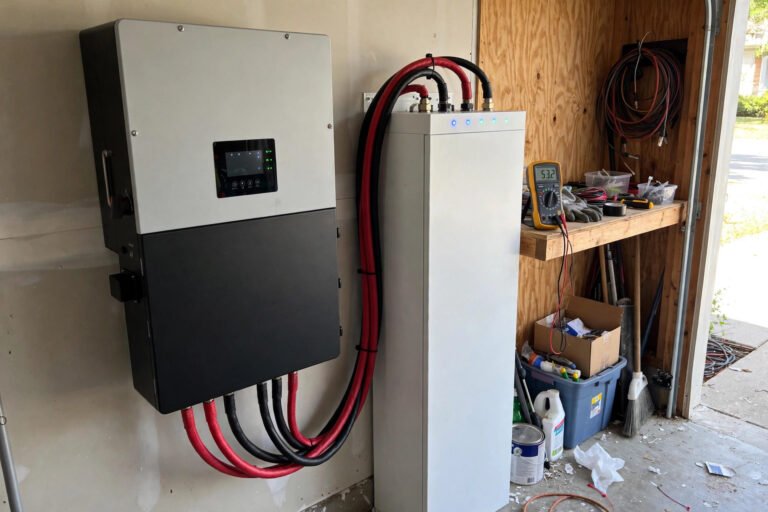
It was a new build. The S6-EH1P6K-L sat on the wall, and the battery box held one Pylontech US3000C. The pack read 49.8 V: 3.32 V per cell, times 15 cells. The BMS read 62% charge. Then the sun came up. The pack charged well through the morning. At 11:40 a.m., near full charge, OV-Vbatt showed. The pack read 54.0 V. The home screen showed the alarm, and the charge stopped. SOC is how full the battery is. The BMS app told the real tale: cell 7 sat at 3.65 V, while the other 14 cells sat near 3.60 V. One cell had hit its guard point. The BMS did its job and cut the charge. The inverter read the jump as an overvoltage. The pack volt looked fine. The cell volt did not.
What the two alarms mean
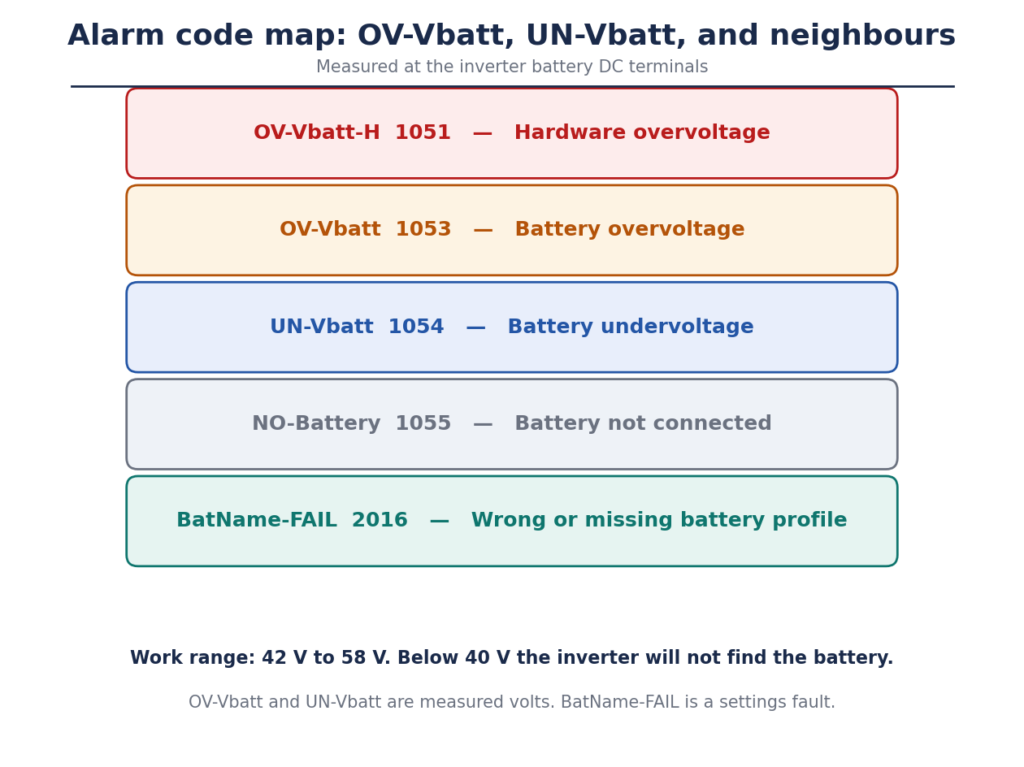
OV-Vbatt is alarm 1053, battery overvoltage. UN-Vbatt is alarm 1054, battery undervoltage. OV-Vbatt-H, alarm 1051, is a hardware overvoltage fault on the battery circuit. NO-Battery, alarm 1055, means the inverter sees no battery at all. All rest on the voltage at the inverter battery DC terminals. That voltage must sit between 42 V and 58 V. Below 40 V the inverter will not find the battery or start to charge it. Solis does not print the exact trip voltage for either alarm. It prints the work range, 42 V to 58 V, and the low cut-off its help team quotes, most often 40 to 42 V.
| Alarm | Code. | What it means. | Check first. |
|---|---|---|---|
| OV-Vbatt-H | 1051. | Hardware overvoltage on the battery circuit. | Battery breaker tripped, battery hurt. |
| OV-Vbatt | 1053. | Battery voltage too high at the DC posts. | Charge volt, profile, cell OVP. |
| UN-Vbatt | 1054. | Battery voltage too low at the DC posts. | Pack volts, SOC limits, load. |
| NO-Battery | 1055. | Inverter sees no battery at all. | DC breaker on, battery on, power cables on. |
| BatName-FAIL | 2016. | Wrong or missing battery profile. | Battery Model pick, DIP switches. |
| Alarm-BMS | 2015 / 2017. | Link works, BMS reports a fault in the pack. | Restart the battery, check the BMS app. |
These numbers fit low-voltage 48 V packs only. A BYD B-Box HV pack works in the 320 to 451 V range, and an LG RESU10H pack in the 350 to 450 V range, under names like OV-Vbatt1 and UN-Vbatt1. Alarm names can mean distinct things on distinct models, so check the model first. Batt_Comm_FAIL means the inverter reads voltage, but the talk with the BMS is bad. NO-Battery means the inverter reads 0 V: a wire or hardware fault.
Who sets the voltage: the closed-loop trap
On a Solis S6 hybrid that runs lithium in closed-loop mode, the BMS sets the charge voltage. Closed-loop means the battery and the inverter talk and share live limits. The inverter reads the charge voltage from the BMS over CAN. It also reads the current limits and the state of charge. CAN is the wire link that lets the battery talk to the inverter. Solis links lithium batteries over CAN through the inverter BMS port. Pin 4 is CAN-H (blue). Pin 5 is CAN-L (blue-white). The full pin map is the Solis hybrid inverter BMS RJ45 pinout.
That is the trap. When the BMS sends a wrong limit, the inverter obeys it and then alarms on what follows. The limit can live in the battery profile, the cell count, or the current limits the BMS sends. Open-loop is the one case where this does not hold. On a User-Defined profile with no link, the inverter charges to the voltage you typed in. Keep the Charge Limit Voltage under the top voltage in the maker guide, most often 56 to 58.4 V. On our rig, the trap was open-loop: the typed-in volt was a 16S volt on a 15S pack.
The 15S vs 16S mistake
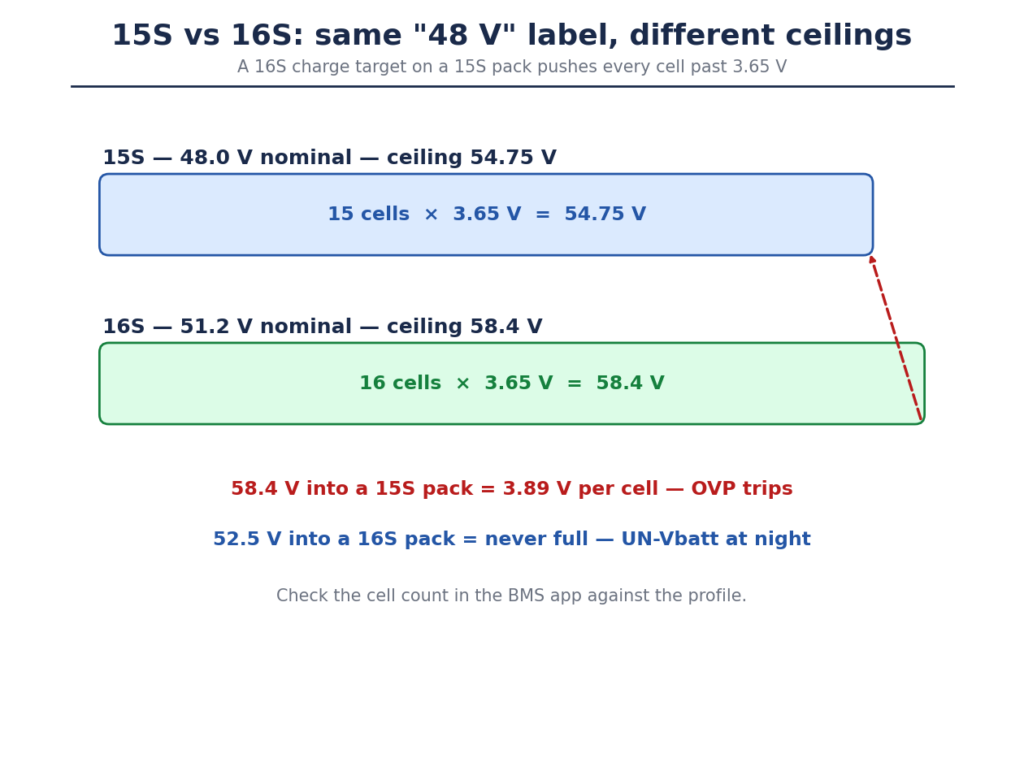
The most common wrong limit is a cell-count mix-up in the battery profile. Pylontech packs are 15S, 48 V nominal. Most home-built packs are 16S, 51.2 V nominal. Both are sold as “48 V” batteries, but a cell tops out at 3.65 V, so a 16S pack tops out at 58.4 V and a 15S pack at 54.75 V. The 15S vs 16S open-loop voltage settings guide keeps the two sets of numbers apart.
| Pack | Nominal voltage. | Cell ceiling. | Pack ceiling. | What goes wrong with the wrong profile. |
|---|---|---|---|---|
| 15S LiFePO4 (Pylontech). | 48.0 V. | 3.65 V per cell. | 54.75 V. | Treated as 16S, charged toward 58.4 V. Cells pushed to 3.89 V each, cell OVP trips, OV-Vbatt. |
| 16S LiFePO4 (most DIY packs). | 51.2 V. | 3.65 V per cell. | 58.4 V. | Treated as 15S, charged to about 52.5 V. Pack never fills, inverter reads low volts under load, UN-Vbatt late at night. |
Solis lists these North American profiles: Lithium Battery LV, PYLON_LV, PYTES and SOLUNA. PYLON_LV is the Pylontech profile, a 15S profile. A 16S home-built pack with a JK or Seplos BMS that speaks Pylontech CAN may still link on PYLON_LV. The CAN frames match. But its voltage hopes belong to a 15S pack. Check the cell count in the BMS app. BatName-FAIL is the linked alarm. It means no profile is picked, the wrong profile is picked, or the DIP switches are set wrong. If you see BatName-FAIL with OV-Vbatt or UN-Vbatt, start at the profile. Never pick a profile with “RS485” in the name for a CAN-linked battery.
Cell over-voltage protection: the spike that trips OV-Vbatt
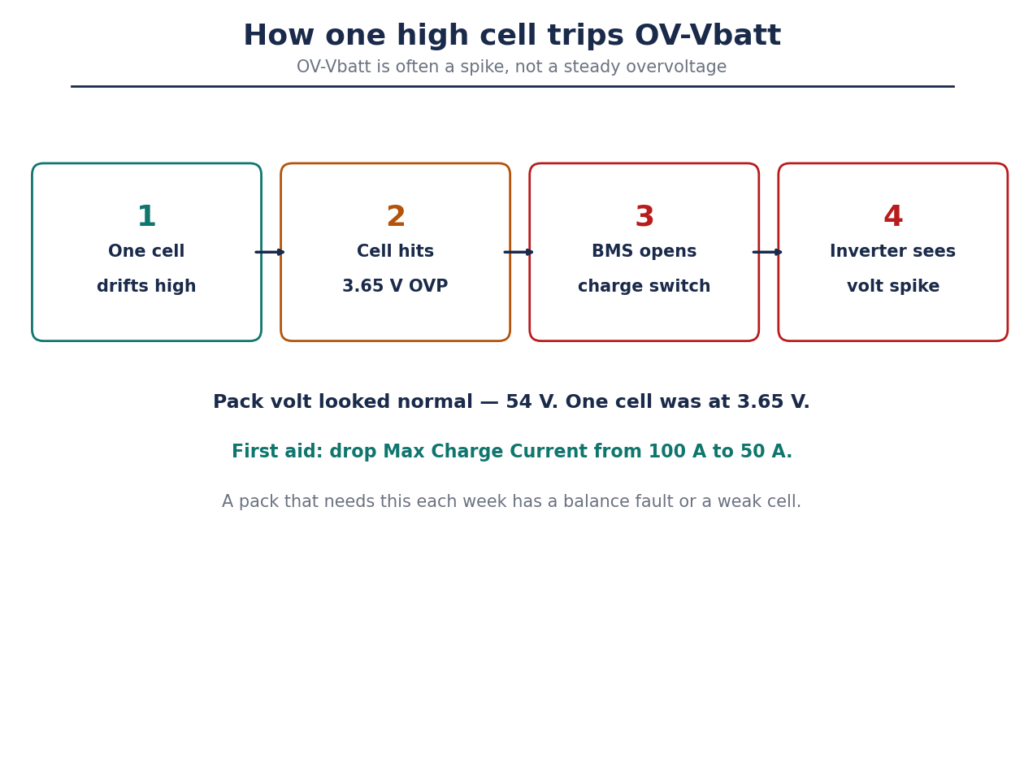
Most OV-Vbatt alarms come from a spike, not a steady high voltage, and the spike is the BMS doing its job. A cell gap builds up over weeks. One cell drifts higher than the rest. It may never have been top-balanced, which means all cells were brought to the same full level at the start. Or it may have sat at part charge for months. Solis gives the case of a pack at 54 V with the alarm still going, because one cell is spiking.
Near the top of charge, that one high cell hits its over-voltage protection point first. OVP means the battery stops charging when one cell gets too full. Most LiFePO4 BMS boards trip cell OVP near 3.65 V per cell. The exact point shifts by brand and by settings, so check your BMS app. When OVP trips, the BMS opens the charge MOSFET and stops the charge at once. A MOSFET is a small switch that cuts the charge current. The inverter is still pushing charge current, so the voltage at its battery terminals jumps. It reads that jump as an overvoltage: OV-Vbatt. If the jump is sharp, it can be the hardware form, OV-Vbatt-H.
That is why the alarm shows up at the same time most days, late morning or midday, when the pack is near full and sun charge current peaks. Solis first aid: drop the Max Charge Current from 100 A to 50 A for a while. That gives the BMS time to bring the cells back in line. A pack that needs this each week has a balance fault or a weak cell. On our rig, the spike came from the wrong volt, not from a weak cell.
Fix it in order: nine steps, each with a check
Work the steps in order. If a check fails, stop there.
- Read the alarm and the voltage side by side. Note if it is OV-Vbatt (1053), UN-Vbatt (1054), OV-Vbatt-H (1051) or NO-Battery (1055), then read the DC voltage at the battery terminals. It must sit between 42 V and 58 V. A read out of range is a battery or wire fact. A read in range points to settings or one spiking cell. Check: alarm code and terminal volts written down.
- Check the battery is on the Solis list. Only packs on the Solis list can run closed-loop. If yours is not on it, use open-loop instead. Check: battery on the list, or open-loop picked.
- Open SolisCloud and read the BMS figures. Check battery SOC, BMS voltage, and the BMS charge and discharge limits against the data sheet. On our rig, SolisCloud showed the pack at 54.0 V and 98% SOC at the alarm, with cell 7 at 3.65 V. Check: SOC, BMS volts, and limits read and noted.
- Check the battery profile and the cell count. Go to Settings, then Battery Select. The profile must fit the battery in place: Lithium Battery LV, PYLON_LV, PYTES or SOLUNA on North American units. Check the cell count in the BMS app: 15S or 16S. On our rig, this was the fault: a 15S pack with a 16S bulk volt of 55.2 V typed in. Check: profile fits the pack, cell count known.
- Check the cells, not just the pack. Open the battery app and look at each cell voltage. A pack at 54 V with one cell at 3.65 V and the rest near 3.60 V has a balance fault. A pack with all cells near the same volt has a settings fault. Check: every cell volt read, worst cell noted.
- Fix the volt and slow the charge. Set the Charge Limit Voltage from the maker data sheet. For our 15S pack, we set 54.0 V. Drop the Max Charge Current from 100 A to 50 A for one full charge round. Check: Charge Limit set, Max Charge Current at 50 A.
- Check the CAN link is truly carrying limits. The Solis BMS port uses pin 4 for CAN-H and pin 5 for CAN-L. A loose or wrongly pinned cable can leave the inverter on stale limits. Test the cable with a network cable tester, even a new one, and tug-test each plug end. If SolisCloud shows no BMS data at all, work the cable, the end plug, and the DIP switches first. Check: cable metered, SolisCloud shows live BMS data.
- Do the full power cycle. Battery off, AC off, PV off. Wait five minutes until the screen is fully dark. Then turn the battery on first, then AC, then PV. On our rig, the set came back clean, and the next full charge ran to 54.0 V with no alarm. The cells sat at 3.59 V to 3.61 V, and the SOC hit 100%. Check: set restarts clean, no alarm on the next full charge.
- Prove it under load. Put a load on the inverter at night and watch the volts. On our rig, a 1,200 W kettle pulled the pack from 52.5 V to 52.1 V over ten minutes, with no UN-Vbatt. The SOC moved with the load and the charge. Check: volts hold under load, SOC moves, no alarm.

If the reading differs, the reading is the answer
A meter at the DC posts can rule out a wire fault in minutes. It cannot read cell volts. Only the BMS app can do that. All volt numbers are DC at the inverter battery posts, unless the text says cell volts.
| Reading | What it means. | What to do. |
|---|---|---|
| Pack 54.0 V, one cell 3.65 V, rest near 3.60 V. | One cell hit OVP, BMS cut the charge. | Drop Max Charge Current to 50 A, fix the Charge Limit volt. |
| Pack over 58 V at the posts. | True overvoltage, past the work range. | Stop. Check the charge volt and the profile. |
| Pack 42 to 58 V, all cells near the same volt. | Settings fault, not a cell fault. | Check the profile, the cell count, and the Charge Limit. |
| Pack below 42 V, near 40 V. | Pack too flat, or cut-off set too low. | Charge the pack, lift the SOC limits. |
| Pack 0 V at the posts. | NO-Battery, wire or hardware fault. | Check the DC wires, the breaker, and the battery switch. |
| SolisCloud shows no BMS data. | CAN link dead, inverter on stale limits. | Check the cable, pins 4 and 5, and the DIP switches. |
What each sign points to
| What you see. | Most likely cause. | Fix. |
|---|---|---|
| OV-Vbatt near full charge, same time each day. | One cell spiking to OVP at the top of charge. | Steps 5 and 6: check the cells, fix the volt, slow the charge. |
| OV-Vbatt right after a profile change. | Wrong cell count in the profile, 15S vs 16S. | Step 4: match the profile to the pack. |
| UN-Vbatt late at night. | Pack too flat, or discharge limit too low. | Charge the pack, lift Over Discharge SOC. |
| OV-Vbatt-H, alarm 1051. | Sharp spike, or hardware fault. | Check the breaker, check if the battery is hurt. |
| Alarm-BMS with OV-Vbatt. | Heat is the most common cause. | Keep the room 10 C to 40 C, check the BMS app. |
UN-Vbatt: the other end of the same mistake
UN-Vbatt is the flip side, and it most often comes at night. The battery voltage has dropped below the inverter work cut-off, most often 40 to 42 V, or below the BMS own guard point. First, read the voltage at the inverter DC terminals. Second, wake the BMS: press and hold the Start or Reset button on the battery. That starts the pre-charge circuit. It is a short boost that lifts the voltage enough for the inverter to see the pack. Third, if the BMS is awake but the voltage is still too low, set a charge slot. Go to System Settings, then Storage Mode, then Charge/Discharge Schedule.
To stop repeat low-voltage trips when sun power is low, Solis says to lift three SOC settings. Over Discharge SOC: 15 to 20%. Force Charge SOC: 10 to 15%. Recover SOC: 1 to 2% above Force Charge. A discharge limit set too low gives a quieter form of the same fault. A big night load pulls the pack voltage down, and UN-Vbatt trips on a pack that still has charge left. Check the discharge limit in SolisCloud and read the voltage under load.
When it is not the limits
OV-Vbatt-H, alarm 1051, is a hardware overvoltage fault. Check if the battery circuit breaker has tripped, and check if the battery is hurt. A pack with a true weak or hurt cell will keep tripping cell OVP, no matter how slow the charge is. The sign is a cell voltage gap that does not close after a full slow charge. The fix is then a new cell or pack part, not a settings change. The same holds for a pack that drops to UN-Vbatt in minutes from a full charge: lost charge hold, or a dead cell.
Heat is the most common cause of Alarm-BMS. Keep the battery room between 10 C and 40 C (50 to 104 F). Lithium packs often stop charging below freezing. To clear it, turn off the battery DC breaker and the logic switch, wait 60 seconds, then start it again. If you run more than one pack, test each one on its own to find the bad one.
What can still go wrong
The cell gap that will not close.
A pack with a true weak cell will keep tripping cell OVP, no matter how slow the charge is. The sign is a cell gap that does not close after a full slow charge. The fix is a new cell or pack part, not a settings change.
The cable that worked yesterday.
A comms cable run tight against DC lugs or AC wiring can pick up noise when current peaks. If the alarm comes back under load, move the cable and shorten it. For runs over 50 ft, use CAT6 cable. If the cable shares a pipe with power wires, use a shielded cable.
Firmware comes last, not first.
Firmware can fix a limit bug. It can also move the menu so the list shifts. Save your settings first. Use firmware only from Solis for your exact model.
A dead cell in disguise.
A pack that drops to UN-Vbatt in minutes from a full charge has lost charge hold, or a dead cell. No SOC setting will fix it. Test each pack on its own. The cell volts in the battery app will tell you which one.
Common questions
Will a reset fix OV-Vbatt?
No. A reset clears the alarm for a day. It changes nothing about the volt, the profile, or the cell gap. If OV-Vbatt comes back at the same state of charge, the limit is still wrong.
Can I use a normal Ethernet cable for the CAN link?
Sometimes. The Pylontech box ships a normal UTP Cat5 cable. It works on some Solis units and fails on others. Meter it first.
Is OV-Vbatt the same as OV-Vbatt-H?
No. OV-Vbatt is alarm 1053, a volt alarm at the DC posts. OV-Vbatt-H is alarm 1051, a hardware fault on the battery circuit. A sharp spike can trip the hardware form. Check the breaker and the battery first.
My pack is 16S but the inverter treats it as 15S. What now?
Pick a profile that fits a 16S pack, or run User-Defined mode with 16S volts: bulk 55.2 V, float 53.6 V, cut-off 48.0 V. A 15S profile on a 16S pack leaves the pack half full.
Why does the alarm hit at the same time each day?
The pack hits full charge at the same time each day, when sun charge current peaks. That is when the high cell trips OVP.
Do this next
- Read the battery voltage at the inverter terminals. Write it down with the alarm code.
- Open SolisCloud and read the BMS limits. Check the profile and the cell count, 15S or 16S.
- Open the battery app and read every cell volt. Note the worst cell.
- Set the Charge Limit from the datasheet. For a 15S pack, 54.0 V. Drop the Max Charge Current to 50 A for one full charge round.
- Lift the Over Discharge, Force Charge and Recover SOC settings if UN-Vbatt trips at night.
- Do the full power cycle: battery, AC, and PV off for five minutes, battery on first.
- If the alarm comes back at the same state of charge, the limit is still wrong. Or a cell is weak. The cell volts will tell you which one.
- Still stuck? Send these notes to your installer or to Solis Support: the alarm code, the inverter model, the battery model, and the BMS build.
Sources
Checked on 20 November 2026. Unconfirmed items are labelled “not confirmed” in the text.
- Solis S6-EH3P(3-10)K-H-EU User Manual v1.3, alarm table. OV-Vbatt and UN-Vbatt: check battery voltage at the inverter posts. OV-BATT-H: high battery voltage at full SOC, or the battery suddenly switching off.
- Solis North America service centre, Battery Troubleshooting. UN-Vbatt: battery voltage abnormally low. OV-Vbatt: battery voltage abnormally high. Alarm-BMS: link works, BMS reports a fault, check the BMS app.
- Solis North America service centre, alarm code list. 1051 OV-Vbatt-H, 1053 OV-Vbatt, 1054 UN-Vbatt, 1055 NO-Battery, 2016 BatName-FAIL, 2015 / 2017 Alarm-BMS.
- Solis support notes. Work range 42 V to 58 V. Below 40 V the inverter will not find the battery. Over Discharge SOC 15 to 20%, Force Charge SOC 10 to 15%, Recover SOC 1 to 2% above Force Charge.
- Solis support notes. BYD B-Box HV 320 to 451 V, LG RESU10H 350 to 450 V, under OV-Vbatt1 and UN-Vbatt1 names.
- Pylontech US3000C datasheet. 15S LiFePO4, 48 V nominal. Cell ceiling 3.65 V, pack ceiling 54.75 V.
- JK BMS community reports. 16S LiFePO4, 51.2 V nominal. Cell ceiling 3.65 V, pack ceiling 58.4 V.
- Solis S6 Series User Manual, Appendix FAQs. No-Battery: check power cables and the breaker.
- ISO 11898-2 CAN standard. Idle 2.5 V per line. Peaks 3.5 V / 1.5 V. 120 ohm per end, about 60 ohms measured.
- This site: Solis hybrid inverter BMS RJ45 pinout, Solis BatName-Fail profile fix, 15S vs 16S open-loop voltage settings, Growatt Warning 04 and Error 56 guide.
Comments (0)