

What this guide works from. One rig: a Growatt SPF 5000 ES. A JK Inverter BMS on a 16-cell LiFePO4 pack, 280 Ah. The pack rested at 52.8 V. The JK app showed 41% charge. At night the screen showed Warning 04. By morning it showed Error 56 as well.
The short answer. Growatt Warning 04 and Error 56 are not the same fault. They do not have the same fix. Warning 04 means low battery. Error 56 means the battery connection is open, the battery is not wired well, or the fuse is burnt. On our rig, the pair had one root cause: a loose DC lug. It dropped volts under load, so the inverter warned low. Then it arced and burnt the fuse, so the inverter saw an open battery. We charged the pack, changed the fuse, and torqued the lugs. Both codes cleared.
The rig that warned low, then went open
It was a new build, and it had run well for a month. The SPF 5000 ES sat on the wall, and the battery box held 16 LiFePO4 cells. A JK Inverter BMS sat on top of the pack. The pack read 52.8 V: 3.30 V per cell, times 16 cells. The JK app showed all 16 cells between 3.29 V and 3.31 V, and 41% charge. State of charge, or SOC, is how full the battery is. At night, with no sun, the screen showed Warning 04. The pack had run down to 47.6 V. By morning, the screen showed Error 56 too. The inverter read 0 V at its DC terminals. The pack still read 47.6 V at the battery. The break was in between: a loose lug had arced overnight and burnt the DC fuse.
First, read the code the right way
Growatt SPF 5000 ES manuals list two code families. The same number can mean a different thing in each family. Warning 04 is low battery. Fault 04 is battery volts too low. Warning 04 is a warning: the inverter keeps running and tells you the pack is low. Fault 04 is a fault: the inverter stops and tells you the pack volts have fallen below the low-volt cut-off.
Error 56 is a fault, not a warning. The SPF 5000 ES manual lists fault 56 as battery connection is open. The fix section says the battery is not connected well or the fuse is burnt. If the battery is connected well, the manual says to return the unit to a repair centre. That last line matters. It means Growatt treats a clean 56 with good cables as a hardware fault, not a settings fault.
Write down three things before you change anything: the exact code and whether it says Warning or Fault, the battery volts on the LCD screen, and the battery type in Program 05. A code number alone is not enough.
| Code | Family | Manual meaning. | First check. |
|---|---|---|---|
| Warning 04 | Warning | Low battery. | Battery volts, charge the pack, check Program 12. |
| Fault 04 | Fault | Battery volts are too low. | Battery volts, Program 21 low DC cut-off, charge or replace. |
| Fault 56 | Fault | Battery connection is open. | DC cables, breaker, fuse, polarity, then BMS protection. |
| Error 20 | Fault | BMS comms fault. | Cable, port, Program 05 LI, Program 36 protocol. |
| Warning 401, SPH/MIN only | Warning | Meter comms fault, not a BMS fault. | Meter power and cable, not the battery cable. |
The family tells you how urgent the code is. A warning lets the inverter keep running. A fault stops it. Warning 401 belongs to a different inverter family, SPH and MIN hybrids, and it is a meter fault, not a battery fault. Do not chase a battery cable for a 401.

What the volts mean
Volts are the whole story in this guide. A 16S LiFePO4 pack has 16 cells in series. Each cell adds its volts to the pack total. Resting volts means the pack with no load and no charge. A resting volt below 44.0 V on a 16S pack means the pack is in protection cut-off, not just low. That is below 2.80 V per cell. Charge it through a path the BMS allows. Do not just lower the cut-off to make the warning go away.
| Number | 16S pack. | 15S pack. | What it means. |
|---|---|---|---|
| Full charge, bulk | 55.2 V | 51.75 V | 3.45 V per cell. |
| Float | 53.6 V | 50.25 V | 3.35 V per cell. |
| Low DC cut-off, Program 21 | 48.0 V | 45.0 V | 3.00 V per cell. |
| Resting volts in cut-off | Below 44.0 V | Below 42.0 V | 2.80 V per cell. Pack in protection. |
| Unit shuts down at start-up | Below 30.6 V | Below 28.7 V | 1.91 V per cell. Battery volts too low. |
| Unit does not respond at all | Below 22.4 V | Below 21.0 V | 1.40 V per cell, or polarity flipped. |
The manual gives two volt limits that help here. If the unit shuts down during start-up, the battery volts are too low, below 1.91 V per cell. If the unit does not respond at all after power-on, the battery volts are far too low, below 1.40 V per cell, or the polarity is flipped. A pack that low is not a settings job. It is a charge or replace job.

Why low volts and an open cable look alike
Warning 04 and Error 56 point at the same DC path from two ends. Warning 04 says the volts at the inverter are low. Error 56 says the inverter sees no battery at all. Both can come from one loose lug. A loose lug, a corroded terminal, or a thin cable can drop volts under load and clear at idle. On our rig, the pack read 48.0 V at the battery and 44.0 V at the inverter under load. The lug dropped 4 V. The inverter was right to warn. Overnight the loose lug arced. The arc burnt the fuse. Then the inverter read 0 V and raised 56.
A lithium BMS can do the same thing from inside the pack. A BMS in protection will open its discharge switches and the inverter will see an open battery, even though the cells are fine. A BMS can trip after a low-volt cut, a high-volt cut, or a cell imbalance trip. Wake the pack with a charge source the BMS allows, or use the BMS app to clear the protection, then measure again. Do not bypass the BMS to clear a 56. A bypassed BMS cannot guard the pack.

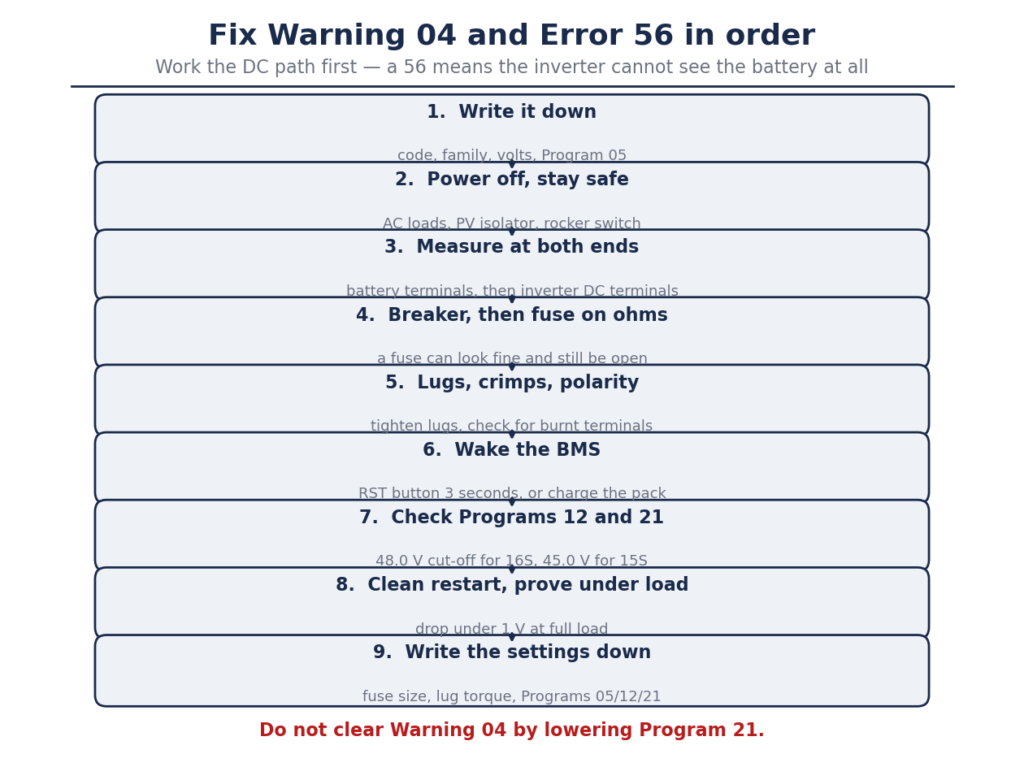
Fix it in order: nine steps, each with a check
Work the steps in order. If a check fails, stop there.
- Write down what you have. Note the exact code and whether it says Warning or Fault, the battery volts on the LCD, and the battery type in Program 05. Photograph the DC wiring and the fuse. Check: code, volts, and photos in hand.
- Stay safe before you touch any DC wire. Switch off the AC load breakers first. Then switch off the PV DC isolator. Then switch off the rocker power switch under the inverter. Wait a few minutes. The parts inside hold charge after power off. Only then open the DC wiring. Check: LCD dark, breakers off.
- Measure at the battery, then at the inverter. Measure the volts at the battery terminals, then at the inverter DC terminals, and compare the two. If the pack reads 48.0 V at the battery and 44.0 V at the inverter under load, the cables or the breaker are dropping 4 V. On our rig, that 4 V drop was the loose lug. Check: both readings written down.
- Check the breaker, then test the fuse with a meter. Is the battery breaker on, and does it stay on? A breaker that trips at once points to a short or flipped polarity. Check the fuse. A burnt fuse is the manual’s own words for fault 56. A fuse can look fine and still be open. Test it with a meter on ohms, not by eye. On our rig, the fuse read open. Check: breaker stays on, fuse reads near zero ohms.
- Check the lugs, the crimps, and the polarity. Check the DC cables for a loose lug, a burnt terminal, or a cable that has pulled out of a crimp. Tighten the lugs. Check the polarity. Flipped polarity can give a dead inverter and a 56 code. On our rig, the positive lug at the inverter was loose enough to turn by hand. We cleaned it, torqued it, and the volt drop went away. Check: lugs tight, no burnt terminals, polarity right.
- Check the BMS and wake the pack. A BMS in protection will open its discharge switches and the inverter will see an open battery, even though the cells are fine. Many lithium packs have a small RST or wake-up button on the front. If yours has one, press and hold it for 3 seconds. That wakes a BMS that went to sleep at low volts. If the pack has no such button, skip this step. If the BMS has cut both charge and discharge, you may need a bench charger or a wake-up charge from the inverter in a mode that does not need BMS comms. Check: BMS awake, pack volts live at the inverter terminals.
- Check Program 12 and Program 21 before you change them. Program 12 is back to utility volts. Program 21 is low DC cut-off volts. If Program 21 is set too high, the inverter warns early and cuts off early, even though the pack still has charge. If Program 21 is set too low, the inverter drains the pack past the safe point and the BMS cuts instead. For a 16S pack in open-loop mode, a low DC cut-off of 48.0 V is a sound start point. For a 15S pack, use 45.0 V. Set the cut-off from volts, not from a SOC number. Check: Program 21 reads 48.0 V for a 16S pack, 45.0 V for a 15S pack.
- Restart clean, then prove it under load. After a fault, do not just flip the breaker back on. Switch off all power first: AC loads, PV isolator, battery breaker, and the rocker switch under the inverter. Wait until the LCD screen light is fully off. Then boot on battery only. Close the battery breaker first. Switch the inverter on. Once it is stable, hook up PV and AC loads again. A clean restart clears stale fault states that a quick breaker flip leaves behind. Then switch a heavy load on and measure the volt drop again. On our rig, the drop was 0.2 V under a 1,200 W load after the fix. Check: no codes, volt drop under 1 V at full load.
- Write down the working settings. Note the fuse size, the lug torque, Programs 05, 12 and 21, and the meter readings. Tape the note inside the battery box door. Check: the note is written and the photos from Step 1 are saved.
If the reading differs, the reading is the answer
Measure at both ends of the DC cable. The two readings tell you where the fault sits. All readings are DC volts, pack to inverter, under the same load.
| Battery terminals. | Inverter DC terminals. | What it means. | What to do. |
|---|---|---|---|
| 51.2 V | 51.2 V | DC path fine. | Check the pack, the BMS, and the settings. |
| 48.0 V | 44.0 V | 4 V drop in the path. | Tighten lugs, check the breaker, measure again. |
| 51.2 V | 0 V | Break is between the two points. | Breaker, fuse, or cable. Work Step 4 and Step 5. |
| 0 V | 0 V | Battery off, or BMS cut discharge. | Wake the pack, charge it, check the BMS app. |
| 51.2 V | 51.2 V, 56 still shows | Fault inside the inverter or its DC sensing. | Repair-centre job, not a settings job. |
If both read 51.2 V and the inverter still shows 56, the fault is inside the inverter or in its DC sensing. That is a repair-centre job, not a settings job. Do not clear Error 56 by changing Program 05 or Program 36.
What each symptom points to
| What you see. | Most likely cause. | Fix. |
|---|---|---|
| Warning 04 at night, clears by day. | Pack low, solar not yet charging. | Charge the pack. Check Program 12. |
| Warning 04 plus Error 20. | Link fault on lithium, inverter cannot trust the SOC. | Fix the comms link first. See below. |
| Error 56 after a heavy load. | Loose lug or burnt fuse. | Steps 4 and 5: fuse, lugs, polarity. |
| Error 56, both ends read 0 V. | BMS cut discharge at low volts. | Wake and charge the pack. |
| Warning 04 at noon, under full sun. | Volt drop under load, or a ground fault. | Measure the drop under load. |
| Fault 04, inverter stopped. | Pack volts below the low-volt cut-off. | Charge or replace. Check Program 21. |
Warning 04 is not Fault 04, and it is not Warning 401
Warning 04 is a warning: the inverter keeps running and tells you the pack is low. Fault 04 is a fault: the inverter stops and tells you the pack volts have fallen below the low-volt cut-off. The family tells you how urgent the code is. Warning 401 is different again. It belongs to the SPH and MIN hybrids, and it is a meter fault, not a battery fault. Do not chase a battery cable for a 401. See the Growatt SPH and MIN BMS COM Fault fix for the meter side of that code.
When Warning 04 and Error 56 show up together
Warning 04 and Error 56 together point to a pack that is both low and cut off, or to a BMS that has cut discharge at low volts. Work the DC path first. A 56 means the inverter cannot see the battery at all. Charge the pack if you can, but only through a path the BMS allows. If the BMS has cut discharge, it may still allow charge. If it has cut both, you may need a bench charger or a wake-up charge from the inverter in a mode that does not need BMS comms.
When Warning 04 shows up with Error 20
Growatt’s SPF 3500 ES manual says Warning 04 is often caused by a comms fault on lithium. It tells you to solve the comms fault first. Fix the comms link, and Warning 04 clears with it. See the Growatt Error 20 fix for the link checks. If Warning 04 and Error 20 show up together, and you cannot change Program 05, the Growatt SPF3000TL HVM manual describes a hard case. Re-upgrade the software to remove Error 20 first. Then change Program 01 to UTI and Program 14 to SNU. That way the battery charges as soon as it can. Do not try that step without a file for your exact model from Growatt support.
When US2 is the right call
If the pack is low and the link will not hold, switch Program 05 to US2, set Programs 19, 20, and 21 from the data sheet, and run open-loop until you have the right cable or protocol. Growatt says to set Programs 19 and 20 to the same full-charge volt for the pack. It notes a current limit of less than 30 A for a single battery in US2 mode. Check your battery data sheet before you set those numbers. For a 16S LiFePO4 pack in open-loop mode, use 55.2 V bulk, 53.6 V float, and 48.0 V cut-off. For a 15S pack, use 51.75 V, 50.25 V, and 45.0 V. Turn equalization off and set temperature compensation to 0 mV per degree C. Those numbers are from the 16S open-loop guide. Do not clear Warning 04 by lowering Program 21 to the bottom of its range. A lower cut-off lets the inverter drain the pack further, and the BMS will cut instead. That trades a warning for a blackout.
What can still go wrong
The fuse that looks fine.
A fuse can look fine and still be open. Test it with a meter on ohms, not by eye. A fuse that reads open must be changed, even if the wire inside looks whole.
The resting volts trap.
Measure the pack with no load and no charge. On a 16S pack, a resting volt below 44.0 V means the pack is in protection cut-off, not just low. That is below 2.80 V per cell. Charge it through a path the BMS allows. Do not just lower the cut-off to make the warning go away.
Program 21 set wrong.
If Program 21 is set too high, the inverter warns early and cuts off early, even though the pack still has charge. If Program 21 is set too low, the inverter drains the pack past the safe point and the BMS cuts instead.
The fault that shows up only under load.
It points to a loose cable, a volt drop, or a ground fault. A fault that shows up only after sleep points to a BMS sleep timer. Check that Warning 04 does not come back at night, when the pack is lowest, or at noon, when solar output peaks.
Common questions
Is Warning 04 the same as Error 56?
No. Warning 04 means low battery. Error 56 means the battery connection is open. Warning 04 is fixed by charging the pack. Error 56 is fixed by checking the DC cables, the breaker, and the fuse.
Can I clear Warning 04 by lowering Program 21?
No. A lower cut-off lets the inverter drain the pack further, and the BMS will cut instead. That trades a warning for a blackout. Charge the pack first.
My fuse looks fine. Can it still be burnt?
Yes. A fuse can look fine and still be open. Test it with a meter on ohms, not by eye.
Why did Error 56 show up right after a heavy load?
A heavy load pulls more current through a loose lug. The lug heats up, arcs, and can burn the fuse. Tighten the lugs and measure the volt drop.
Is Warning 401 the same as Warning 04?
No. Warning 401 is a meter fault on SPH and MIN hybrids. Warning 04 is a low battery warning on SPF inverters. Do not chase a battery cable for a 401.
My battery reads fine but the inverter reads 0 V. What now?
The break is between the two points: breaker, fuse, or cable. Work Steps 4 and 5. If both ends read fine and 56 stays, the fault is inside the inverter.
Do this next
- Write down the code, the family, and the volts. For Warning 04, measure the pack, charge it, and check Program 12 and Program 21.
- For Error 56, turn the inverter off, check the breaker, test the fuse with a meter, check the lugs and the polarity, then measure at both ends of the DC cable.
- If the battery reads fine and the inverter reads 0 V, the break is in between. If both read fine and 56 stays, contact Growatt support with the inverter model, firmware version, battery brand and model, and a photo of the DC wiring.
- If the pack is low and the link will not hold, switch Program 05 to US2, set Programs 19, 20, and 21 from the data sheet, and run open-loop.
- Watch it for a full charge cycle. Check that Warning 04 does not come back at night, and that Error 56 does not come back under a heavy load.
Sources
Checked on 20 November 2026. Unconfirmed items are labelled “not confirmed” in the text.
- Growatt SPF 5000 ES User Manual, warning and fault lists. Warning 04 is low battery. Fault 04 is battery volts too low. Fault 56 is battery connection is open. The fix section says the battery is not connected well or the fuse is burnt.
- Growatt SPF 3500 ES Manual. Warning 04 is often a link fault on lithium. Fix the link fault first.
- Growatt SPF3000TL HVM Fault Guide. Error 20 + Warning 04 with Program 05 locked: re-install software, then set Program 01 to UTI and Program 14 to SNU.
- Growatt FAQ via PowerForum (Growatt China reply). Battery not on the list: use US2, Programs 19 and 20 to the same full-charge volt, current limit under 30 A for a single battery.
- Growatt SPF 5000 ES Manual, start-up limits. Unit shuts down at start-up below 1.91 V per cell. Unit does not respond below 1.40 V per cell, or polarity flipped.
- This site: Growatt Error 20 fix, Growatt SPH and MIN BMS COM Fault fix, 16S open-loop guide, JK BMS to Growatt SPF 5000 ES CAN setup.

Comments (0)