
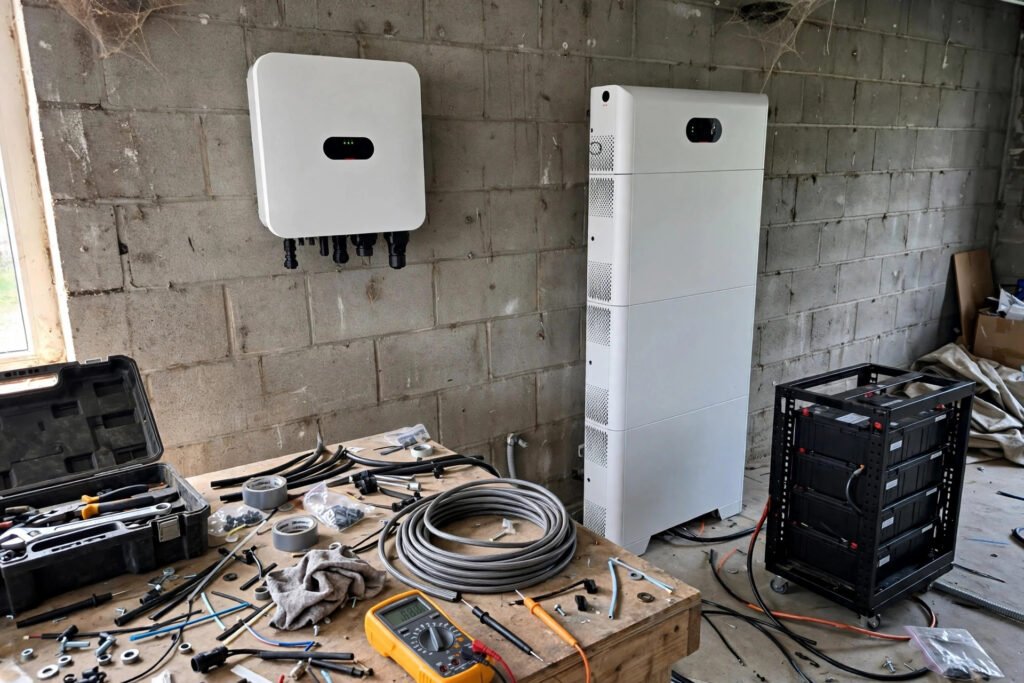
What this guide works from. One rig: a Huawei SUN2000-5KTL-L1, a 5 kW single-phase hybrid, one Pylontech US3000C pack, 15 cells, 48 V nominal, 3.55 kWh, 74 Ah. The pack rested at 51.8 V and 49% charge. The fix pack is a Luna2000-5-S0, one 5 kWh module, 450 V nominal.
The short answer. No. A 48 V Pylontech US3000C, US2000C, or US5000 cannot talk to a Huawei Luna2000 port, and no cable or menu setting can fix that. The SUN2000-5KTL-L1 needs at least 350 V at its battery posts, and the US3000C gives 51.8 V. The gap is 298.2 V. The port also speaks Huawei’s own RS485 protocol, not the CAN protocol the Pylontech BMS speaks, and the inverter has no menu choice for a third-party battery. The battery that does fit is the Luna2000-5-S0. One 5 kWh module reads 438 V at 62% charge, inside the 350 to 560 V window. This guide shows the failed rig, the volt math, and the Luna2000 setup that works.
The rig that would not talk
The SUN2000-5KTL-L1 sat on the wall, and the US3000C pack sat below it in a rack. The pack read 51.8 V at rest, or 3.45 V per cell times 15 cells. The pack screen showed 49% charge. SOC is state of charge, how full the pack is. The owner had bought the pack first and the inverter second. It looked like a match. Both boxes are lithium iron phosphate, and both use a small comms plug. The BMS is the battery management system, the board that guards the pack.
Then the inverter was switched on. The FusionSolar app showed no battery at all: no SOC, no volts, no charge limit. The inverter has no screen, so the app is the only place to see alarms. Minutes later the app showed Alarm 3001. That means the inverter has lost talk with the battery. The owner tried a reseated plug and a second cable. He also searched the battery settings for a Pylontech choice. There is none. The battery menu lists only Luna2000 models.
At the pack posts the meter read 51.8 V, and the L1 datasheet says the battery must sit between 350 and 560 V. The pack was 298.2 V short. The owner had tried the pack on the DC side first, before any comms cable was fitted. The inverter still showed nothing. That was the first clue. The volts were the block, not the cable.
The volt gap: why a 48 V pack can never work here
Huawei SUN2000 hybrids are high-voltage hybrids: the battery string runs at hundreds of volts, not 48 V. The SUN2000-5KTL-L1 takes 350 to 560 V at its battery port. The newer single-phase models, the LB0 and LC0, take the same 350 to 560 V. The three-phase M1 takes 600 to 980 V. The Luna2000-5-S0 is built for that window. One module is 5 kWh, with a nominal volt of 450 V on a single-phase system. Two or three modules stack to 10 or 15 kWh.
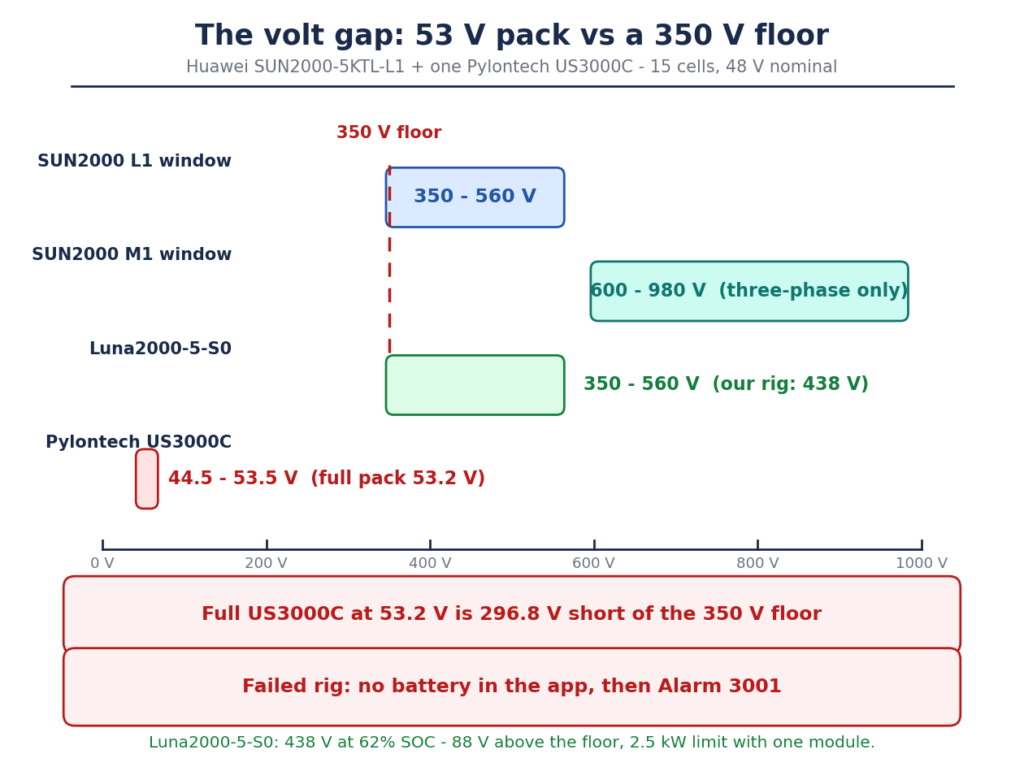
Pylontech US2000C, US3000C, and US5000 packs are 48 V packs, with a working range of 44.5 to 53.5 V. A full US3000C reads about 53.2 V, still 296.8 V below the lowest volt an L1 will take. The two ranges do not touch at any point. The same 48 V lesson hits on Fox ESS too. See the Pylontech Fox ESS H1 and KH setup guide.
| Pack or window | Volts | Gap to the L1 floor of 350 V |
|---|---|---|
| US3000C at rest, our rig | 51.8 V, 49% SOC. | 298.2 V short. |
| US3000C full | 53.2 V. | 296.8 V short. |
| US3000C range | 44.5 to 53.5 V. | 296.5 to 305.5 V short. |
| Luna2000-5-S0 range | 350 to 560 V. | Inside the window. |
| Luna2000-5-S0, our rig | 438 V, 62% SOC. | 88 V above the floor. |
| L1 battery window | 350 to 560 V. | The floor itself. |
| M1 battery window | 600 to 980 V. | Higher still, three-phase only. |
If you already own a US pack, do not wire it to a SUN2000. Use it on a 48 V inverter. A Growatt SPF 5000 ES takes it with Program 05 set to Li and Program 36 set to L52. See the Pylontech Growatt menu 05 and 36 guide. Why 55.2 V is the right absorb volt for a 48 V lithium pack is in the same-day optimal absorption voltage for LiFePO4 guide.
One more number matters. A single Luna2000-5-S0 module caps charge and discharge at 2.5 kW. Two modules lift that to 5 kW. The SUN2000-5KTL-L1 can discharge at 5,000 W, but with one module the battery is the limit. Plan backed-up loads around 2.5 kW until you add a second module.
What the pins carry
The SUN2000-5KTL-L1 has no RJ45 BMS port. Its COM port is a small screw block at the base of the inverter, and the battery talks on RS485. RS485 is a two-wire serial link: one wire carries the plus signal, the other carries the minus signal. The L1 book gives the block in the Luna2000 quick guide: pin 4 is 485A2, pin 3 is 485B2, pin 6 is EN+, and pin 5 is GND. The three-phase M1 uses a 16-pin block instead: pin 7 is 485A2, pin 9 is 485B2, pin 11 is EN, and pin 13 is GND. The M1 pins are the same ones in the Huawei SUN2000 COM pins 7 and 9 guide. Do not mix the two blocks.
The Luna2000 side has a 10-pin COM port on the power control module. Its pins are 1 PE, 2 Enable-, 3 Enable+, 4 and 5 485A, 6 and 7 485B, 8 CANL, 9 CANH, and 10 PE. The CAN pins, 8 and 9, are for battery-to-battery cascading only. They are not the inverter link. The inverter link is the RS485 pair, pins 4 to 7, plus the enable pair, pins 2 and 3. The enable wire tells the battery to wake up.
The Pylontech US3000C talks on a different plug and a different protocol. Its CAN port is an RJ45 socket. CAN-H sits on pin 4 and CAN-L on pin 5. CAN is a two-wire bus that lets boxes swap short data frames, like RS485. But the frame format is not the same. A CAN frame means nothing to an RS485 port. There is no pin on the L1 COM block that speaks CAN.
| Wire | Huawei L1 COM block | Luna2000 COM port | Pylontech US3000C CAN port |
|---|---|---|---|
| Data plus | Pin 4, 485A2. | Pins 4 and 5, 485A. | Pin 4, CAN-H. |
| Data minus | Pin 3, 485B2. | Pins 6 and 7, 485B. | Pin 5, CAN-L. |
| Enable plus | Pin 6, EN+. | Pin 3, Enable+. | No matching pin. |
| Enable ground | Pin 5, GND. | Pin 2, Enable-. | No matching pin. |
| Shield ground | PE on the block. | Pins 1 and 10, PE. | Pin 6, CAN-GND. |
| Cable type | Shielded twisted pair, 8 cores. | Shielded twisted pair, 8 cores. | Shielded Cat5e or Cat6. |
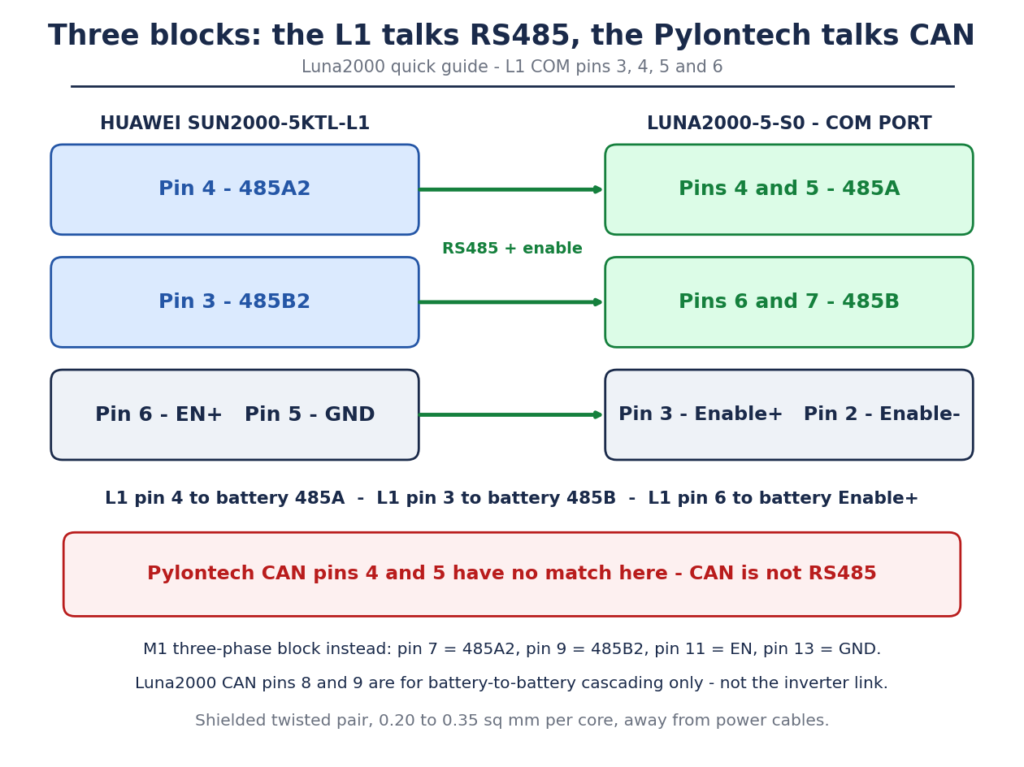
Read that table twice. Three things block the Pylontech at once: the volts, the protocol, and the enable wire. Fixing one leaves two. A CAN-to-RS485 adapter cable would fix none of them. The Fox ESS H1 and AC1 port shows the same trap in a different shape. There the pins are RJ45 on both ends, yet the CAN-H and CAN-L order is flipped. See the same-day Fox ESS H1 and AC1 BMS port pinout guide.
Use shielded twisted pair for the Luna2000 signal cable, 0.20 to 0.35 square mm per core. Keep it away from power cables. The Luna2000 manual warns that laying the signal cable next to a power cable can break comms.
Why the handshake fails
Think of the handshake as a short call the two boxes make again and again. The inverter asks the battery for data. The battery answers with a frame: SOC, charge and discharge limits, cell volts, temps, and alarms. If no answer comes back in time, the inverter stops trusting the pack and raises Alarm 3001. The app is the only place you see it, because the inverter has no screen.
On our first rig, the handshake failed before it started. The pack sat at 51.8 V, below the 350 V floor. The inverter refused the pack on volts and never asked for data. The BMS was awake, and its screen showed 49% charge. But the inverter had already said no. No cable fix helps here.
On the Luna2000 rig, the handshake can fail in four ways: the volts, the wire, the enable, or the bus. The volts are the first gate. A Luna2000 module below 350 V will not be trusted. A healthy module never sits that low. The wire is the second gate. The A and B wires must land on the right pins, 485A to 485A and 485B to 485B, on both ends. The enable is the third gate. Pin 6 on the L1 must reach pin 3 on the battery, with pin 5 to pin 2 as its ground. Without it the battery never wakes. The bus is the fourth gate. A shorted pair, or a cable run next to power cables, kills every frame.
Huawei’s protocol is also closed. The inverter asks in Huawei’s own frame format. Only a Luna2000 power control module answers in that format. A Pylontech BMS answers in Pylontech CAN format. The L1 cannot read it, even if you wired the pins somehow. Huawei’s own signed compatibility statement lists only the Luna2000-5, 10, and 15-S0 against the SUN2000 L1 and M1 ranges. No third-party battery appears on it. That is the whole list.
One more gate sits above the wires: firmware. The Luna2000 manual says to upgrade the inverter and the Smart Dongle when the app asks. An old firmware build can refuse a new battery module even when the volts and pins are right. Update first, then check the battery page.
Fix it in order: ten steps, each with a check
Work the steps in order. If a check fails, stop there. High-voltage DC can kill. Wait five minutes after you switch everything off before you touch a terminal. The Luna2000 manual says only trained techs may install the battery. If you are not trained, stop at step 1 and call your installer with your meter readings.
- Meter the pack you own. Meter the pack posts and write down the volts and SOC. Check: a US pack reads 44.5 to 53.5 V, a Luna2000-5-S0 reads 350 to 560 V. Under 350 V, stop.
- Check the inverter window. Read the battery volt range off your inverter datasheet. The L1 takes 350 to 560 V. The M1 takes 600 to 980 V. Check: your pack volts sit inside that window. If not, the pairing is wrong.
- Fit the right battery. Fit a Luna2000-5-S0: one power control module plus one 5 kWh module. Check: the battery posts read 350 to 560 V. Ours read 438 V at 62% charge.
- Wire the DC side. Connect BAT+ and BAT- from the battery to the inverter with the MC4 plugs that ship with the inverter, plus to plus and minus to minus. Check: polarity is right, both plugs click, and the meter still reads 438 V.
- Wire the signal cable. At the L1 end, 485A goes to pin 4, 485B to pin 3, EN+ to pin 6, and GND to pin 5. At the battery end, 485A goes to pins 4 and 5, 485B to pins 6 and 7, Enable+ to pin 3, and Enable- to pin 2. Shield to PE. Check: each wire runs end to end, no shorts between A and B.
- Test the cable before power. With all power off, test each core end to end and test A to B for a short. Check: every core shows continuity, and A to B shows open.
- Set the battery in the app. Open the FusionSolar app, go to the plant, then the inverter, then Battery Control. Pick the Luna2000 settings the app offers. There is no third-party battery choice. Check: the battery page shows the Luna2000, not a blank page.
- Power up in order. Turn on the DC switch on the battery. After first install the ring LED blinks for three circles. If no PV is wired, press the black start button. Then power on the inverter. Check: the ring LED turns steady green, and the app shows the battery within five minutes.
- Check the live numbers. In the app, open the battery page. Check: SOC, volts, and limits are all live, with no Alarm 3001. Ours showed 62% SOC, 438 V, and a 2.5 kW limit.
- Prove it under load and on charge. Put a 1,000 W load on the house for ten minutes, then let the sun charge the pack. Check: SOC moves both ways. Ours fell from 62% to 59% on the load, then reached 100% on charge.
Read the meter: what the numbers mean
A meter settles most fights about a dead link. The app can lag, and its alarm text can mislead. All volt numbers are DC to ground. On a live RS485 pair a plain meter will not show clean numbers. The frames flip the lines many times a second. So meter the battery DC posts, not the signal wires.
| When you read it | Reading on our rig | What it means |
|---|---|---|
| US3000C at rest, before | 51.8 V, 49% SOC. | Pack healthy, BMS awake. |
| US3000C full | 53.2 V. | Still 296.8 V short of the 350 V floor. |
| Luna2000-5-S0 at rest | 438 V, 62% SOC. | Pack healthy, inside the window. |
| Luna2000 DC switch off | 0 V at the inverter end. | Switch off, or a DC cable fault. |
| Signal cable, power off | Each core shows continuity. | Cable is sound. |
| Signal cable, power off | A to B shows a short. | Cable fault, replace the cable. |
| Battery page, after fix | 62% SOC, 438 V, 2.5 kW limit. | Link is live, BMS runs the charge. |
| 1,000 W load, 10 min | SOC 62% to 59%. | Pack gives power, 167 Wh used. |
| Full charge | 100% SOC. | Link is live, charge path works. |
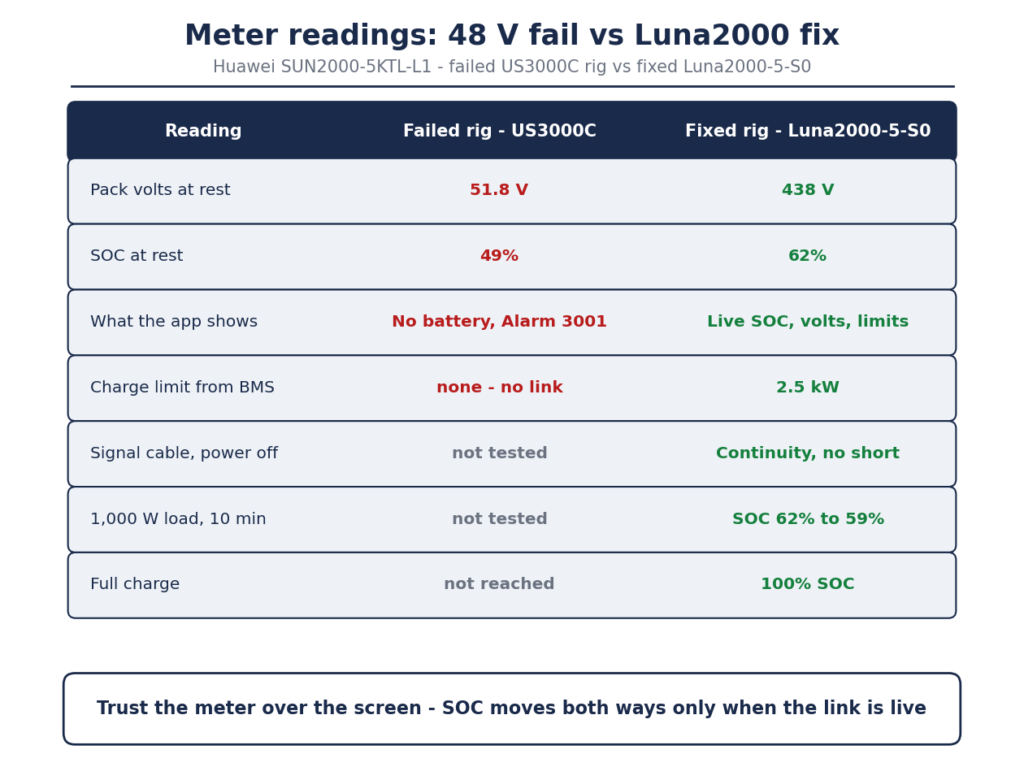
Trust the meter over the screen. A US pack that reads 51.8 V is a good pack on the wrong inverter. A Luna2000 that reads 438 V at its posts but shows no SOC in the app is a signal cable fault, not a volt fault. Work the steps from step 5. The 167 Wh in the load test is simple math. 1,000 W for ten minutes is one sixth of an hour. 1,000 divided by 6 is 167 Wh. That is 3.3% of a 5 kWh pack, so SOC fell three points, from 62% to 59%.
What each symptom points to
Match what you see to a row, then work the fix.
| What you see | Most likely cause | Fix |
|---|---|---|
| No battery in the app, pack reads 51.8 V | 48 V pack on a high-voltage inverter. | Fit a Luna2000, steps 1 to 3. |
| Alarm 3001, pack reads 438 V | Signal cable or enable wire fault. | Work the ten steps from step 5. |
| Alarm 3001, pack reads 0 V | Battery DC switch off, or DC cable fault. | Switch on, check the DC plugs, step 4. |
| Battery page shows volts only, no SOC | App or firmware out of date. | Update the inverter and dongle, then step 8. |
| SOC stuck, never moves | Link is down, inverter runs on volts. | Work the ten steps from step 5. |
| Alarm 3012 or 3013 | CAN link between battery modules failed. | Check the cable between the modules. |
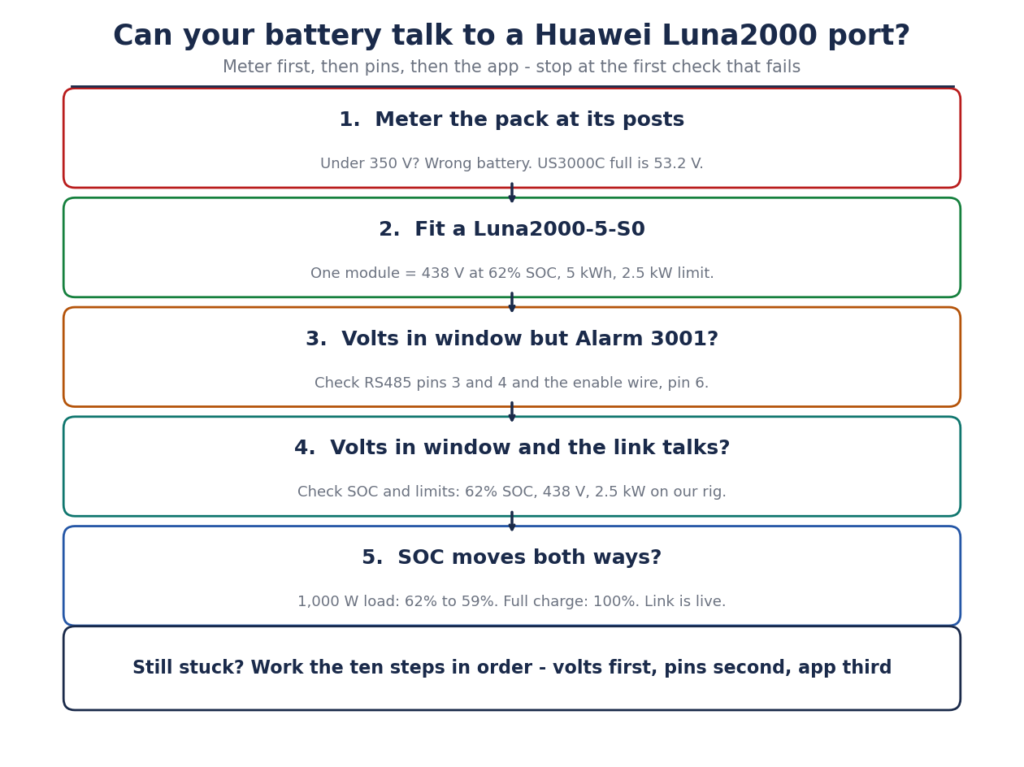
The first row is the one most owners hit: a new build, a good pack, and a blank battery page in the first minute. It is almost always the volts. The same no-talk fault on an Axpert shows a different code, Warning 61. See the same-day Axpert Warning 61 BMS communication lost fix.
What can still go wrong
Alarm 3001 is labelled two ways, and the docs disagree.
PSW Energy lists Alarm 3001 as battery communication failure. That is the label our Day 15 rig showed in the app. The Huawei manual alarm table, as quoted by SolarQuoteChecker, lists 3001 as abnormal battery power control module. The two labels point at the same place: the battery link. If your app shows 3001, check the signal cable first, then the enable wire. Then restart the battery: off, wait two minutes, on.
One dealer page says Pylontech works on Huawei, and Huawei’s own papers say it does not.
Fotovol, a Romanian dealer, says Pylontech is officially supported on Huawei SUN2000 hybrids and listed in Huawei’s official compatibility matrix. Huawei’s own signed compatibility statement lists only the Luna2000-5, 10, and 15-S0 against the SUN2000 L1 and M1 ranges. The dealer claim is not confirmed. It fights with Huawei’s own papers. On volts alone it cannot be true for a US5000, a 48 V pack on a 350 V port.
The high-voltage Pylontech is not confirmed for Huawei.
The Pylontech Force-H2 is a high-voltage stack, 96 V per module. It works on several high-voltage inverters. But no Huawei doc I read lists it. ComparePV says there is no certified link at all between third-party batteries and Huawei, naming the Force H2 by name. Sun.store lists the Force H2 against Kostal, GoodWe, Fox ESS, Fronius, SMA, SolarEdge, and Victron. Huawei is not on that list. So a Force-H2 on a SUN2000 is not confirmed.
The M1 takes 600 to 980 V, not 350 to 560 V.
Owners read the L1 range and apply it to a three-phase M1. The M1 battery window is 600 to 980 V. A Luna2000-5-S0 on a three-phase system runs at a nominal 600 V, not 450 V. Our rig read 438 V because it is a single-phase L1. If your M1 shows a Luna2000 near 438 V, that is below its floor. Check the window for your exact model string, L1, M1, LB0, LC0, or MAP0.
Seven US packs in series would reach the volts. Do not do it.
Seven US3000C packs at 51.8 V each would read 362.6 V in series, inside the L1 window on volts alone. Do not try it. Pylontech US packs are built to wire in parallel, not in series. The BMS in each pack cannot balance cells across a series string. The comms still would not talk, because the protocol is closed. Series wiring voids the warranty. The volt math is a trap.
Common questions
Can a Pylontech US3000C work on a Huawei SUN2000 inverter?
No. The US3000C is a 48 V pack, and the SUN2000-5KTL-L1 needs at least 350 V. A full US3000C reads 53.2 V, which is 296.8 V short. No cable, adapter, or menu choice closes that gap.
Can any third-party BMS talk to the Luna2000 port?
No. The port speaks Huawei’s own RS485 protocol. Huawei’s signed compatibility statement lists only Luna2000 batteries against the SUN2000 L1 and M1 ranges. The inverter has no setting for a third-party battery.
What does Alarm 3001 mean on a Huawei SUN2000?
Alarm 3001 means the inverter has lost talk with the battery. Check the RS485 pins first, then the enable wire, then the cable. Restart the battery if the cable is sound: off, wait two minutes, on. Note that one Huawei manual table labels 3001 as an abnormal power control module instead. The app text is what matters, not the label in a guide.
Why does my Huawei show no battery at all after I wired a Pylontech?
Because the inverter refused the pack on volts before it ever tried comms. A 48 V pack on a 350 V port reads as no battery. The app shows a blank battery page and then Alarm 3001. Meter the pack at its posts.
Can I use a Pylontech Force-H2 stack on a Huawei SUN2000?
Not confirmed. The Force-H2 is high-voltage, so the volts could fit. But no Huawei doc lists it. ComparePV says there is no certified link between Huawei and any third-party battery, naming the Force H2. Ask your Huawei distributor to confirm it in writing for your exact model and firmware.
Do this next
- Meter your pack at its posts. If it reads under 350 V, it will never fit a SUN2000-5KTL-L1.
- Ask your Huawei distributor to confirm the Luna2000 size for your exact model and firmware.
- Fit a Luna2000-5-S0 and wire the DC side plus to plus and minus to minus with the MC4 plugs.
- Wire the signal cable: L1 pin 4 to battery 485A, pin 3 to 485B, pin 6 to Enable+, pin 5 to Enable-.
- Test the cable end to end, then power the battery first and the inverter second.
- Check the FusionSolar app for live SOC, volts, and limits, with no Alarm 3001.
- Still stuck? Call Huawei support with your meter readings, pin map, and the exact alarm ID and time.
Sources
Checked on 26 November 2026. Unconfirmed items are labelled “not confirmed” in the text.
- Huawei SUN2000-2/3/3.68/4/4.6/5/6KTL-L1 Datasheet, Version 04-202403. Compatible battery LUNA2000-5/10/15-S0 and LUNA2000-7/14/21-S1, operating voltage range 350 to 560 Vdc.
- Huawei LUNA2000-5/10/15-S0 Datasheet, Version 03-202311. Nominal voltage 450 V single-phase and 600 V three-phase, operating range 350 to 560 V single-phase and 600 to 980 V three-phase, max charge and discharge 2.5 kW with one module and 5 kW with two or three.
- Huawei Inverter and Battery Compatibility Statement, Huawei Technologies Australia. LUNA2000-5/10/15-S0 compatible with SUN2000-2/3/4/4.6/5/6KTL-L1 and SUN2000-5/6/8/10KTL-M1. No third-party battery listed.
- Huawei LUNA2000-(5-30)-S0 Quick Guide, ManualsLib. COM port pin table: pins 2 and 3 enable, pins 4 to 7 RS485, pins 8 and 9 CAN for cascading only. L1 COM pins 3, 4, 5, and 6. M1 COM pins 7, 9, 11, and 13. Signal cable shielded twisted pair, 0.20 to 0.35 square mm. Power-on order and ring LED states.
- PSW Energy, Huawei inverter error code reference. Alarm 3001 battery communication failure, Alarm 3013 battery extension module communication failure, restart order AC off, DC off, battery off, then AC on, DC on, battery on. Verified against Huawei FusionSolar docs and SUN2000 user manual Issue 28, 2025.
- SolarQuoteChecker, Huawei LUNA2000 Battery Troubleshooting Guide. Alarm 3000 low battery DC input bus voltage, Alarm 3001 abnormal battery power control module, Alarm 3012 abnormal parallel communication. Conflicts with PSW on the 3001 label, stated in the text.
- SolarGuide, Huawei vs GoodWe Hybrid Inverters. Every Huawei hybrid spec page lists only LUNA2000-5/10/15-S0 and LUNA2000-7/14/21-S1. Single-module 2.5 kW limit. GoodWe approved list includes Pylontech US models, Huawei has none.
- ComparePV, Huawei SUN2000-3.68K-LB0. No certified interoperability with third-party batteries, naming BYD HVS, Pylontech Force H2, and Solta. Battery voltage 350 to 560 Vdc.
- Fotovol, Pylontech vs Huawei LUNA. Claims Pylontech is officially supported on Huawei SUN2000 and listed in Huawei’s matrix. Contradicted by Huawei’s own statement and datasheets, stated in the text as not confirmed.
- Pylontech US3000C Operation Manual, Information Version 20CQSV1103. 48 V nominal, 15 cells, 44.5 to 53.5 V range, over-discharge protection at 44.5 V, over-charge protection above 54 V. CAN pins 4 and 5.
- Pylontech Compatibility List of ESS and Inverters, Ver. 2.29, 2 May 2023. Covers Force H1 and H2 over CAN in the high-voltage section, and US2000C, US3000C, and US5000 in the 48 V section.
- Sun.store, Pylontech Force H2 residential battery efficiency and compatibility. Force H2 module 96 V, 3.55 kWh. Force H2 compatible-inverter list does not include Huawei.
- This site: Brand Pairings hub, Huawei SUN2000 COM pins 7 and 9 guide, Pylontech Fox ESS H1 and KH setup guide, Pylontech Growatt menu 05 and 36 guide, Fox ESS H1 and AC1 BMS port pinout, Axpert Warning 61 BMS communication lost fix, Optimal absorption voltage for LiFePO4.
Comments (0)