

What this guide works from. One rig: a Deye SUN-8K-SG04LP3, a JK Inverter BMS on a 16-cell LiFePO4 pack, 280 Ah. After three cloudy days the pack fell to 46.0 V. The BMS went quiet. The inverter showed no battery at all.
The short answer. Switching a Deye or Sunsynk from Lithium to Use Batt V takes about two minutes. Go to Settings, then Battery Setting. Change Batt Mode from Lithium to Use Batt V. Type in the volts for your cell count. For a 16S pack, absorption 55.2 V, float 53.6 V, shutdown 48.0 V. For a 15S pack, 51.75 V, 50.25 V, and 45.0 V. Turn equalization off. The inverter will charge by voltage from then on. The BMS still guards the pack. The house keeps its backup. The cost is real: the SOC number on the screen turns into a voltage guess. On LiFePO4 that guess is rough. Set a safe low cut-off. Use the BMS app or a shunt for a true SOC number.
The pack that would not wake
It was the third cloudy day in a row. The house had run on battery each night, and the solar had not kept up. By 6 a.m. the pack sat at 46.0 V. That is 2.875 V per cell on a 16S pack. The BMS had gone quiet to guard the cells. The Deye screen showed no battery. No SOC, no volts, no charge. The sun came up, and the panels made power, but the inverter would not start charging. In Lithium mode the Deye needs to talk to the BMS first. The BMS was asleep. No talk, no charge.
This is the best-known use for Use Batt V: the deep discharge rescue. Installers have filmed the fix. Go to Settings, then Battery Setting, and switch the mode from Lithium to Use Batt V. The inverter reads the real pack volt at once. It starts to take charge. The screen begins to show a charge level again. On our rig, the switch took two minutes. At 9:00 a.m. the inverter read 46.0 V and started charging at 40 A. The BMS woke up as the pack rose. By 10:30 a.m. the pack read 52.4 V. The BMS app showed 35%. At 12:15 p.m. the pack hit 55.2 V, and the current tapered from 60 A down to 7 A. At 1:00 p.m. the inverter dropped to float at 53.6 V. The app showed all 16 cells between 3.44 V and 3.46 V, and 100% charge. We switched back to Lithium that same day, with Lithium Mode 00 and BMS_Err_Stop ticked. The battery details page showed a BMS volt, a BMS SOC, and limits that matched the app.
That trick is a rescue, not a setup. Running a pack that way for weeks means running without SOC, without limits, and without alarm flags. Use it to wake the pack, then go back to Lithium. If the pack will not wake even in Use Batt V, the fault is not the mode. Check the DC breaker, the fuse, and the pack terminals with a meter.
What Use Batt V actually changes
In Lithium mode the Deye takes its orders from the battery. The BMS sends state of charge, current limits, temperature, and alarm flags over CAN, and the inverter follows them. The manual calls this self-adaption to BMS. It gives no fixed charge volt for lithium. The number comes from the battery, not from you. In Lithium mode you type in the pack size by hand. You also type in the top charge and discharge current, and three SOC cut-offs: shutdown, low battery, and restart.
In Use Batt V mode the inverter stops listening and starts guessing. The Deye manual says it in one line: Use Batt V means use battery voltage for all the settings. The menu changes with it. Shutdown, low battery, and restart become volts, not SOC percents. Instead of a BMS charge limit, you get absorption, float, and equalization volts, plus the same size and current limits. The inverter charges to the volts you type. The BMS sits behind it as a safety net. It cuts charge or discharge only if a cell goes out of range.
There is a third mode in the same menu, Use Batt %. It uses SOC percent for all the settings instead of volts. It only works if the inverter still gets a true percent from somewhere. When comms are dead, there is no true percent. Use Batt V is the safe pick.
| Setting | Lithium mode (closed loop) | Use Batt V mode (open loop) |
|---|---|---|
| Charge target | Set by the BMS. | Set by you: absorption and float volts. |
| Low cut-off | SOC percent, set by the BMS. | Volts, set by you: shutdown volt. |
| Charge current limit | Set by the BMS, live. | Set by you, fixed: 0.3C or below. |
| SOC on screen | Live BMS SOC. | Volt guess, rough. |
| Comms failure | Inverter waits, may stop. | No comms to fail. |
| BMS guard | Active, and sent to the inverter. | Active, but not sent. |
That is the trade. Lithium mode gives you a true SOC and BMS limits. Use Batt V gives you a working house tonight with no comms at all. Open loop is better than a broken closed loop. Just do not mistake the SOC number on the screen for a real reading. On a LiFePO4 pack the discharge curve is flat in the middle, so a pack can sit at 52.0 V for hours and then fall fast. Under load the volts sag, and a pack at 60% can read like 30%. Under charge the volts rise, and a pack at 60% can read like 90%.

The voltages: 16S and 15S, kept separate
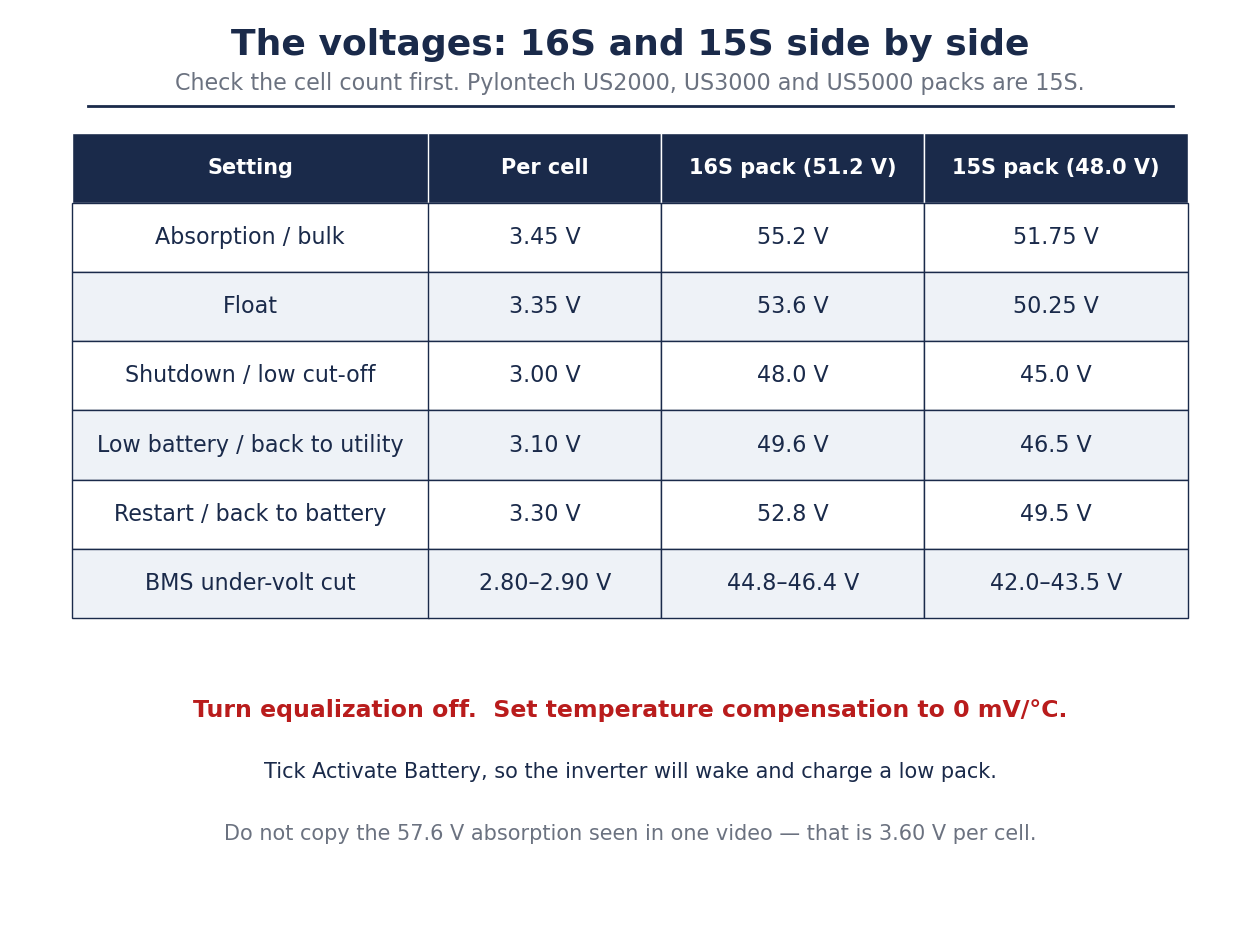
A pack sold as 48 V can be 15S or 16S, and the two need different numbers. Pylontech US2000, US3000, and US5000 packs are 15S. Most DIY server-rack packs are 16S. Check the cell count from the nameplate or the BMS app, then pick the column. Do not work from memory.
For a 16S pack, 51.2 V nominal: set absorption, or bulk, to 55.2 V (3.45 V per cell). Set float to 53.6 V (3.35 V per cell). Set the low cut-off, or shutdown, to 48.0 V (3.00 V per cell). Set back to utility, the low battery volt, to 49.6 V, and back to battery, the restart volt, to 52.8 V. The BMS under-volt cut sits below all of these at 44.8 to 46.4 V. That is the safety net, not a daily setting.
For a 15S pack, 48.0 V nominal, use absorption 51.75 V and float 50.25 V. Set shutdown to 45.0 V, back to utility to 46.5 V, and back to battery to 49.5 V. The BMS cut sits at 42.0 to 43.5 V. Turn equalization off. A Deye in Use Batt V mode will run one if you leave it on, and LiFePO4 cells do not want it. Set temperature compensation to 0 mV per degree C. Set the top charge current to 0.3C or below. That is 30 A per 100 Ah, 60 A per 200 Ah, 84 A per 280 Ah. The Deye manual says Ah size times 50% for lithium, which is higher than 0.3C. But 0.3C is the safe number for a pack you are running blind.
| Setting | Per cell | 16S pack (51.2 V nominal) | 15S pack (48.0 V nominal) |
|---|---|---|---|
| Absorption / bulk | 3.45 V | 55.2 V | 51.75 V |
| Float | 3.35 V | 53.6 V | 50.25 V |
| Shutdown / low cut-off | 3.00 V | 48.0 V | 45.0 V |
| Low battery / back to utility | 3.10 V | 49.6 V | 46.5 V |
| Restart / back to battery | 3.30 V | 52.8 V | 49.5 V |
| BMS under-volt cut | 2.80–2.90 V | 44.8–46.4 V | 42.0–43.5 V |
One field case shows why you should use these numbers and not copy a stranger’s screen. A video of a Deye in Use Batt V mode shows absorption at 57.6 V and float at 55.2 V on a 200 Ah pack. That is 3.60 V per cell on a 16S pack. It is not a number to copy. Use 55.2 V for absorption and 53.6 V for float on 16S.
Why voltage SOC lies on LiFePO4
Voltage-only SOC lies because the LiFePO4 curve is flat in the middle and steep at the ends. At rest, a cell at 80% reads about 3.32 V, at 50% about 3.26 V, and at 20% about 3.20 V. That is a spread of about 0.12 V per cell across 60% of the pack. An inverter under load cannot read it cleanly.
Under load, the volts sag. A pack at 60% can read like 30% while a kettle runs. Under charge, the volts rise. A pack at 60% can read like 90% while solar pushes 40 A in. The inverter has no other clue. It only sees volts. Ignore the screen SOC. Read the BMS app.
Here is a real case that shows the gap. One owner found the screen said 45% while the BMS app said 40%. Same pack, two numbers. The screen was guessing from volts. The BMS app was counting amps. Trust the BMS app.
The fix is counting, not guessing. A BMS counts amp hours in and out. That count drifts over weeks if the pack never reaches full charge. When the pack reaches 55.2 V and the current tapers, the BMS can reset its count to 100%. Without that reset, the count drifts a little each day. After a month of short charges, it can show 40% when the pack is near empty. So run a full charge weekly.
One more watch point. The inverter and the BMS can read the same pack a little differently. Field reports from JK BMS owners on Deye show the gap plainly: the BMS asks for 55.2 V, but the inverter only gives 54.7 V. The inverter reads about half a volt low. That half volt can stop the absorption timer from ever starting, so the BMS never resets its SOC to 100%. If they differ by 0.3 to 0.5 V, do not raise the inverter volt to chase it. The fix sits in the BMS volt setup.

The switch in nine steps
Do the switch at idle, with light loads. A mode change mid-charge can confuse the charge state, and a Deye that flips between grid and battery while you type is a Deye you cannot read.
- Write down the Lithium settings. Note the Lithium Mode code, the pack size, the charge and discharge current, and the three SOC cut-offs. Check: Lithium Mode code and cut-offs in hand.
- Go to the Battery Setting menu. Tap Settings, then Battery Setting. Note the pack volt it shows now. Check: menu open, pack volt noted.
- Change Batt Mode to Use Batt V. Tap Batt Mode and pick Use Batt V. Check: menu now shows volts, not percents.
- Enter the pack size and the current limits. Type the real size in amp hours. Set the top charge current to 0.3C or below: 84 A on a 280 Ah pack. Set the top discharge current no higher than the BMS limit. Check: size right, charge current at or below 0.3C.
- Enter absorption, float, and equalization. Set absorption to 55.2 V for 16S or 51.75 V for 15S. Set float to 53.6 V for 16S or 50.25 V for 15S. Turn equalization off. Check: numbers right, equalization off.
- Enter shutdown, low battery, and restart. Set shutdown to 48.0 V for 16S or 45.0 V for 15S. Set low battery to 49.6 V for 16S or 46.5 V for 15S. Set restart to 52.8 V for 16S or 49.5 V for 15S. Set temp comp to 0 mV per degree C. Check: shutdown reads your cut-off volt.
- Tick Activate Battery and set grid charge. Tick Activate Battery, so the inverter will wake and charge a low pack instead of sitting idle. Set grid charge and generator charge the way you want them. In Use Batt V mode the inverter will charge from grid if grid charge is on, to the volts you set. There is no BMS to say stop. Check: Activate Battery ticked, grid charge set as you want it.
- Save, then watch one full charge. Save and watch the screen. The pack volt should show at once, and the SOC number will now be a volt guess. Watch the pack reach absorption, hold 30 to 60 minutes, then drop to float. Check the cell spread at the top in the BMS app. On our rig, the pack hit 55.2 V at 12:15 p.m., the current tapered from 60 A to 7 A, and float came at 1:00 p.m. Check: pack reaches absorption, current tapers, float follows, cells within 0.10 V.
- Watch one discharge, then switch back when ready. Run the house on battery. The inverter should switch to grid at the low battery volt and stop drawing at the shutdown volt. The BMS should not cut. When the cable, the code, and the battery are ready, switch back: Batt Mode to Lithium, Lithium Mode 00 for Pylontech CAN, tick BMS_Err_Stop. Check: grid switch at 49.6 V, no BMS cut, details page shows live BMS data after the switch back.
If the reading differs, the reading is the answer
| Reading | What it means. | What to do. |
|---|---|---|
| Battery details page shows BMS volt, SOC, and limits. | Link alive, closed loop. | Stay in Lithium mode. |
| Details page blank, home screen shows volts only. | Link dead, inverter on volts alone. | Switch to Use Batt V tonight. |
| Screen SOC 45%, BMS app 40%. | Screen guesses from volts. | Trust the app. |
| Pack hits 55.2 V, current tapers to near zero. | Pack full, balancer working. | Let it drop to float. |
| Pack never reaches absorption on the app. | Inverter reads 0.3–0.5 V low. | Check BMS volt calibration. Do not raise the inverter volt. |
| BMS cuts before the inverter cut-off. | Inverter cut-off too low. | Raise the inverter cut-off by 0.8 V. |
What each symptom points to
| What you see. | Most likely cause. | Fix. |
|---|---|---|
| No battery shown, will not charge, pack low. | BMS asleep, Lithium mode needs comms. | Switch to Use Batt V to wake the pack. |
| SOC jumps around after the switch. | Volt guess doing its job badly. | Ignore it. Read the BMS app. |
| Pack never quite reaches absorption. | Inverter volt reads low vs the BMS. | Compare the two readings. Check BMS calibration. |
| Inverter cuts out under a heavy load. | Volt sag under load. | Check the load. Do not lower the cut-off. |
| BMS cuts first, loads drop. | Inverter cut-off too low. | Raise the inverter cut-off by 0.8 V. |
| Time of Use plan runs at the wrong hours. | Plan runs on a volt-guessed SOC. | Check the first night and adjust. |
When to switch back to Lithium
Switch back the moment the cable, the code, and the battery are ready. Go to Settings, then Battery Setting. Change Batt Mode from Use Batt V to Lithium. Set the Lithium Mode code for your battery. For Pylontech on CAN that code is 00. Tick BMS_Err_Stop. Then the inverter halts rather than guessing if comms drop again. If you see a Disable Float Charge box, tick it too. The manual says it holds the charge volt when the BMS asks for zero charge current. That helps stop a full pack from being pushed over the top. Check that the battery details page shows a BMS volt, a BMS SOC, and limits that match the BMS app. If the home screen shows a volt but the details page is blank, the inverter is still running on voltage alone. For the cable and code side, see the JK BMS to Deye hybrid inverter protocol and the Deye and Sunsynk BMS port pinout.

What can still go wrong
You lose three things in Use Batt V.
Name them before you switch. You lose the true SOC, so the percent on the screen is a guess. You lose the BMS charge and discharge limits, so the inverter will push the current you typed even if the BMS would have said slow down. And you lose the alarm flags, so a cell going high or a temperature rising will not reach the inverter until the BMS cuts the pack outright.
The volt gap between inverter and BMS.
Field reports from JK BMS owners on Deye show the inverter reads about half a volt low. That half volt can stop the absorption timer from ever starting. Then the BMS never resets its SOC to 100%. Compare the two volt readings side by side. If they differ by 0.3 to 0.5 V, do not raise the inverter volt to chase it. The fix sits in the BMS volt setup.
A SOC-based Time of Use plan will now run on a guess.
The work mode picks when the battery discharges. A switch to Use Batt V does not change it. But a SOC-based Time of Use plan will now run on a volt-guessed SOC. Check the first night and adjust.
Common questions
How long can I run in Use Batt V?
As long as you need to, if the volts are right and you watch the pack. Weeks are fine. Months are fine too, with a weekly full charge and a check of the cell spread at the top. Fix the link when you can and switch back.
Will Use Batt V wake a dead pack?
Yes, in most cases. A Deye in Lithium mode needs comms with the BMS. That link can fail when the SOC drops and the BMS goes quiet. In Use Batt V the inverter reads the real pack volt at once and starts to charge. Once the BMS wakes up, switch back to Lithium.
Why does the SOC jump around after the switch?
Because the SOC on the screen is now a volt guess, and the LiFePO4 curve is flat in the middle. A pack at 60% can read like 30% under load and like 90% under charge. Ignore the screen SOC. Read the BMS app or a shunt.
Can I use Use Batt % instead?
No, not when comms are dead. Use Batt % uses SOC percent for all the settings, and it only works if the inverter still gets a true percent from somewhere. With no link there is no true percent.
What if the pack will not wake even in Use Batt V?
Then the fault is not the mode. Check the DC breaker, the fuse, and the pack terminals with a meter. A pack at 30.6 V or below on a 16S bank is a charge-or-replace job.
Do this next
- Confirm the cell count from the nameplate, 15S or 16S.
- Change Batt Mode to Use Batt V. Enter the volts from the table for your cell count, turn equalization off, set temp comp to 0, and set the charge current to 0.3C or below.
- Tick Activate Battery. Set grid charge and generator charge the way you want them.
- Charge on a sunny morning. Watch the pack reach absorption, hold, then drop to float. Check the cell spread at the top.
- Watch one discharge and confirm the inverter switches to grid at the low battery volt and stops at shutdown without the BMS cutting. If the BMS cuts first, raise the shutdown volt by 0.8 V.
- Keep the open loop numbers on the card by the inverter. Switch back to Lithium with the right code the moment the cable, the code, and the battery are ready. A working volt fallback beats a dead closed loop link every time.
Sources
Checked on 20 November 2026. Unconfirmed items are labelled “not confirmed” in the text.
- Deye SUN-5K/8K/12K-SG04LP3 User Manual, Battery Setting section. Use Batt V means use battery voltage for all the settings. Lithium Mode 00 for Pylontech CAN. BMS_Err_Stop halts the inverter if comms drop. Disable Float Charge holds the charge volt when the BMS asks for zero charge current.
- Deye / Sunsynk installer videos and field reports. Deep discharge rescue: switch Lithium to Use Batt V to wake a pack that will not charge. Field-reported.
- Pylontech US2000/US3000/US5000 Datasheet. 15S LiFePO4, 48 V nominal.
- JK BMS community reports. Inverter reads about 0.5 V low vs the BMS on Deye; screen SOC 45% vs app 40%. Field-reported.
- Growatt SPF 5000 ES User Manual. Program 05 US2 for lithium with no data link. Error 20 is the BMS comms fault.
- EG4 6000XP Manual v1.2.0. Comms failure code W000, not Error 19.
- This site: JK BMS to Deye hybrid inverter protocol, Deye and Sunsynk BMS port pinout, closed loop vs open loop LiFePO4, open loop LiFePO4 volt settings.
Comments (0)