

What this guide works from. One rig: Solis S6-EH1P6K-L with a Pylontech US3000C. The pack is 15 cells, resting at 49.8 V. The BMS reads 58% charge. BatName-Fail showed on first setup.
The short answer. BatName-Fail means the battery profile you picked does not match the battery in front of you. A profile is the battery name you pick in the inverter menu. The inverter is not saying the battery is dead. It does not know the name it was given. On our rig, the fix was one menu pick. The installer had picked the RS485 form of the profile while the cable was CAN. We picked “Lithium Battery LV”, restarted the set, and the alarm cleared in under two minutes.
The rig that would not link
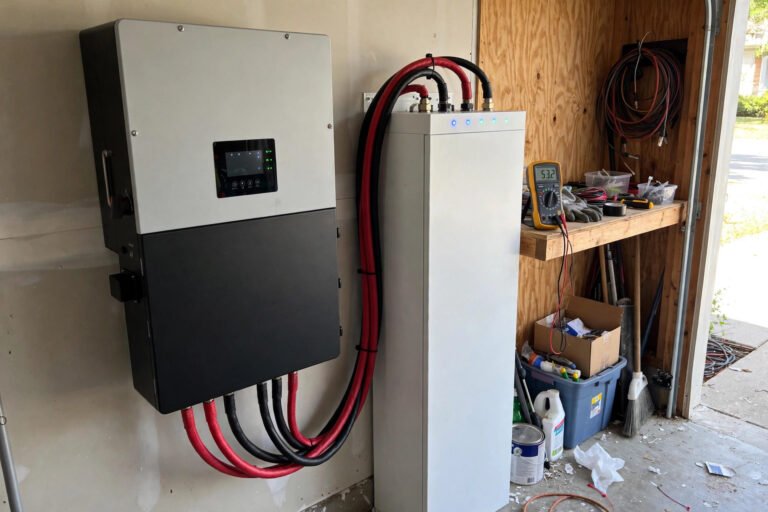
It was a new build. The S6-EH1P6K-L sat on the wall, and the battery box held one Pylontech US3000C. The pack read 49.8 V: 3.32 V per cell, times 15 cells. The Pylontech lights showed green, and the BMS read 58% charge. Then the inverter was switched on. BatName-Fail showed within seconds. The home screen showed 49.8 V, so the power cables were fine. But the battery page was blank. SOC is how full the battery is. The inverter could see the volts, yet it could not read the name of the battery. Without a name it knows, it will not trust the pack. It will not charge it in closed-loop mode.
BatName-Fail is a name fault, not a dead battery
BatName-Fail is a first-time setup alarm. It shows up when a set is first built. It also shows up when a battery is swapped and the inverter still holds the old profile. The S6 series manual states it plainly. BatName-Fail means the wrong battery model was picked. Check Battery Setting, then Battery Model. Confirm the pick matches your battery module’s nameplate. The nameplate is the label on the battery with the model name. Solis North America adds two more causes. No battery profile has been picked. Or the BMS DIP switches are set wrong. BMS means the battery’s brain, the board that watches the cells and guards the pack. DIP switches are small on-off switches that set the battery address.
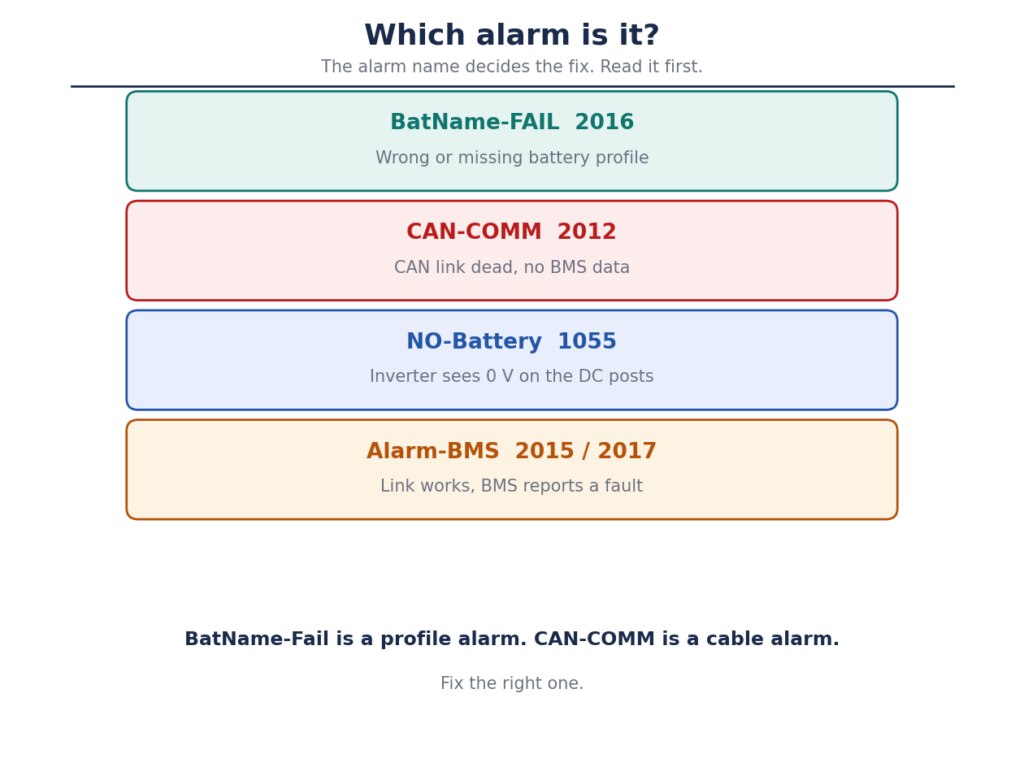
It is not a battery fault. The battery can be healthy and talking. The inverter will still show the alarm if the profile name is wrong. It is also not the same as CAN-COMM. That alarm means the CAN link itself is dead. BatName-Fail means the name the inverter finds does not match the name it was told to expect. The Puredrive fault guide puts it as alarm 2016. That split sets the fix order. If you also see CAN-COMM, fix the cable first. A dead link cannot carry a name at all. If BatName-Fail is the only alarm, start with the profile.
| Alarm | Code. | What it means. | Check first. |
|---|---|---|---|
| BatName-FAIL | 2016. | Wrong or missing battery profile, or wrong DIP switches. | Battery Model pick against the nameplate. |
| CAN-COMM / Batt_Comm_FAIL | 2012. | CAN link dead, no BMS data at all. | Cable in COMM and BMS port, pins 4 and 5. |
| NO-Battery | 1055. | Inverter sees no battery voltage. | DC breaker on, battery on, power cables on. |
| Alarm-BMS | 2015 / 2017. | Link works, BMS reports a fault in the pack. | Restart the battery, check the BMS app. |
Check the approved list first
Before you touch a setting, check that your battery is on the Solis approved battery list. Only batteries on that list can be used in closed-loop talk with the inverter. If the battery is not on the list, no profile pick will fix it. Run the battery in open-loop voltage mode, or fit a battery the inverter knows.
The list changes with inverter model and firmware. Firmware is the software inside the inverter. Check the list for your exact Solis model. Note the exact profile name the list gives.
While you are here, check the firmware. If the Lithium profile is not offered at all, stop. The inverter needs a firmware update from Solis first. Check the BMS firmware too. Older batteries often need a BMS firmware update. Update both at first setup.
Pick the profile: Lithium Battery LV or PYLON_LV
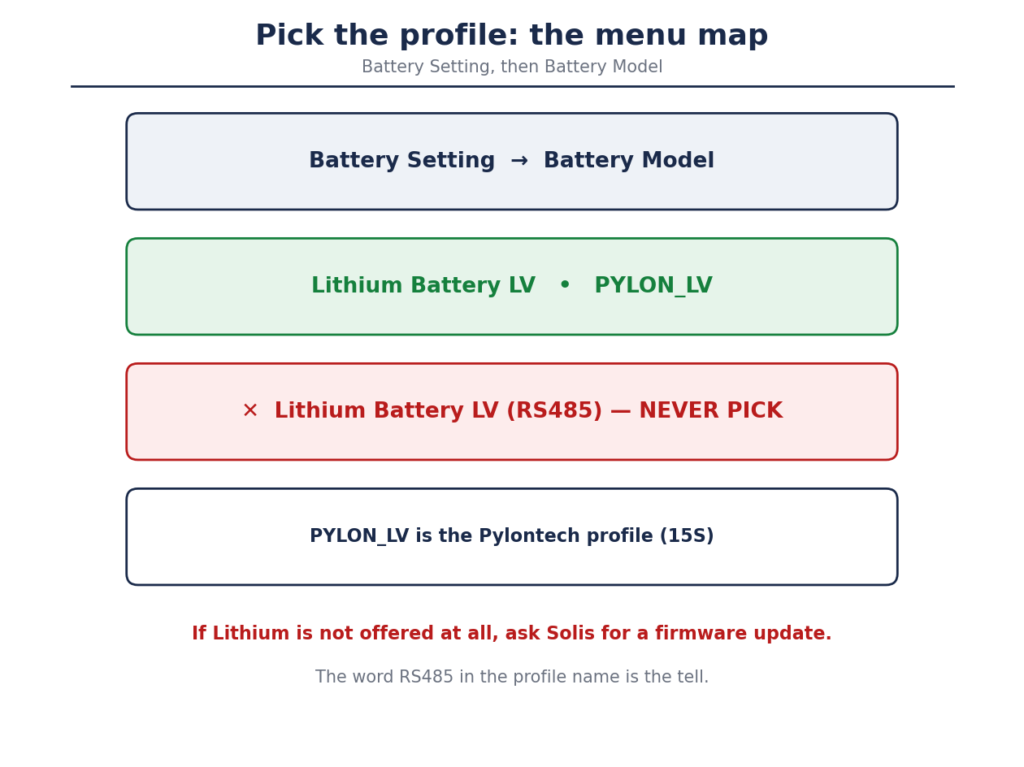
Go to Settings, then Battery Select, or on the S6 menu, Battery Setting, then Battery Model. The menu names change a little between Solis models. But the job is the same: pick the profile that matches your battery. On North American Solis hybrids, the profiles are Lithium Battery LV, PYLON_LV, PYTES, and SOLUNA. Most batteries use Lithium Battery LV or PYLON_LV. The Puredrive guide says the same in its own words. Pick “Puredrive” for a Puredrive battery, and “Lithium” for a Dura 5 or Dura 16. The pattern is the same in every source. Pick the lithium CAN profile for your battery. Never pick a profile with RS485 in the name when your cable is CAN.
That last rule is the one people break most. Solis menus offer RS485 versions of the same battery names. They look like the right pick. They are not. The RS485 version expects the battery on an RS485 bus, and your cable is on the CAN bus. Picking it gives you BatName-Fail, and no cable check will fix it. On our rig, this was the fault. The menu held the RS485 variant while the cable was CAN. We picked “Lithium Battery LV” and the alarm cleared. If you are not sure which version you picked, open the menu again and read it slowly. The word RS485 in the profile name is the tell. Save the profile, then restart the set. Battery breaker off, inverter off, wait until the screen is dark. Then battery on, then inverter on. A saved change that is not restarted looks just like one that never happened.
| Battery in place | Profile to pick | Never pick |
|---|---|---|
| Pylontech US2000 / US3000 / US3000C | Lithium Battery LV or PYLON_LV. | Any profile with RS485 in the name. |
| Pytes / Soluna | PYTES / SOLUNA. | Any profile with RS485 in the name. |
The menu path is different on each Solis model
The menu path to Battery Model is not the same on every Solis. The AERL Solis guide gives the path for three Solis lines. Use the one that matches your inverter. The full pairing guide is the JK BMS to Solis hybrid inverter CAN setup.
On the S6-EH1P-L models, use the SolisCloud app. Open More Tools, then Local Operation, and connect with Bluetooth. Log in as Installer. Go to Setting, then Battery Setting. Set Battery Type to Lithium Battery. Set Battery Model to Lithium Battery LV. Do not pick the RS485 form.
On the S6-EO1P models, use the front screen. Go to Advanced Settings, with password 0010, then 3. Battery Settings, then Battery Select. Pick Lithium battery, the talking option, not the “without comm” options. Set Overdischar SOC to 20% and Force SOC Set to 10%, the defaults in the AERL guide.
On the S5-EH1P-L models, use the front screen. Go to Advanced Settings, with password 0010, then Storage Energy Set, then Battery Select. Pick Lithium Battery LV. Set OverDischg SOC to 20% and ForceCharge SOC to 10%. If your model is not one of these three, the shape is the same. Find Battery Select or Battery Model. Pick the lithium CAN profile. If the Lithium profile is not listed at all, stop and ask Solis for a firmware update.
Why the name has to match
BatName-Fail is a handshake fault of a distinct kind. A handshake is the short exchange where two units agree they can talk. The inverter sends a frame on the CAN bus. A frame is one short packet of data. The BMS answers with its own frame: SOC, charge limit, cell volts, temps, alarms, and its battery name. The inverter reads that name and checks it against the profile you picked. If the names do not match, it raises BatName-Fail and will not trust the pack. The link is up, but the trust is not. Volts come down the thick power cable. The name comes down the thin comms cable.
A reboot fixes none of this. It changes nothing about the profile pick or a DIP switch set wrong. A saved change that is not restarted also fails. The inverter still runs on the old name until it restarts. Work the menu, then the cable, then the DIP switches, in that order.
The cable and the DIP switches
BatName-Fail is a profile alarm. But the profile cannot be read over a dead cable. And the BMS cannot be read at the wrong address. Check both after the profile. The Solis BMS port uses the standard CAN pinout. Pin 4 is CAN-H on the blue wire. Pin 5 is CAN-L on the white-blue wire. Pins 4 and 5 at both ends. Cable in the COMM socket on the battery. Count pins with the clip facing away, pin 1 on the left. Use the cable that came in the battery box where you have it. A hand-made cable is fine if it is metered. Metered means tested with a meter for the right pins. The full pin map is the Solis hybrid inverter BMS RJ45 pinout.
Check the DC side too. A battery breaker left open, or a battery switched off, gives you NO-Battery. A profile cannot be read from a battery that is off. Make sure the battery is on and showing green lights before you judge the profile.
Then the DIP switches. Solis support lists wrong DIP switches as one of the three causes of BatName-FAIL. The DIP setting is battery-specific, so this guide gives no number here. Read it from your battery manual or the maker’s Solis note. The master pack, the one wired to the inverter, must carry the address the profile expects. No two packs should share an address.

Fix it in order: nine steps, each with a check
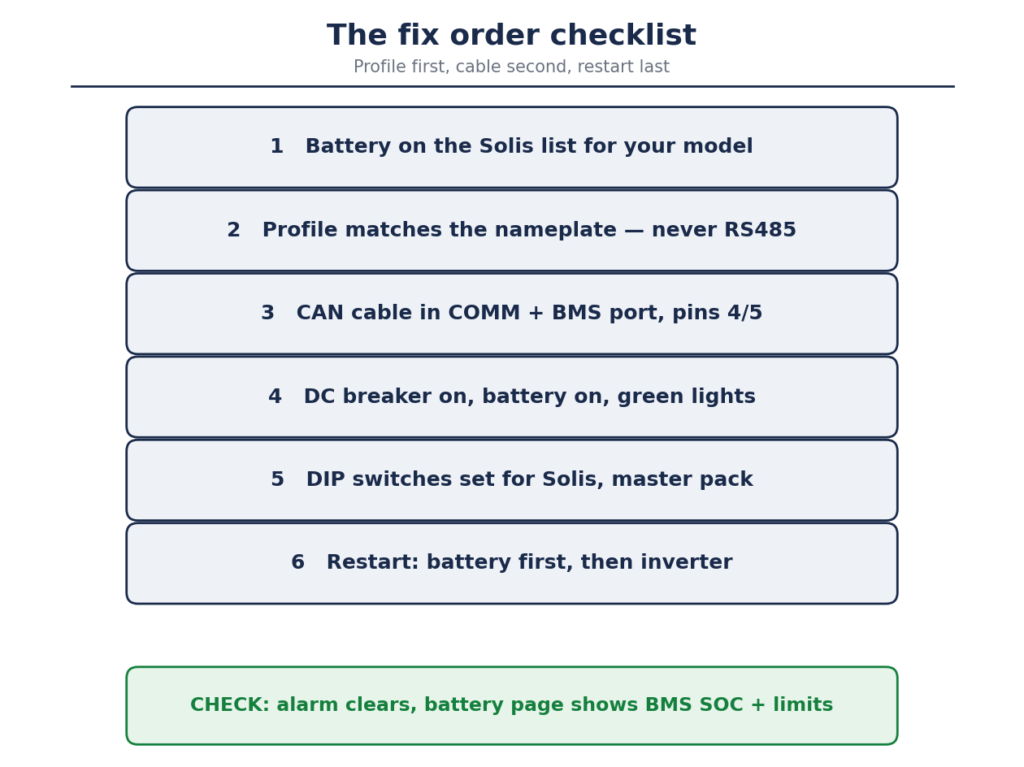
Work the steps in order. If a check fails, stop there.
- Write down what you have. Note the inverter model, the battery model on the nameplate, the profile in the menu, and the alarm code. Photograph the nameplate. Check: model names and photos in hand.
- Check the approved list and the firmware. Look up your battery on the Solis list for your exact model. If the Lithium profile is not offered, stop and ask Solis for a firmware update. Check: battery on the list, Lithium profile offered.
- Pick the right profile. Open Battery Setting, then Battery Model. Pick the profile that matches the nameplate. For most packs that is Lithium Battery LV or PYLON_LV. Never pick a profile with RS485 in the name when your cable is CAN. On our rig, this was the fault. The menu held the RS485 variant. Check: profile name matches the nameplate, no RS485 in the name.
- Check the cable. Pull the plug at each end. Use the cable from the battery box where you have it. It goes in the COMM socket on the battery and the BMS port on the inverter. Pins 4 and 5 at both ends, metered. Check: both plugs click home, pins 4 and 5 metered.
- Check the DC side. Make sure the battery is on and showing green lights. Make sure the DC breaker is on. A battery that is off gives NO-Battery. Check: battery on, green lights, DC breaker on.
- Check the DIP switches. Read the DIP setting from your battery manual. Set the master pack to the address the profile expects. No two packs share an address. Check: master DIP set per the battery manual.
- Test the bus with a meter. With all power off, test ohms between CAN-H and CAN-L. A good bus reads about 60 ohms. With power on and the bus idle, test each line to ground: each should sit near 2.5 V DC. On our rig, the test read 61 ohms, and 2.5 V per line at idle. Check: about 60 ohms power off, about 2.5 V per line power on.
- Restart the whole set and wait. Battery breaker off, inverter off, wait until the screen is dark. Then battery on, then inverter on. Wait two full minutes. On our rig, the alarm cleared in about 40 seconds, and SolisCloud showed 58% SOC, the same as the BMS. Check: alarm cleared, SOC matches the BMS.
- Prove it under load. Put a load on the inverter, then charge the pack, and watch the SOC move. On our rig, a 1,200 W kettle pulled the SOC from 58% to 57% in ten minutes. On charge, the SOC hit 100% as the pack hit 54.0 V: 15 cells times 3.60 V. Check: SOC moves with charge and discharge, and it reaches 100% without jumping.
If the reading differs, the reading is the answer
A meter can rule out a dead link in minutes. It cannot read CAN frames, but it can tell you if the bus is shorted or open. All volt numbers are DC to ground, on a CAN bus built to ISO 11898-2. On a live bus, a plain meter shows the mean: CAN-H reads 2.6 to 3.0 V and CAN-L reads 2.0 to 2.4 V.
| Reading | What it means. | What to do. |
|---|---|---|
| About 60 ohms, power off. | Both 120 ohm end resistors are there. | Go to Step 8. |
| Near 120 ohms, power off. | One end resistor is missing. | Check the BMS end resistor. |
| Open circuit, power off. | No end resistor, a broken wire, or the plug is in a port with no CAN pair. | Check the port first, then test the cable. |
| 2.5 V on each line, power on, idle. | Bus idle and sound, but nobody is talking. | Check the profile and the BMS power. |
| 2.6–3.0 V on CAN-H, 2.0–2.4 V on CAN-L. | Traffic is flowing. The link is alive. | Go to Step 8. |
| 0 V or pack volts on one line. | That line is shorted, or the signal chip is dead. | Stop. Unplug the BMS end. If the line clears, the fault is in the BMS. |
What each sign points to
| What you see. | Most likely cause. | Fix. |
|---|---|---|
| BatName-Fail alone, volts look fine. | Wrong profile pick, often the RS485 variant. | Step 3: pick Lithium Battery LV or PYLON_LV. |
| BatName-Fail plus CAN-COMM. | Dead CAN link, the name cannot cross at all. | Steps 4 and 7: fix the cable first. |
| NO-Battery with BatName-Fail. | Battery off or DC breaker open. | Step 5: battery on, breaker on. |
| Lithium profile not in the menu at all. | Firmware too old to offer it. | Stop. Ask Solis for a firmware update. |
BatName-Fail is not CAN Fail
BatName-Fail, alarm 2016, is a name fault. The inverter cannot match the battery name to a profile. CAN Fail, alarm 2012, is a link fault. The inverter cannot hear the BMS at all. The S6 manual FAQ says CAN Fail means the CAN link is lost, and it says to check the CAN cable first and that the battery is on. A name fault needs a menu fix. A link fault needs a cable fix. The full link fix is the Solis CAN Fail alarm 2015 fix.
When NO-Battery shows up with it
NO-Battery, alarm 1055, means the inverter sees 0 V on the DC posts. That is a wire or hardware fault, not a profile fault. Check the DC wires, plus and minus, and the battery breaker. Check that BATT+ and BATT- are not swapped. Make sure the battery is on and showing green lights. If NO-Battery stays, the fault is in the battery or the inverter hardware. That is a support call.
When open-loop is the right call
Closed-loop is better when it works. Open-loop is better than a broken closed-loop. If your battery is not on the Solis list, or if no profile links after a full check, run User-Defined mode for the night. Set the charge volts from the battery datasheet. For a 16S pack, use bulk 55.2 V, float 53.6 V, and cut-off 48.0 V. For a 15S pack, use bulk 51.75 V, float 50.25 V, and cut-off 45.0 V. The full guide is the Solis User-Define battery mode.
What can still go wrong
The RS485 trap, twice.
If BatName-Fail stays after you picked the right name, open the menu again and read it slowly. The word RS485 in the profile name is the tell.
The JK pin swap.
JK’s own papers conflict on CAN-H and CAN-L pins 4 and 5. If the tests and the menu all read right, swap CAN-H and CAN-L at one end only and test again. Read the print on your own board. Wire H to H and L to L.
Firmware comes last, not first.
Firmware can fix a profile bug. It can also move the menu so the list shifts. Save your settings first. Use firmware only from Solis for your exact model.
A pack that will not link at all.
If BatName-Fail stays after a correct profile, a metered cable, and a proper restart, it points at a firmware mismatch. Or the list does not cover your battery for your firmware version. The S6 manual says to turn off the inverter and wait 5 minutes, then restart it. If the fault is still there, contact your dealer. Give them both serial numbers and the install date.
Common questions
Will a reboot fix BatName-Fail?
No. A reboot changes nothing about the profile pick or the DIP switches. Work the nine steps.
Can I use a normal Ethernet cable?
Sometimes. The Pylontech box ships a normal UTP Cat5 cable. It works on some Solis units and fails on others. Meter it first.
Is BatName-Fail the same as CAN Fail?
No. BatName-Fail is a name fault, alarm 2016. CAN Fail is a link fault, alarm 2012. A name fault needs a menu fix. A link fault needs a cable fix.
My battery is not on the Solis list. What now?
Run open-loop on volts. Or fit a battery the inverter knows. No profile pick will fix a battery that is not on the list.
Why does the home screen show volts but the battery page stays blank?
Volts come down the thick power cable, not the thin comms cable. A blank battery page means the data link is dead, even when the volts look fine.
Do this next
- Read the battery nameplate. Open Battery Setting and Battery Model. Pick the profile that matches it.
- For most packs that is Lithium Battery LV or PYLON_LV, never an RS485 variant. Check the cable is in COMM and the BMS port, pins 4 and 5.
- Check the DC breaker is on and the battery is on. Check the DIP switches on the master pack.
- Restart the whole set, battery first, then inverter. Look for a live SOC and BMS limits.
- Prove it under load and on charge, then write the settings on a note in the battery box door.
- Battery not on the list? Switch to User-Defined mode for the night and set the volts from the datasheet.
- Still stuck? Call Solis support with both serial numbers, the profile pick, and meter readings.
Sources
Checked on 20 November 2026. Unconfirmed items are labelled “not confirmed” in the text.
- Solis S6 Series User Manual, Appendix FAQs. CAN Fail: link lost, check the cable and that the battery is on. BATName-Fail: check Battery Setting, then Battery Model, confirm the pick matches the nameplate. No-Battery: check power cables and the breaker.
- Solis S6-EH3P(3-10)K-H-EU User Manual v1.3, alarm table. BatName-FAIL: wrong battery brand pick. CAN Fail: link failure between inverter and battery.
- Solis North America service centre, Battery Troubleshooting. Check the compatible list first. Update inverter and BMS firmware. BatName-FAIL: no profile picked, wrong profile picked, or DIP switches set wrong. North American profiles: Lithium Battery LV, PYLON_LV, PYTES, SOLUNA.
- Puredrive fault guide. BatName-Fail is alarm 2016. Pick Puredrive for a Puredrive battery, Lithium for a Dura 5 or Dura 16. Over-discharge SOC 15, force-charge SOC 12.4.
- AERL Solis field guide. Menu paths for S6-EH1P-L, S6-EO1P, S5-EH1P-L. Overdischar SOC 20%, Force SOC 10%. CAN pins 4 and 5.
- Solis North America service centre, alarm code list. 2012 CAN_Comm_FAIL, 2015 / 2017 Alarm-BMS, 2016 BatName-FAIL, 2011 MET_Comm_FAIL, 1055 NO-Battery.
- ISO 11898-2 CAN standard. Idle 2.5 V per line. Peaks 3.5 V / 1.5 V. 120 ohm per end, about 60 ohms measured.
- JK BMS community reports. JK Inverter BMS, Pylontech CAN, 500 kbps. JK papers conflict on CAN-H/L pins 4/5; not confirmed.
- This site: JK BMS to Solis hybrid inverter CAN setup, Solis hybrid inverter BMS RJ45 pinout, Solis CAN Fail alarm 2015 fix, Solis User-Define battery mode, open-loop LiFePO4 voltage settings.

Comments (0)